Version note: Analysis specifically documents Grok 4.5. For new coding work, consider Grok 4.7, released September 21, 2026. Grok 4.6 launched in between.
Grok 4.5 is a cloud model for coding, agents and professional knowledge work. The native xAI API model name is grok-4.5; the OpenRouter slug is x-ai/grok-4.5. For Mac users, the most important limitation is clear: Grok 4.5 does not run locally on Apple Silicon. The Mac is the client; inference happens in the cloud.
Checked October 11, 2026: Grok 4.5 remains documented as the grok-4.5 API model, but newer Grok 4.6 (August 12) and Grok 4.7 (September 21) have shipped. Grok 4.7 is now the default in Grok Build. Grok 4.5 API list rates remain $2 input, $0.30 cached input, and $6 output per million tokens for requests below the 200K threshold, with higher long-context rates. These are API charges, not SuperGrok subscription fees. xAI Grok 4.5 model · Grok 4.7.
That separates Grok 4.5 from Ollama, LM Studio and MLX models. It is most useful when cloud processing is acceptable and long context, strong coding performance or agent workflows matter more than full local control.
Grok 4.5 versus 4.7: current API decision
Do not confuse July’s Grok 4.5 with September’s Grok 4.7 in new API integrations. The models share $2 fresh input / $6 output per million tokens at the standard xAI API rate below 200K prompt tokens. Cached inputs differ: Grok 4.5 lists $0.30 per million cached input tokens, compared with $0.50 for Grok 4.7. Lower cache rates alone do not prove lower total task cost; model quality, retry rates and generated token counts can outweigh the difference.
| Direct xAI API, below 200K prompt tokens | Grok 4.5 | Grok 4.7 |
|---|---|---|
| Fresh input / 1M | $2.00 | $2.00 |
| Output / 1M | $6.00 | $6.00 |
| Cache read / 1M | $0.30 | $0.50 |
| Context window | 500K | 500K |
| Native model ID | grok-4.5 | grok-4.7 |
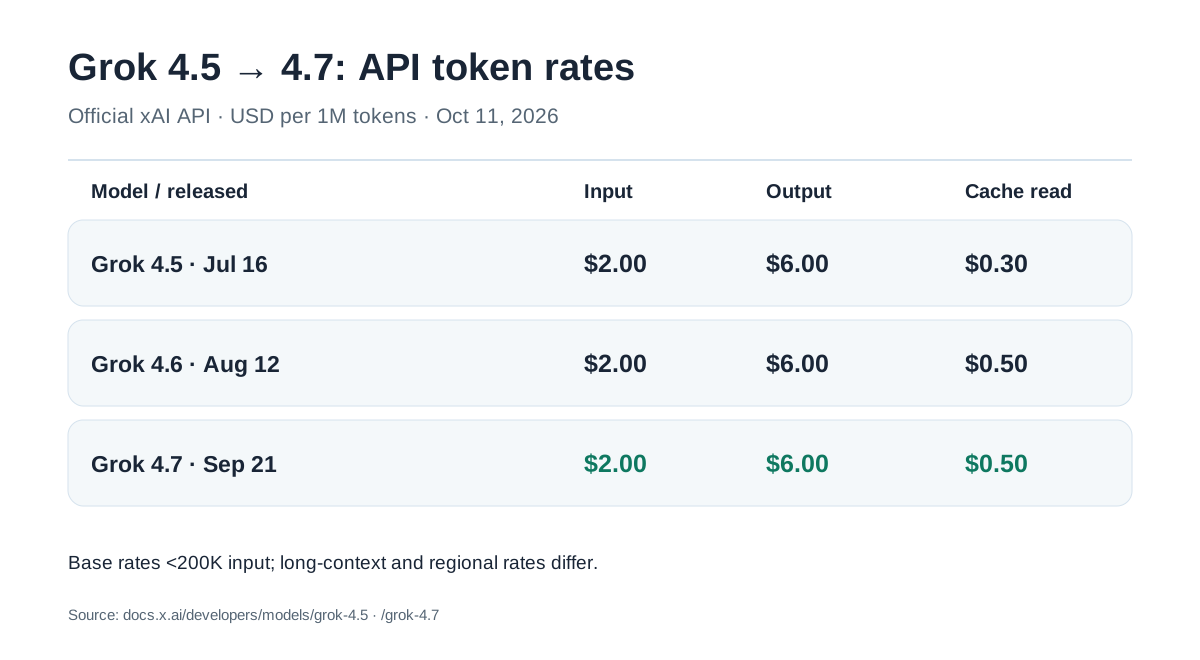
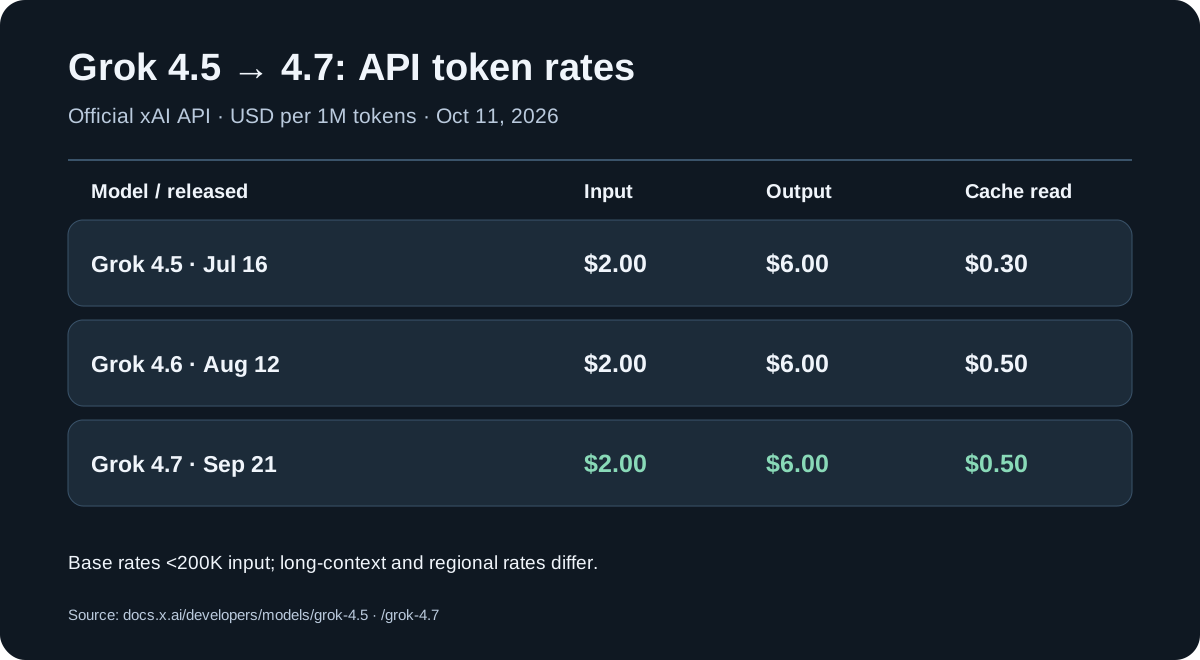
xAI’s long-context tier above the 200K prompt threshold costs $4 input / $1 cached input / $12 output per million tokens for Grok 4.7, versus $4 / $0.60 / $12 for Grok 4.5. Plan for your actual cache reuse and prompt length. Grok 4.7 model · Grok 4.5 model.
United States: These are USD API list rates, not Grok subscriptions. State/local sales taxes and provider fees may apply. The xAI pricing table distinguishes the global https://api.x.ai/v1 endpoint from the US regional endpoint https://us.api.x.ai/v1, where token usage costs 10% more. As checked October 11, 2026, only grok-4.6 and grok-4.7 are listed for that regional endpoint, not grok-4.5. US cluster locations on the Grok 4.5 model card do not establish that the regional option is available for it or guarantee contractual data residency. An English prompt sent globally does not select U.S.-only inference; verify processing, storage and retention terms separately.
Grok 4.7 Fast is not the public xAI API model. xAI lists it within Cursor and Grok Build, where it is charged through the relevant plan. Keep the API model ID grok-4.7 separate from the Fast offering.
Grok on Mac: which app are you looking for?
The phrase “Grok for Mac” now covers three different access paths. They are related, but they are not the same product:
| If you want … | Use … | Where the model runs |
|---|---|---|
| A desktop teammate that works across apps | Grok Bot | In a cloud computer |
| Terminal-first coding and repository work | Grok Build | Cloud model, local terminal client |
| Your own integration or API client | Grok 4.5 through the xAI API | xAI infrastructure |
Grok Bot desktop app for macOS
xAI launched Grok Bot in beta on August 11, 2026. That was the initial launch eligibility, not the current access list. On August 26, xAI expanded Grok Bot to SuperGrok, Cursor Pro and all Cursor Teams tiers, among others. Allowances and rights depend on the exact plan. xAI: expanded Grok Bot access. Grok Bot has its own cloud computer, works across apps and websites, and requires cloud data storage; it is therefore not local inference on the Mac.
The official setup guide provides separate Apple-silicon and Intel downloads. On macOS, choose the matching download, open the disk image, drag Grok Bot to Applications and sign in with a Cursor account. Linux is now supported too: the October 9 setup guide lists x64/Arm64 builds as .deb, .rpm or AppImage. Grok Bot still uses a cloud computer and requires cloud data storage. Official setup.
Grok Build for terminal coding
Grok Build is a separate terminal coding agent. The Grok 4.5 launch post described 4.5 as the default model in Grok Build at that time; the current xAI documentation identifies Grok 4.7 as the Grok Build default and shows the one-command installer. Choose Grok Build for terminal-based repository work; Grok Bot is the desktop option for working across apps.
Grok 4.5 API
The API remains the direct integration path: the model ID is grok-4.5, the Mac runs the client, and xAI runs inference. If your priority is offline work or private files, compare this cloud path with the open-weight LLM guide and the Mac mini local-AI RAM guide.
What is Grok 4.5?
Grok 4.5 is a July 1626 generation in xAI’s model series, not the most recent frontier release. Current official pages sometimes use the name SpaceXAI, while the developer documentation and API still live under x.ai. The launch post positions Grok 4.5 for coding, agentic tasks and knowledge work: bug fixing, refactoring, terminal work, large repositories, multi-step workflows and office tasks.
For Mac users, the category is straightforward: Grok 4.5 is a strong cloud model for Mac workflows, not a local Mac model. Users searching for “Grok 4.5 Mac”, “Grok 4.5 local”, “Grok Ollama” or “install Grok on MacBook” can use the model on a Mac, but they cannot download it and run it offline. Access goes through the xAI API, Grok Build, Cursor, OpenRouter or other model gateways.
Official model name vs. OpenRouter slug
| Name | Meaning |
|---|---|
grok-4.5 | official xAI/API model name |
x-ai/grok-4.5 | OpenRouter model slug |
grok-4.5 with an OpenAI-compatible client | direct xAI usage via base_url="https://api.x.ai/v1" |
With direct xAI usage, the model is grok-4.5. On OpenRouter, it is x-ai/grok-4.5. The names refer to the same model access from different ecosystems, but they are not interchangeable: x-ai/grok-4.5 is a router/provider identifier, not the native xAI model name.
Grok 4.5 specifications
| Property | Grok 4.5 |
|---|---|
| Provider | xAI / currently described as SpaceXAI on some launch pages |
| Official model name | grok-4.5 |
| OpenRouter slug | x-ai/grok-4.5 |
| Release date | July 16, 2026 |
| Model type | cloud/API model |
| Main focus | coding, agents, knowledge work, STEM, office |
| Context window | 500K tokens |
| xAI input price | $2.00 / 1M tokens |
| xAI cached input | $0.30 / 1M tokens below 200K prompt tokens |
| xAI output price | $6.00 / 1M tokens |
| Long-context pricing | 2× standard rates from 200K prompt tokens |
| Reasoning | low, medium, high; default high |
| Tools | function calling, web search, X search, code execution |
| Local Mac use | No |
| Ollama / LM Studio / MLX | No |
| Open weights | No |
| EU availability | available in the xAI API console |
EU update: xAI’s release notes now confirm Grok 4.5 availability in the API console for EU users. The earlier launch restriction no longer applies.
Does Grok 4.5 run locally on Mac?
No. Grok 4.5 is not an open-weight model. There are no official weights to download, no GGUF release, no MLX build and no Ollama tag. If Grok 4.5 is used, inference runs on xAI infrastructure or through a model gateway.
| Question | Answer |
|---|---|
Can I run ollama run grok-4.5? | No |
| Is Grok 4.5 available for LM Studio? | No |
| Is there an MLX version? | No |
| Does it work offline? | No |
| Can I use it on a Mac? | Yes, through API, Grok Build, Cursor or OpenRouter |
| Is it ideal for private offline files? | No, use local models for that |
In practice, this leads to a hybrid workflow: local models for private files and offline work, Grok 4.5 for tasks where cloud processing is acceptable and model quality matters more than full local control.
Why Grok 4.5 still matters for Mac users
A Mac does not accelerate Grok 4.5 directly. M1, M2, M3 and M4 chips do not run the model inference. Still, many AI workflows begin on macOS:
- terminal coding
- Cursor, VS Code, Zed and other editors
- repository analysis
- bug fixing and refactoring
- web app prototyping
- technical documentation
- spreadsheets, presentations and office files
- web and X-based research
- code execution for small tests and calculations
- tool-based agent loops
The Mac is not the machine running Grok 4.5. It is the working environment for the cloud model.
Benchmarks: useful, but not a world ranking
xAI published several benchmark comparisons in the launch post. The numbers matter, but they are not fully independent and not always directly comparable. Some values come from different harnesses or provider-specific setups. They show a performance range, not a neutral leaderboard.
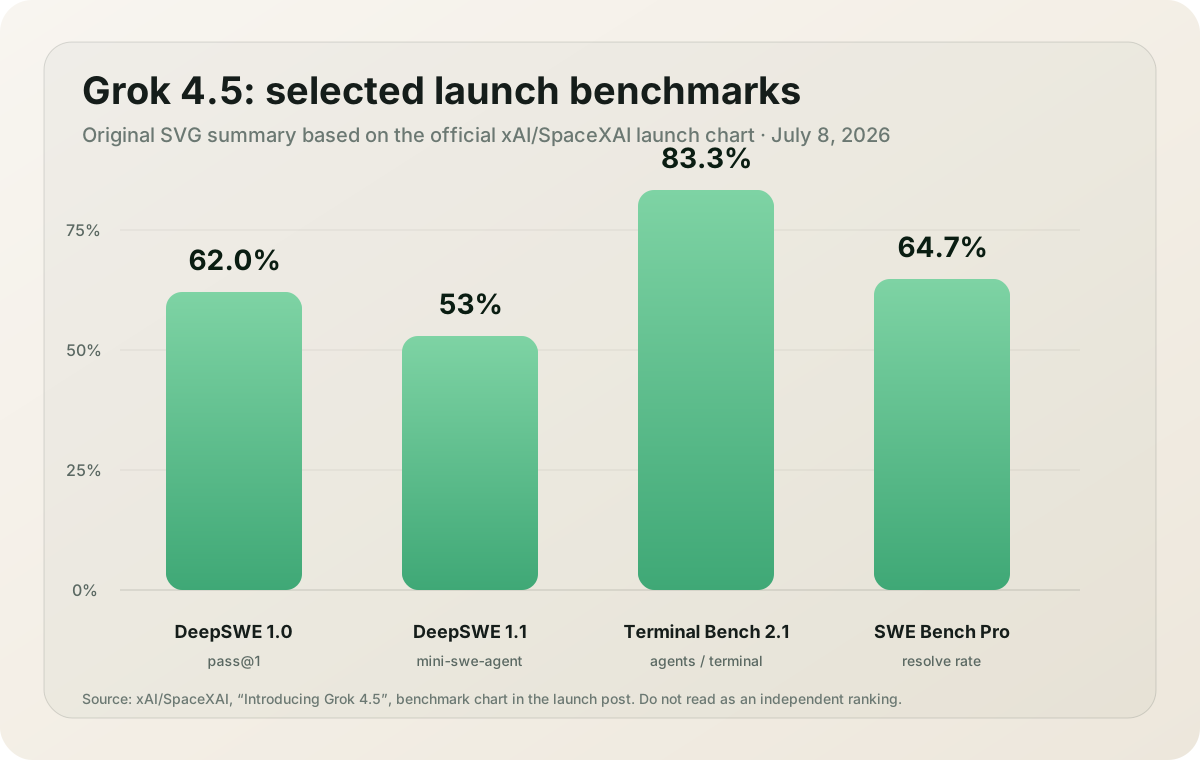
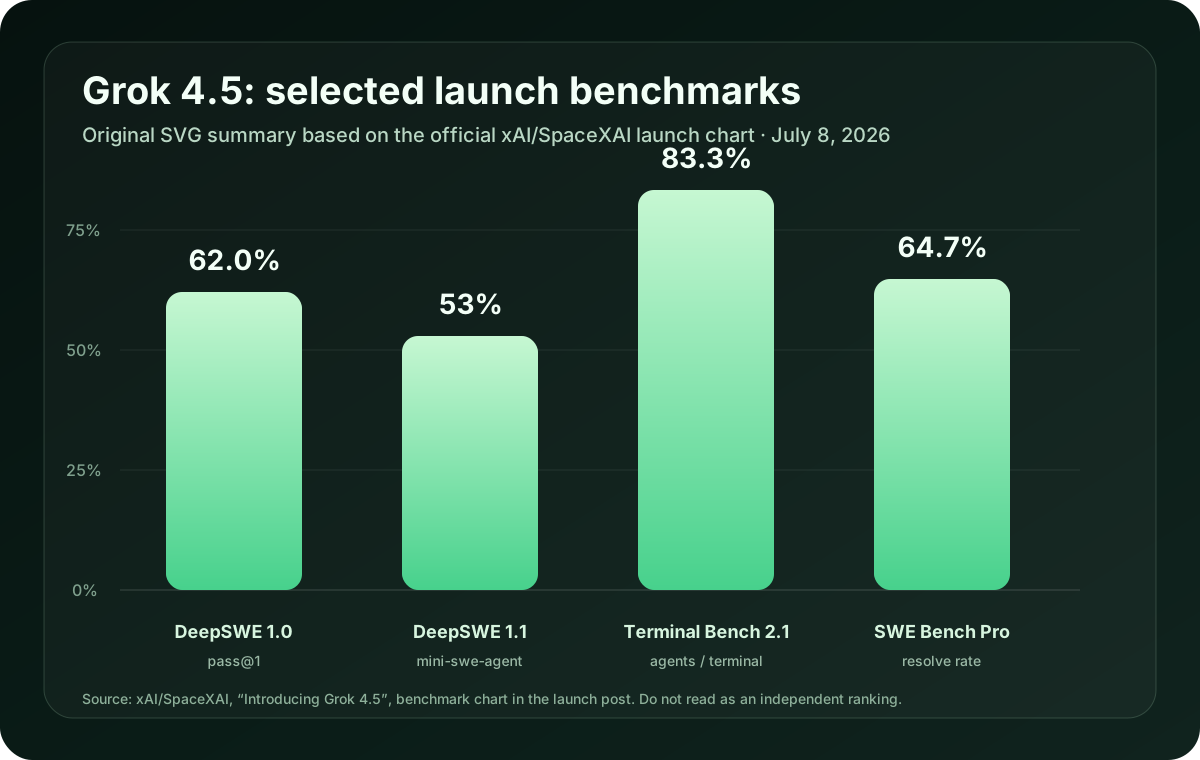
Graphic: original SVG summary based on the official benchmark chart in the xAI/SpaceXAI Grok 4.5 launch post. Source: x.ai/news/grok-4-5.
Selected launch benchmarks
| Benchmark | Grok 4.5 | Comparison values shown by xAI | Context |
|---|---|---|---|
| DeepSWE 1.0 | 62.0% | Fable max 66.1%, GPT 5.5 xhigh 64.31%, Opus 4.8 max 55.75% | within each model provider’s harness |
| DeepSWE 1.1 | 53.0% | Fable max 70%, GPT 5.5 xhigh 67%, Opus 4.8 max 59%, GLM 5.2 44% | DataCurve mini-swe-agent harness |
| Terminal-Bench 2.1 | 83.3% | Fable max 84.3%, GPT 5.5 xhigh 83.4%, Opus 4.8 max 78.9% | very close top cluster |
| SWE Bench Pro | 64.7% | Fable max 80.4%, Opus 4.8 max 69.2%, GLM 5.2 62.1%, GPT 5.5 xhigh 58.6% | resolve rate; setup matters |
Based on these launch numbers, Grok 4.5 is strong for terminal, coding and agent workflows. It is not the top model in every benchmark shown. SWE Bench Pro in particular shows that other frontier models can be ahead depending on the setup. The values are most useful when read together with the source, harness and context.
Token efficiency: more important than one score
xAI emphasizes token efficiency as much as benchmark scores. According to the launch post, Grok 4.5 resolves SWE Bench Pro tasks with an average of 15,954 output tokens. For Opus 4.8 max, xAI shows 67,020 output tokens. xAI describes this as about 4.2 times fewer output tokens.
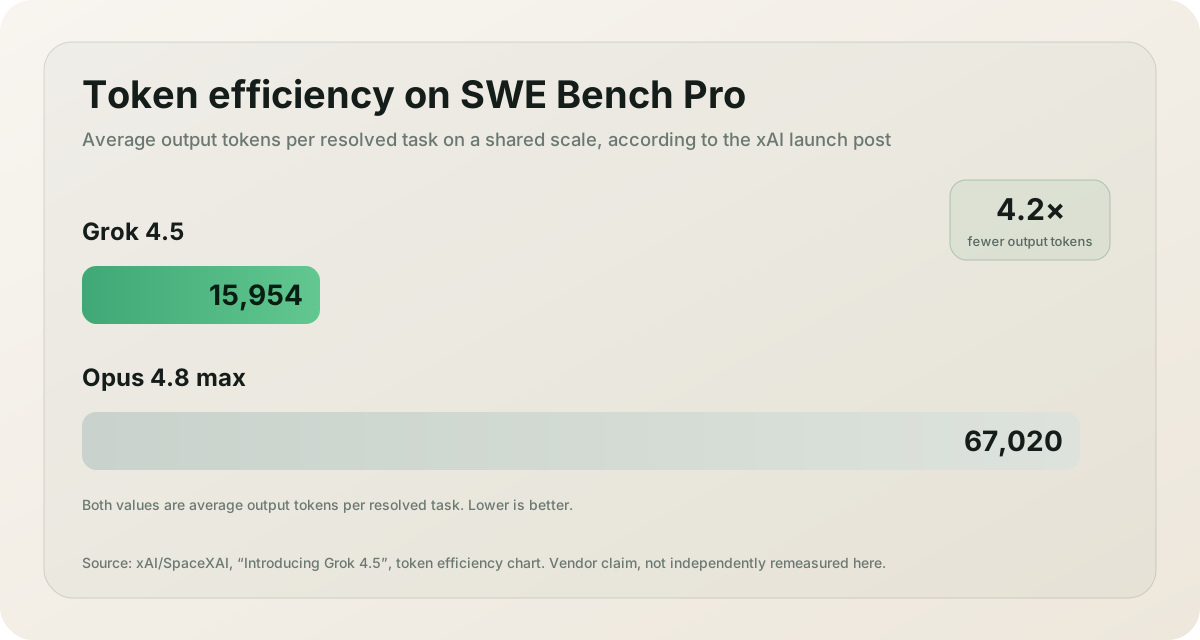
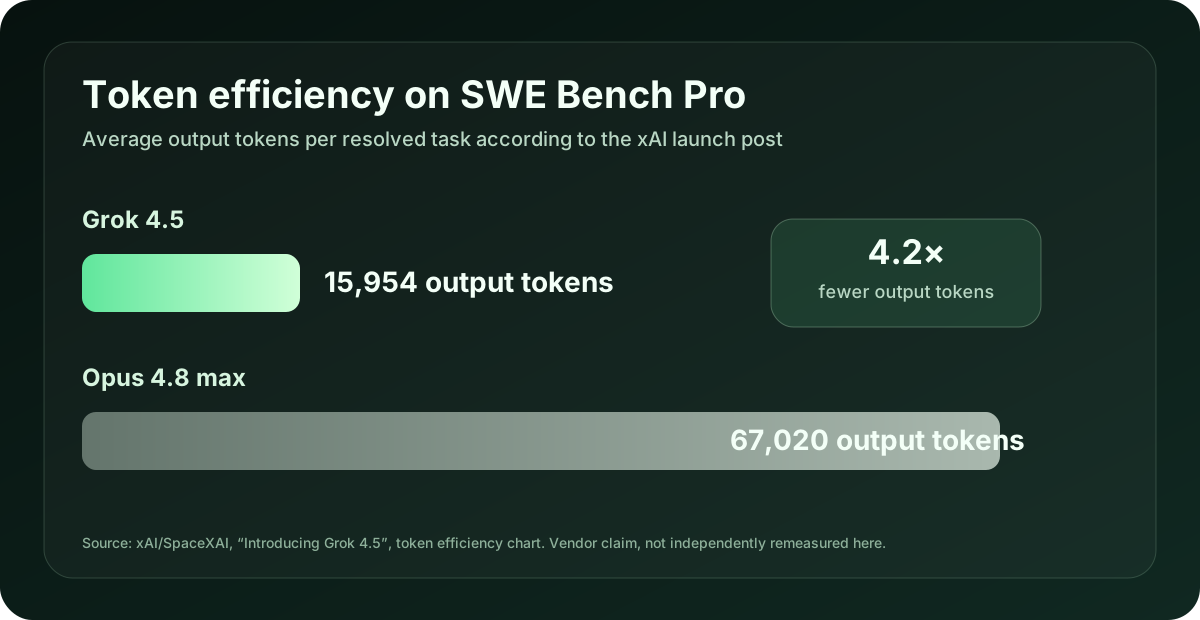
Graphic: original SVG summary based on the official token efficiency chart in the xAI/SpaceXAI launch post. Source: x.ai/news/grok-4-5.
With cloud models, benchmark scores are only part of the cost picture. Token volume and tool calls also matter. A model that solves a task with fewer intermediate steps, shorter intermediate messages and less output can be faster and cheaper in practice, even if the raw per-token price is not the lowest.
This matters especially for agents. A coding-agent run can plan, read files, call tools, edit code, run tests, analyze failures and patch again. Less output reduces both cost and waiting time.
Speed: 80 tokens per second in the API
xAI reports 80 tokens per second serving speed for Grok 4.5. That is a useful reference point, but not a guarantee for every account, region and prompt. Real-world latency and throughput depend on region, load, routing, tool calls, reasoning level, context size and platform. For Mac users, Grok 4.5 speed depends on the API path and workload, not on the local M-series chip.
Grok 4.5 API rates: historical model, current comparison
xAI uses two price tiers for Grok 4.5. Once a prompt reaches 200K tokens, the long-context rate applies to all tokens in that request:
| Token type | Below 200K prompt | 200K–500K prompt |
|---|---|---|
| Input | $2.00 / 1M tokens | $4.00 / 1M tokens |
| Cached input | $0.30 / 1M tokens | $0.60 / 1M tokens |
| Output | $6.00 / 1M tokens | $12.00 / 1M tokens |
Not all server-side tools are billed per call. The official xAI price list charges web_search and code_execution $0.005 per call. But x_search costs $0.005 per X post retrieved and $0.01 per profile retrieved; parent or quoted posts may count. A search that retrieves many posts can therefore cost more than a single Web Search invocation, in addition to model tokens and possible storage charges.
Example cost without tool calls
A longer coding request with 120K input tokens and 8K output tokens costs approximately:
| Part | Calculation | Cost |
|---|---|---|
| Input | 0.12 × $2.00 | $0.24 |
| Output | 0.008 × $6.00 | $0.048 |
| Total | — | about $0.288 |
Cached input can reduce cost if repeated context is served from cache reliably. xAI recommends prompt_cache_key or the x-grok-conv-id header so that conversation requests are routed to the same server more reliably and cache hits become more likely. The example stays below 200K. Long-context pricing applies to the full request, not merely tokens above the threshold. At 210,000 uncached input tokens and 8,000 output tokens, the token total would be (210,000/1M × $4) + (8,000/1M × $12) = $0.936.
Illustrative agent budget without caching: Four Web Search calls cost $0.020, ten X posts retrieved cost $0.050, two X profiles retrieved cost $0.020, and three code executions cost $0.015. That is $0.105 in tool charges; added to the earlier 120K/8K example, the total is $0.393. This is rate-based arithmetic, not actual measured usage or a spending cap. Multi-step agents can incur multiple requests with separate context and tool bills.
Reasoning: low, medium, high or xhigh
The current model card lists low, medium, high and xhigh; the default is high. Extra reasoning effort can consume more output tokens without helping every task.
| Reasoning level | Best for |
|---|---|
| low | short answers, simple transformations, lower cost |
| medium | normal coding and analysis work |
| high | difficult bugs, architecture questions, agents, STEM, planning |
| xhigh | unusually demanding work; test quality and token costs first |
Not every request needs high. For short transformations or simple answers, low or medium is often enough. For large codebase work, hard-to-reproduce bugs or complex agent loops, high is more useful.
Tools: more than a chat model
Grok 4.5 supports several server-side capabilities:
- function calling
- web search
- X search
- code execution
- structured outputs
- streaming
- context compaction for long agent loops
These capabilities make the model useful in workflows where it does more than generate text: it can use tools, process results and plan next steps. On Mac, Grok 4.5 is therefore most relevant in Grok Build, Cursor, OpenRouter-compatible clients and custom API workflows.
Current information does not automatically come from the model itself. Without search tools, a model does not have access to new events or external data. Use Web Search or X Search when the task needs current information.
Privacy and API data
For sensitive Mac files, Grok 4.5 is not automatically the right choice. xAI’s security FAQ says API inputs and outputs are not used for training without explicit permission. At the same time, API requests and responses are stored temporarily for 30 days for abuse or misuse auditing. Zero Data Retention is available as an enterprise feature.
| Data type | Recommendation |
|---|---|
| private notes | process locally |
| confidential client data | use only after compliance review, ideally ZDR |
| public code examples | Grok 4.5 can be useful |
| large open-source repos | Grok 4.5 can be useful |
| internal business docs | check privacy requirements |
| offline work | use a local model |
For private offline data, local Mac models remain the better fit. Grok 4.5 is better suited to cloud agents, public code examples and large repositories where cloud processing is allowed.
Setup: xAI API on Mac
Option 1: xAI Responses API with cURL
export XAI_API_KEY="your_api_key"

curl https://api.x.ai/v1/responses \
  -H "Content-Type: application/json" \
  -H "Authorization: Bearer $XAI_API_KEY" \
  -d '{
    "model": "grok-4.5",
    "input": "Find and fix the bug, then explain it: function median(a){a.sort();return a[a.length/2]}"
  }'
Option 2: Python with the OpenAI-compatible client
import os
from openai import OpenAI

client = OpenAI(
    api_key=os.environ["XAI_API_KEY"],
    base_url="https://api.x.ai/v1",
)

response = client.responses.create(
    model="grok-4.5",
    input="Explain when I should use a local Mac model and when Grok 4.5 is worth the cloud cost.",
)

print(response.output_text)
Option 3: OpenRouter on Mac
import os
from openai import OpenAI

client = OpenAI(
    api_key=os.environ["OPENROUTER_API_KEY"],
    base_url="https://openrouter.ai/api/v1",
)

response = client.chat.completions.create(
    model="x-ai/grok-4.5",
    messages=[
        {"role": "system", "content": "You are a precise Mac AI workflow assistant."},
        {"role": "user", "content": "Compare Grok 4.5 with a local Qwen model for coding on a Mac."},
    ],
)

print(response.choices[0].message.content)
Grok 4.5 vs local Mac models
| Task | Grok 4.5 | Local Mac model |
|---|---|---|
| private offline notes | weaker fit | better |
| large codebase analysis | strong | limited by model/RAM |
| terminal agents | strong | possible, but usually weaker |
| low recurring cost | depends on usage | good after setup |
| data control | cloud trade-off | better |
| 500K context | yes | rarely practical locally |
| no-internet work | no | yes |
| web/X search tool use | strong | requires your own tool layer |
Grok 4.5 does not replace local AI on Mac. It complements it for tasks where local models are too small, too slow or too unreliable.
Workloads that justify Grok 4.5
Grok 4.5 is most useful for:
- large repositories,
- difficult bugs,
- tool-heavy agent runs,
- terminal and coding workflows,
- long context,
- token-efficient agent responses,
- OpenRouter or xAI API workflows,
- Cursor or Grok Build.
It is a weaker fit for:
- private data that must stay offline,
- short everyday questions,
- simple tasks already handled by a local model,
- anyone looking for a model they can download and run locally.
Grok 4.5 on Mac: cloud access only
For Mac users, Grok 4.5 is mainly a cloud tool: long context, configurable reasoning, tool support, strong Terminal-Bench numbers and comparatively aggressive API pricing. The important boundary remains: Grok 4.5 is not a local Mac model, and vendor benchmarks do not replace independent rankings.
Local first for private data. Use Grok 4.5 selectively for large, difficult and agentic tasks.
Frequently Asked Questions
Is there a Grok app for Mac?
Yes. xAI's current Grok Bot is a desktop app for macOS, Windows and Linux, available to eligible paid Cursor and linked SuperGrok plans. It uses a cloud computer and cloud storage; it is not a local Grok 4.5 model running on Apple Silicon. For terminal coding, Grok Build is a separate option.
Does Grok Bot work on Intel Macs and iMacs?
Yes. xAI's setup guide offers separate Apple silicon and Intel downloads for macOS, so Intel Macs and iMacs are covered. Grok Bot needs an eligible plan, and the model runs in xAI's cloud, not on the Mac.
How do I install Grok Bot on Mac?
The official setup guide says to choose the Apple silicon or Intel download, open the disk image, drag Grok Bot to Applications and sign in with a Cursor account. Access currently depends on an eligible plan.
What is the official Grok 4.5 model name?
The official xAI/API model name is grok-4.5. The name x-ai/grok-4.5 is the OpenRouter model slug and should not be described as the native xAI model ID.
Can I run Grok 4.5 locally on a Mac?
No. Grok 4.5 is not an open-weight model and does not run locally through Ollama, LM Studio or MLX. On Mac, you use it as a cloud/API model.
How much does Grok 4.5 cost?
For prompts below 200K tokens, xAI lists Grok 4.5 at $2.00 per 1M input tokens, $0.30 per 1M cached input tokens and $6.00 per 1M output tokens. At 200K tokens or more, long-context rates of $4.00, $0.60 and $12.00 apply to the whole request. Tool calls can add extra costs.
What is the context window?
The xAI documentation lists Grok 4.5 with a 500K token context window. For long agent runs, context management, prompt caching and tool costs still matter.
Is Grok 4.5 available in the EU?
Yes. xAI's release notes confirm that Grok 4.5 is now available in the API console for EU users.
Is Grok 4.5 better than Claude, GPT or GLM?
Not universally. xAI shows strong launch results on coding, terminal and agent benchmarks, but those are vendor-provided figures and some are not directly comparable.
Is Grok 4.5 still the newest Grok Build model?
No. Grok 4.7 launched September 21, 2026 and is now the default in Grok Build. Grok 4.5 remains a distinct API model; choose exact model IDs for reproducible workflows.
Transparency
Sources and review basis
These primary and reference sources form the basis of the technical assessment. Vendor claims and external benchmarks are identified as such in the article.
- x.ai news / introducing-grok-bot
- docs.x.ai grok-bot / get-started
- x.ai build
- x.ai news / grok-4-5
- x.ai news / grok-4-7
- docs.x.ai developers / grok-4-7
- docs.x.ai models / grok-4.7
- x.ai news / grok-bot-more-plans
- docs.x.ai developers / grok-4-5
- docs.x.ai models / grok-4.5
- docs.x.ai developers / pricing
- docs.x.ai developers / release-notes
- docs.x.ai faq / security
- docs.x.ai text / reasoning
- docs.x.ai tools / function-calling
- docs.x.ai tools / web-search
- docs.x.ai tools / x-search
- docs.x.ai tools / code-execution
- openrouter.ai x-ai / grok-4.5