Reviewed October 11, 2026. On an 8GB or 16GB Mac, begin with Gemma 4 E2B/E4B rather than chasing a large model at maximum context. At 24GB, Gemma 4 12B (7.7–8.0GB Ollama package depending on variant) is a safer first benchmark. Qwen3.8-27B currently has an 18GB Ollama package and is best treated as a 32GB-or-larger starting point for meaningful tool calls and context. Its files may technically load on some 24GB Macs, but that leaves little space for macOS, the KV cache and other apps. Llama 4 Scout (~67GB package) is a specialist option for very large memory configurations. A download size is not an operating-memory measurement. Ollama Qwen3.8 · Ollama Gemma 4.
For a hardware purchase, the 2026 MacBook AI development guide compares the M5 Pro memory and GPU configurations.
Choosing by unified memory
| Mac unified memory | Sensible starting point | Do not promise |
|---|---|---|
| 8 GB | Gemma 4 E2B or a smaller tag | large context or comfortable multitasking |
| 16 GB | Gemma 4 E2B/E4B, smaller Qwen tags | large agent runs are memory-sensitive |
| 24 GB | Gemma 4 12B; 27B only as a short-context experiment | 18GB package does not leave generous room for 27B agent workloads |
| 32 GB | Qwen3.8-27B or Gemma 4 26B at moderate context | Qwen3.6 35B (23–24GB package) leaves little headroom |
| 48 GB | Gemma 4 31B or Qwen3.6 35B with more headroom | 256K context can still be too much |
| 64 GB+ | evaluate larger local variants deliberately | Llama 4 Scout remains a specialist case |
These are starting points, not performance guarantees. For a purchase or production decision, test the exact model with your own prompts, context and tools.
Ollama tags: download size is not a RAM benchmark
The table shows package sizes and available size ranges listed on the official Ollama model pages on October 11, 2026. These are download/model-package figures, not measured peak RAM usage or benchmarks on a Mac. Ranges reflect offered variants and quantizations, and may change on later pulls:
| Family/tag | Ollama listing | Context in Ollama | Input |
|---|---|---|---|
qwen3.6:27b | 18–19 GB | 256K | text, image |
qwen3.6:35b | 23–24 GB | 256K | text, image |
qwen3.6:27b-mlx | 19 GB | 256K | text, image |
qwen3.6:35b-mlx | 24 GB | 256K | text, image |
qwen3.8:27b | 18 GB | 256K | text, image |
gemma4:e2b | 4.6–7.5 GB | 128K | text, image |
gemma4:e4b | 6.6–9.5 GB | 128K | text, image |
gemma4:12b | 7.7–8.0 GB | 256K | text, image |
gemma4:26b | 16–19 GB | 256K | text, image |
gemma4:31b | 19–20 GB | 256K | text, image |
llama4:16x17b | 67 GB | 10M | text, image |
These numbers describe Ollama tag package sizes, not the RAM required with a 256K context. Qwen3.6’s MLX tags have their own listed sizes and should not be conflated with the regular builds. Check the specific variant with ollama show <model>, then verify running memory with ollama ps and macOS Activity Monitor. Qwen3.6 · Qwen3.8 · Gemma 4 · Llama 4.
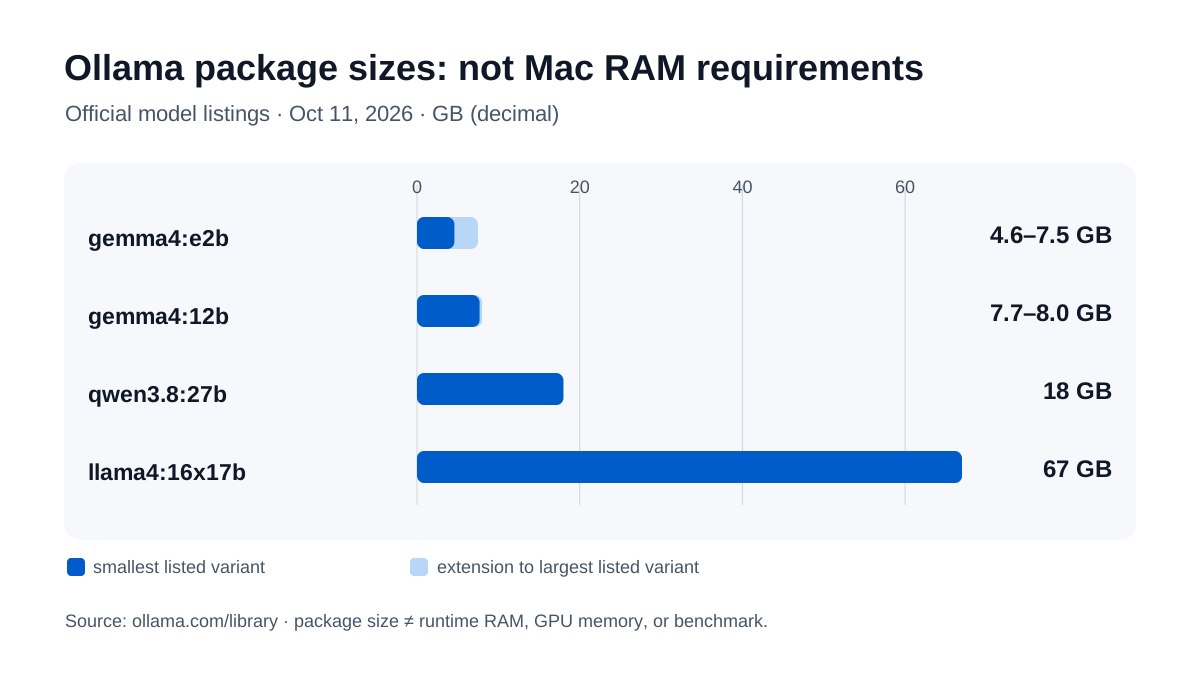
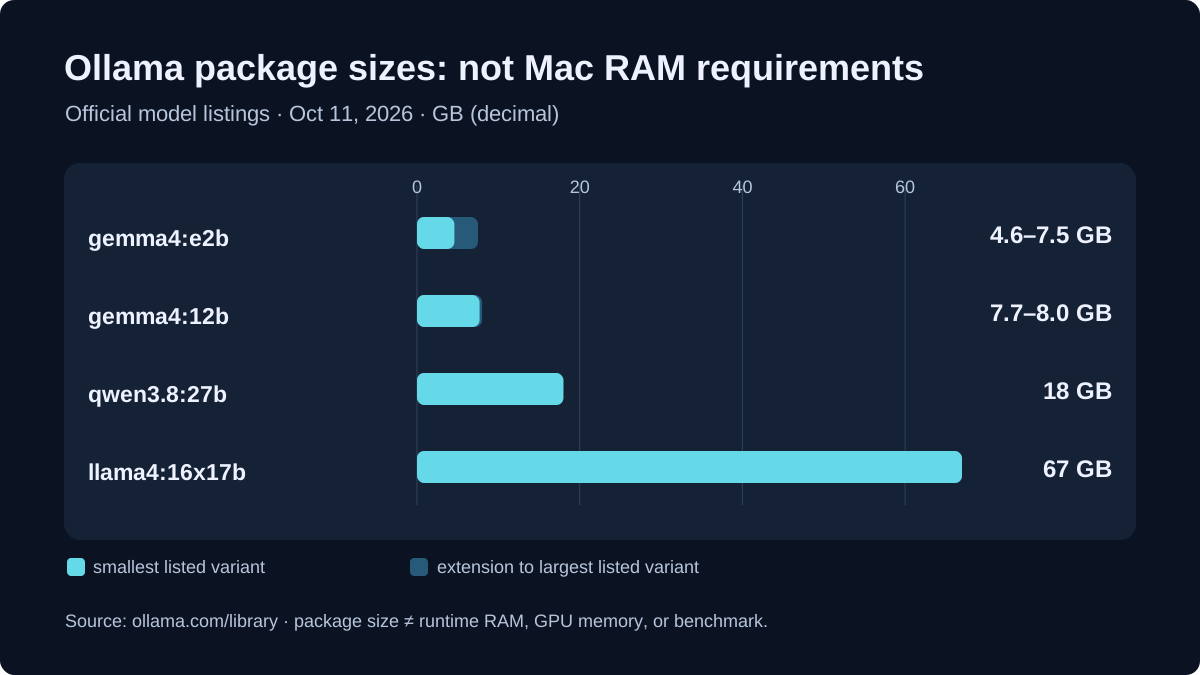
Figure: package sizes from official Ollama Gemma 4, Qwen3.8 and Llama 4 listings. Original SVG summary; not a memory or performance benchmark.
Package size is not memory use
A local run needs more than the file shown in the model library:
- model weights and runtime,
- KV cache for the selected context,
- image or audio encoders,
- macOS and background processes,
- browser, editor and other applications,
- temporary buffers for long or parallel tasks.
Apple Silicon shares a unified memory pool between CPU and GPU. An 18 GB package may therefore start on a 24 GB Mac but leave almost no room for 256K context or other applications. A clean start is not proof of comfortable use.
Qwen3.6: coding and agents
Ollama currently lists Qwen3.6 in 27B and 35B variants plus MLX tags. The model cards describe improvements for coding agents, repository tasks, multimodal inputs and preserving thinking context across historical messages.
# 27B: smaller text/image starting point
ollama pull qwen3.6:27b
ollama run qwen3.6:27b

# 35B: larger variant, more memory headroom required
ollama pull qwen3.6:35b
ollama run qwen3.6:35b
The current Ollama pages also list qwen3.6:27b-mlx and qwen3.6:35b-mlx with text and image input.
Qwen publishes extensive benchmark tables covering coding, agents, vision and video. The model cards also document differing harnesses, timeouts, context lengths, prompts and internal datasets. Treat the scores as source material, not as a direct Mac ranking. The first practical question is whether context and tool calls run without unacceptable offloading on your machine.
Qwen3.8-27B is the newer 27B checkpoint. Ollama lists it as qwen3.8:27b (18 GB package, 256K context, text and image input). Qwen publishes the checkpoint under Apache 2.0; it lists 27.8B parameters and a native 262,144-token context, with MLX 4-bit/8-bit and GGUF conversions available. Newer does not automatically mean better on your own Mac: independent runtime measurements are still missing, so the same test discipline applies. The full breakdown is in the Qwen3.8-27B guide.
Gemma 4: more sizes and explicit on-device targets
Google describes Gemma 4 as a multimodal family with dense and MoE variants:
- E2B and E4B for smaller devices,
- 12B as the Unified model,
- 26B A4B as an MoE model,
- 31B as a dense model.
Google’s model card lists native audio on E2B, E4B and 12B. The current Ollama entries primarily show text and image input for local tags, so audio is not automatically available in every Ollama/client combination.
# lighter starting point
ollama pull gemma4:e4b
ollama run gemma4:e4b

# 12B: more capability at a moderate package size
ollama pull gemma4:12b
ollama run gemma4:12b

# 26B MoE: plan memory deliberately
ollama pull gemma4:26b
ollama run gemma4:26b
On a 24 GB Mac, gemma4:12b is the more sensible first test. Ollama lists gemma4:26b at about 18 GB, leaving little headroom for context, images and other applications. Google’s model card lists the 26B A4B model at 25.2B total and 3.8B active parameters. That makes it more efficient than 31B dense, but not memory-free.
Llama 4 Scout: large context, not a normal Mac install
Ollama lists llama4:16x17b at 67 GB and a 10M context. Meta’s model card describes Scout as a 109B MoE model with 17B active parameters. The combination of a 67 GB package and 10M context is impractical for ordinary local Macs:
# only for very large-memory or server experiments
ollama pull llama4:16x17b
Even 64 GB of unified memory does not mean that a 67 GB package plus runtime, macOS and KV cache will fit comfortably. Ollama lists the 128x17B variant at 245 GB and 1M context. For everyday Mac work, Qwen3.6 or Gemma 4 are more realistic candidates.
Licensing: Gemma 4 and Qwen are not Llama 4
Checked October 12, 2026. “Open weights” means downloadable model weights, not a single uniform license. A commercial app, distributed checkpoint, or hosted inference service must comply with the license of the actual weights. Check Ollama tags and third-party quantizations separately.
| Original model | License in primary source | Practical requirements |
|---|---|---|
| Gemma 4 | Apache 2.0, Google model card | Commercial use and redistribution are generally allowed, subject to copyright, license and applicable NOTICE requirements. Do not confuse Gemma 4 with older Gemma licenses. |
| Qwen3.8-27B | Apache 2.0, official weights | Apache obligations apply; inspect the provenance and bundled files of GGUF/MLX conversions separately. |
| Llama 4 Scout | Llama 4 Community License, Meta original | Not Apache 2.0: distribution and product integration can require a license copy and “Built with Llama” attribution; additional conditions apply to very large operators. |


A license is not a privacy guarantee. Apache 2.0 alone neither transmits user data nor proves compliant local processing. Check the actual tag and runtime using ollama list, ollama show <model> and ollama ps. A :cloud tag or enabled web/API tools can send data outside the Mac even if the agent itself starts locally. Review all embedded software and model licenses before commercial distribution.
Context length: the setting that distorts comparisons
Ollama’s current documentation gives defaults by VRAM:
- below 24 GiB: 4K context,
- 24–48 GiB: 32K,
- 48 GiB or more: 256K.
Apple Silicon uses shared memory, so these thresholds should not be read as an exact Mac RAM guarantee. Ollama recommends at least 64K for coding, agents and web search, while also warning that larger contexts need more memory.
Check the actual allocation after loading a model:
OLLAMA_CONTEXT_LENGTH=8192 ollama serve
# In another terminal, pull and run a model:
# ollama run gemma4:12b
# Then: ollama ps
This starts a separate Ollama server. Quit the Ollama desktop app or stop any server already using port 11434 first; otherwise the new server cannot bind. The environment variable applies when the server starts, not to an already-running service. ollama ps becomes useful after inference has loaded a model. If memory pressure appears, reduce the context before drawing a conclusion about the model’s speed.
Why local speed numbers require a test
Tokens per second depend on model tag, quantization, backend, context, prompt, temperature, Metal/MLX path and background load. Community reports and vendor numbers are useful for initial orientation, but are not reproducible enough for a purchase or production decision.
A fair local benchmark records at least:
- exact Mac model and unified memory;
- macOS and Ollama versions;
- model tag and quantization;
- context length and prompt size;
- prompt and output tokens;
- prefill and decode speed;
- CPU/GPU offload and memory pressure.
Test the Mac, not just the model’s parameter count
Use the actual Ollama library name. In October 2026 Ollama lists qwen3.8:27b with an 18GB package and 256K advertised context; that does not make 256K a practical default on a 32GB Mac. For a fair comparison start with short context in the app and expand only if the memory-pressure graph stays healthy.
ollama pull gemma4:12b
ollama pull qwen3.8:27b
ollama show qwen3.8:27b
ollama ps
Check Activity Monitor → Memory during a fixed text task and a fixed tool-use task, and record swap, prompt-processing latency, tokens/sec, model tag, Ollama version and context length. ollama ps tells you what is loaded and its execution placement; it is not a comprehensive macOS RAM benchmark. For private files, remember that an Ollama cloud tag is a different data-flow choice than a downloaded local checkpoint.
Measure locally: Gemma 4 versus Qwen 3.8 on the same Mac
Instead of inventing a speed ranking from package sizes, run a small reproducible local comparison. These six requests use Ollama on 127.0.0.1 only; the script requires Python 3 and does not call a paid cloud API. Install the packages first with ollama pull gemma4:12b and ollama pull qwen3.8:27b. A 27B model can fail on a memory-constrained Mac.
python3 - <<'PY'
import json
import statistics
from urllib.request import Request, urlopen
from urllib.error import URLError

models = ("gemma4:12b", "qwen3.8:27b")
prompt = "Reply with JSON only: give the sorted unique integers from [3,1,3,2] as a list under the key result."
for model in models:
    samples = []
    for trial in range(1, 4):
        payload = {
            "model": model, "prompt": prompt, "stream": False,
            "format": "json", "keep_alive": "0",
            "options": {"num_ctx": 4096, "num_predict": 128, "temperature": 0},
        }
        req = Request(
            "http://127.0.0.1:11434/api/generate",
            data=json.dumps(payload).encode(), headers={"Content-Type": "application/json"},
        )
        try:
            with urlopen(req, timeout=240) as res:
                result = json.load(res)
        except URLError as exc:
            raise SystemExit(f"Cannot run {model}: {exc}. Check Ollama and model installation.")
        try:
            correct = json.loads(result.get("response", "{}")).get("result") == [1, 2, 3]
        except (ValueError, AttributeError, TypeError):
            correct = False
        n = result.get("eval_count", 0)
        ns = result.get("eval_duration", 0)
        tps = n * 1e9 / ns if ns else None
        sample = {
            "model": model, "run": trial, "correct": correct,
            "prompt_tokens": result.get("prompt_eval_count"),
            "output_tokens": n,
            "decode_tok_s": round(tps, 2) if tps is not None else None,
            "total_s": round(result.get("total_duration", 0) / 1e9, 2),
        }
        samples.append(sample)
        print(json.dumps(sample))
    speeds = [s["decode_tok_s"] for s in samples if s["decode_tok_s"] is not None]
    print("Summary", model, "passed", sum(s["correct"] for s in samples),
          "/3; median decode tok/s", statistics.median(speeds) if speeds else "n/a")
PY
The official Ollama generate API returns prompt_eval_count, eval_count, eval_duration and total_duration. Decode tokens per second divides generated tokens by the generation duration, not by total wall time; total_s also includes loading overhead. Setting keep_alive: "0" unloads each model after use, making this a cold-run comparison, not a warm-cache throughput benchmark. The fixed 4K context and zero temperature remove some confounders. Three runs are an initial sanity check, not rigorous performance statistics.
The JSON task has a checkable expected answer: 3/3 correct runs matter more than a high throughput figure with the wrong result. Record your exact Mac chip, Ollama version, model digest (ollama show), unified memory, and Activity Monitor → Memory pressure/swap. The script generates results on your Mac; AI on Mac does not claim to have run or independently verified those measurements. Before making a purchasing decision, also test a realistic coding task and a longer document on the same hardware.
Reusable local tool: Download the Ollama benchmark source to compare exact model tags, provide a custom local prompt/expected-answer JSON, and export a CSV for your own records. Read the Python source before running it and use locally downloaded model tags: an Ollama cloud tag can still forward data beyond localhost. After saving the file:
python3 ollama-mac-benchmark.py --models gemma4:12b qwen3.8:27b --runs 3 --ctx 4096 --csv results.csvThe CSV does not measure RAM automatically. Record Activity Monitor memory pressure and swap separately. This is an executable measurement tool, not an AI on Mac benchmark result.
Practical choice
For open-weight LLMs on a Mac, package size, context and free unified memory matter together. Gemma 4 E2B/E4B targets smaller machines, Gemma 4 12B is a sensible 24 GB starting point, Qwen3.8-27B fits more safely from 32GB, while Qwen3.6-35B is a separate, older larger option, and Llama 4 Scout remains a specialist for very large memory environments despite its 10M context.
A low-memory specialist is Ternary Bonsai 2 27B: PrismML derives it from Qwen3.8-27B and ships ternary-quantized GGUF packs (from 5.95 GB) plus an MLX bundle (8.60 GB including the vision tower). The weights are Apache 2.0, but the GGUF packs currently require PrismML’s llama.cpp fork with the Hadamard transform; 5.9 GB is a file size, not measured RAM use. There is no universal 8 GB RAM guarantee: context length, KV cache, vision projector, macOS and the required PrismML runtime all consume memory. Verify the workload on your own Mac before buying hardware. Details and caveats are in the Ternary Bonsai 2 27B fact-check.
The tag listings also show why a static ranking ages quickly: Ollama tags, package sizes and input modalities change. Check the exact tag, start with a bounded context and measure your own workflow before turning a model name into a buying recommendation.
Sources
-
Google Gemma 4 model card — Gemma 4 Apache 2.0.
-
Qwen3.8-27B original checkpoint — Apache 2.0.
-
Meta Llama 4 Community License — attribution and redistribution conditions.
-
Ollama: Qwen3.6 — current tags, package sizes, context and input modalities.
-
Qwen3.6 27B Model Card and 35B-A3B Model Card — architecture, benchmarks and methodology notes.
-
Qwen: Qwen3.6-27B and Qwen3.6-35B-A3B — official release framing and open-weight availability.
-
Ollama: Gemma 4 — current local tags and sizes.
-
Google Gemma 4 Model Card — modalities, sizes, context and benchmarks.
-
Ollama: Llama 4 — Scout/Maverick tags, package sizes and context.
-
Meta: Llama 4 — official Scout/Maverick model framing.
-
Ollama: Context length — context defaults and
ollama ps.
Frequently Asked Questions
Which model should I try first on a 24 GB Mac?
For a cautious start, use a smaller Gemma 4 or Qwen tag. Ollama currently lists Gemma 4 12B at about 7.7–8.0 GB depending on the variant; gemma4:26b is about 18 GB and leaves little room for context, macOS and other apps.
Does Llama 4 Scout run on a Mac?
Ollama lists Llama 4 Scout at about 67 GB with a 10M context. That is impractical for normal local Mac setups because the model, runtime, context and macOS need memory together.
Are the package sizes in the table local RAM measurements?
No. This table was checked against the official Ollama model pages on October 11, 2026 and shows package sizes or variant ranges, not measurements on a Mac. Peak memory also depends on context, KV cache, runtime, input modality and background load.
What context length should I use in Ollama?
Ollama's current documentation lists defaults of 4K below 24 GiB VRAM, 32K at 24–48 GiB and 256K at 48 GiB or more. Apple Silicon shares memory, so verify the real allocation with ollama ps before increasing context.
Does Gemma 4 support audio?
Google lists native audio support for E2B, E4B and 12B. Current Ollama tags primarily list text and image input, so audio support needs to be checked for the exact tag and client.
What is the best local LLM for a 16GB Mac?
Start with Gemma 4 E2B or E4B, or a smaller Qwen tag. Large agent runs are memory-sensitive on 16GB.
Which open LLM fits a 32GB Mac?
Qwen3.8 27B and Gemma 4 26B are better first tests. Ollama lists Qwen3.6 35B at about 23–24 GB of download size, which leaves little headroom on a 32GB Mac.