Short answer
For many local LLMs, 24GB to 32GB is a useful starting tier. Some 70B Q4 quantizations may fit into 64GB with limited context, but running them reliably requires verifying real weights, KV cache and macOS headroom.
- 16GB
- 7B–8B models at Q4/Q5, short to moderate context
- 24–32GB
- 12B–32B at Q4: the best all-round starting tier
- 48–64GB
- Many 32B workloads; 70B Q4 on 64GB needs model-specific checks
- 96–128GB+
- 70B at higher precision, 100B–120B Q4, long context
Last reviewed: October 12, 2026
Running local language models on Apple Silicon requires 16GB of unified memory as an absolute baseline, 24GB to 32GB as the balanced everyday development tier, 48GB to 64GB for comfortable 32B to 70B experimentation, and 96GB to 128GB+ for deep context or multi-model pipelines.
The parameter count printed next to a model name is never its total RAM requirement. Actual unified memory consumption follows this formula:
model weights
+ quantization metadata
+ KV cache
+ runtime buffers and temporary tensors
+ macOS and applications
+ safety headroom
Apple silicon changes the hardware layout, but not the arithmetic. The CPU and GPU share one physical memory pool rather than maintaining separate system RAM and VRAM pools. That lets the GPU address far more memory than a typical discrete consumer GPU, without copying every tensor over PCIe. The same pool is also used by macOS, the browser, an IDE, vector databases and every other process.
Unified-memory tiers and model fit
| Unified memory | Model classes that fit in practice |
|---|---|
| 8GB | 1B–3B models, usually 4-bit, short context only |
| 16GB | 7B–8B at Q4/Q5; 12B–14B is possible but constrained |
| 24GB | a solid 12B–14B tier; selected 20B–24B Q4 models with modest context |
| 32GB–36GB | practical for 20B–32B Q4 and development tools |
| 48GB | comfortable 32B use, higher-bit quants and more context |
| 64GB | the first broadly practical tier for a 70B Q4 model |
| 96GB–128GB | 70B at higher precision, roughly 100B–120B Q4, long context and concurrency |
| 192GB–256GB | very large dense or MoE models, multiple instances and research |
| 512GB | enough room for a documented 405B Q4_K_M file plus the rest of the working set |
These are planning ranges, not compatibility promises. They follow from the weight and KV-cache arithmetic in this guide and were last reviewed on August 16, 2026. A model’s architecture, actual file size, cache precision and runtime version can move the boundary.
Calculate your actual workload: The Mac LLM RAM calculator combines model weights, KV cache, macOS headroom and compatible Macs.
Buying a notebook? The MacBook for AI development guide compares M1 through M5 configurations and explains when an Air, Pro or Max offers the right memory tier.
RAM needed for popular 2026 models
The tiers above are generic. For concrete models, the same arithmetic gives these planning estimates, not measurements (Q4_K_M weight estimates, F16 KV cache, one session, computed with the Mac LLM RAM calculator on October 4, 2026). Exception: gpt-oss is distributed in MXFP4; the gpt-oss rows are not measured Q4_K_M Ollama files. “Tight” means 8K context with about 5GB left for macOS and a few apps; “comfortable” means 32K context with an 8GB app reserve and at most 85% memory use.
| Model | Q4 weights | KV cache at 32K | Tight fit | Comfortable |
|---|---|---|---|---|
| Qwen 3.5 9B | 5.1GB | 1.0GB | 16GB | 24GB |
| Gemma 4 12B | 6.8GB | 0.6GB | 16GB | 24GB |
| gpt-oss 20B (MoE) | 11.9GB | 0.8GB | 24GB | 32GB |
| Gemma 4 26B A4B (MoE) | 14.8GB | 0.5GB | 24GB | 32GB |
| Qwen 3.8 27B | 15.4GB | 2.1GB | 24GB | 36GB |
| Muse Glimmer 30B | 16.0GB | 0.5GB | 24GB | 32GB |
| Gemma 4 31B | 17.5GB | 2.0GB | 32GB | 48GB |
| Qwen 3.6 35B A3B (MoE) | 19.9GB | 0.7GB | 32GB | 48GB |
| Llama 3.1 70B | 39.9GB | 10.0GB | 64GB | 96GB |
| gpt-oss 120B (MoE) | 66.6GB | 1.1GB | 96GB | 96GB |
Two things stand out. First, the KV-cache estimates in this table vary by a factor of 5 to 20: at 32K context, the figures are about 10GB for Llama 3.1 70B, about 2GB for Gemma 4 31B and Qwen 3.8 27B, and about 0.5GB for Muse Glimmer 30B. The differences follow from the modeled attention architecture, sliding-window/fixed-state configuration and assumed F16 cache precision – not from Mac benchmark measurements. Second, mixture-of-experts models activate fewer weights per token, but this does not automatically reduce memory requirements or latency: Gemma 4 26B A4B activates roughly 4B parameters at a time. The much larger quantized expert weight set still needs to be accessible for responsive inference. Runtime efficiency, memory bandwidth, cache and architecture determine actual speed. Ollama’s download files can be 1–4GB larger than the pure Q4 weights because embeddings and vision towers are often stored at higher precision. gpt-oss ships in MXFP4 instead of Q4_K_M; Ollama lists the 120B at 65GB, a little below the Q4 estimate. Release dates and model identity are independently supported by Google’s Gemma release chronology (Gemma 4 26B/31B: March 31; 12B: June 3, 2026), the official Qwen3.8 repository (27B: August 14) and Meta’s Muse Glimmer model card (August). Those sources verify model releases, not the calculated Mac capacity tiers. Memory fit still depends on the exact quantized package, runtime, context and other applications.
Unified memory is useful, not unlimited
Conventional system RAM
On a typical desktop with a discrete GPU, the CPU uses system RAM while the GPU uses dedicated VRAM. A model may fit in system memory yet exceed VRAM, forcing CPU execution or transfers across the PCIe bus.
Apple silicon’s shared pool
Apple documents its GPU memory model as unified: CPU and GPU share system memory. Resources can be accessed without maintaining duplicate copies in two physical pools. MLX is explicitly designed around this architecture.
For local LLMs, that creates two advantages:
- A large model can be addressed by the integrated GPU when enough unified memory is installed.
- CPU and GPU code can work with the same data more efficiently than a design that constantly copies tensors between RAM and VRAM.
It does not guarantee that every model fits, that the Neural Engine is used by every runtime, or that two Macs with 64GB deliver the same generation speed.
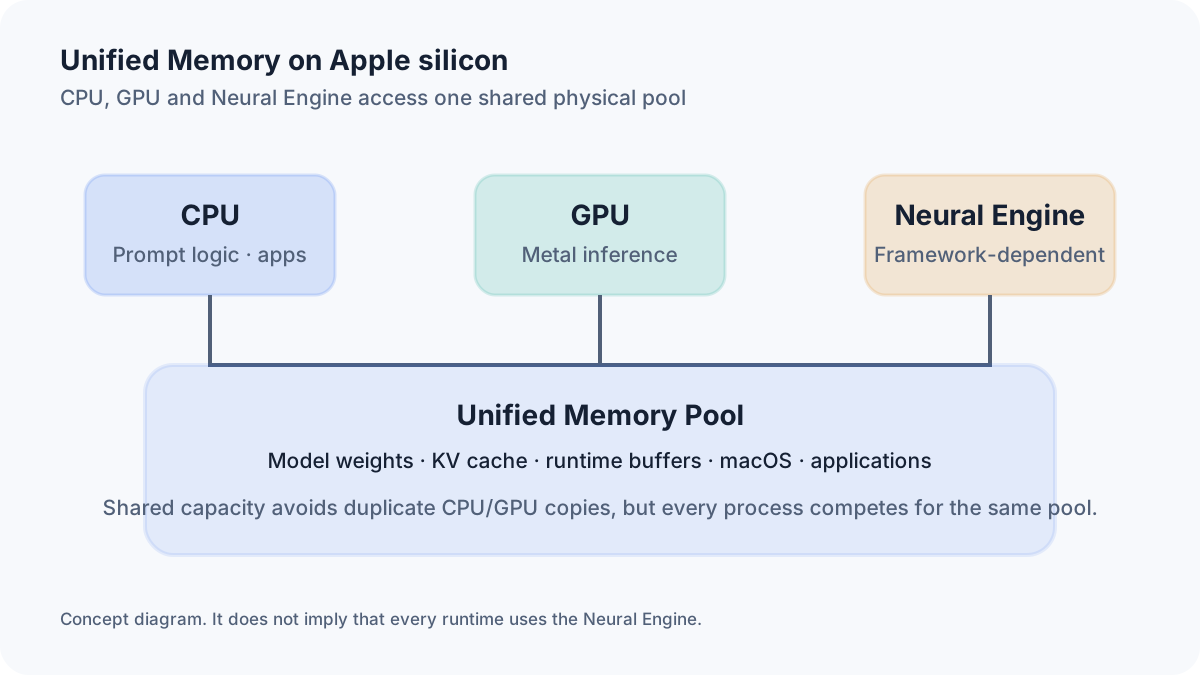
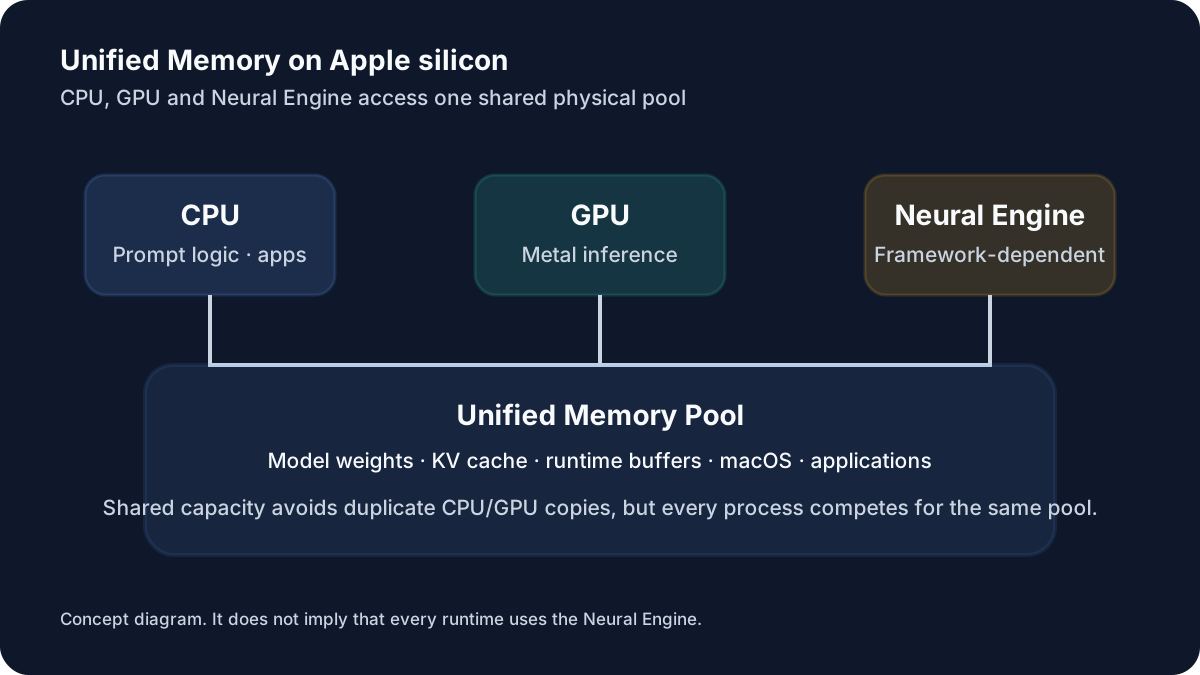
*Figure 1: On Apple silicon, the CPU and GPU access the same physical unified-memory pool instead of separate system RAM and VRAM. *
Capacity and performance are separate questions
Ask two questions:
- Can the complete working set remain in physical memory?
- Can the chip process that working set at an acceptable rate?
A large low-bit model may fit but decode slowly because its weights must be streamed through memory for every generated token. This is why memory bandwidth matters so much.
What actually consumes unified memory?
Model weights
Weights are the persistent tensors that contain the learned parameters. They are usually the largest fixed allocation.
Quantization structures
A 4-bit label describes the dominant weight encoding, not necessarily the exact average number of bits stored per parameter. Block scales, offsets, mixed tensor types and metadata make real files larger than an ideal calculation. llama.cpp’s quantization documentation gives Q4_K_M examples of 4.9GB for an 8B model, 43.1GB for 70B and 249.1GB for 405B.
KV cache
Autoregressive generation stores keys and values for previous tokens so the model does not recompute the full attention history for every new token. The cache grows with context length and active sequences.
Runtime and workspace buffers
The inference engine needs graph metadata, Metal buffers, tokenization structures, sampling state and temporary workspaces. Prefill can have a different peak from token-by-token decoding.
Operating system and user applications
WindowServer, background services, browser tabs, editors, Docker, databases and file caches use the same memory. Activity Monitor exposes app memory, wired memory, compressed memory, memory pressure and swap use.
Additional models and encoders
A draft model for speculative decoding, an embedding model for RAG, a reranker or a vision encoder adds another set of weights and buffers.
Concurrency
Each active sequence generally needs its own KV-cache allocation. Four simultaneous long-context requests can be a very different workload from one interactive chat.
Mixture-of-Experts models
An MoE model may activate only a small subset of experts for each token, but most implementations still need the full expert weight set available in memory or mapped for access. Do not plan from active parameter count alone.
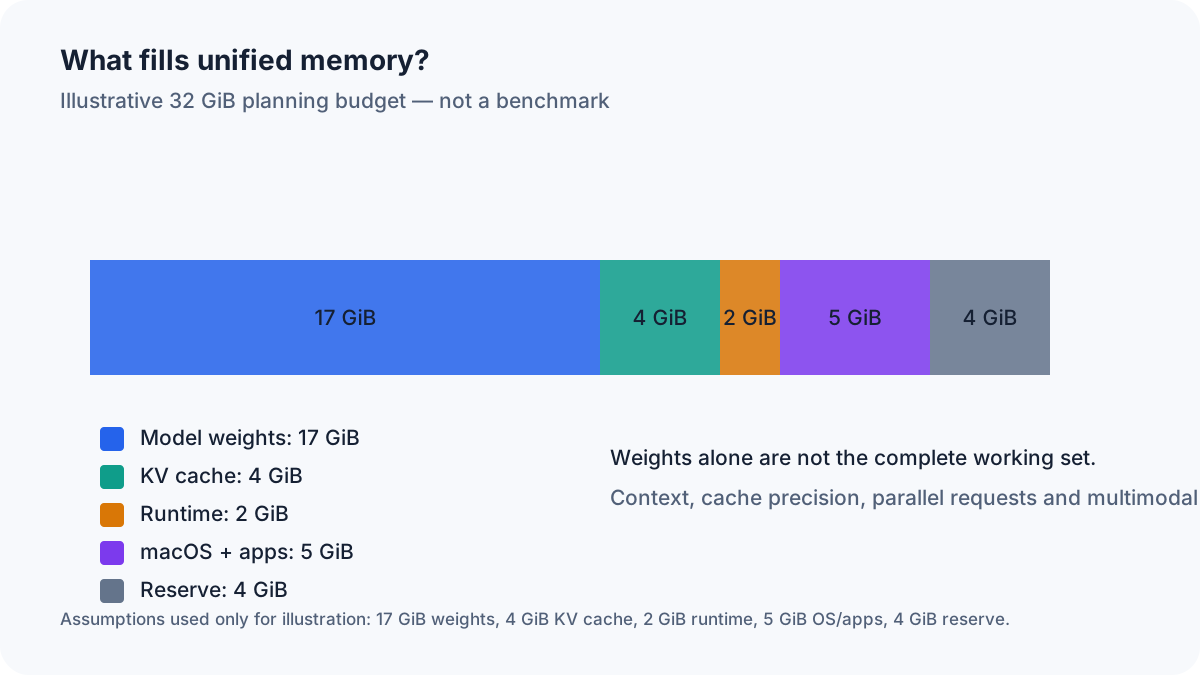
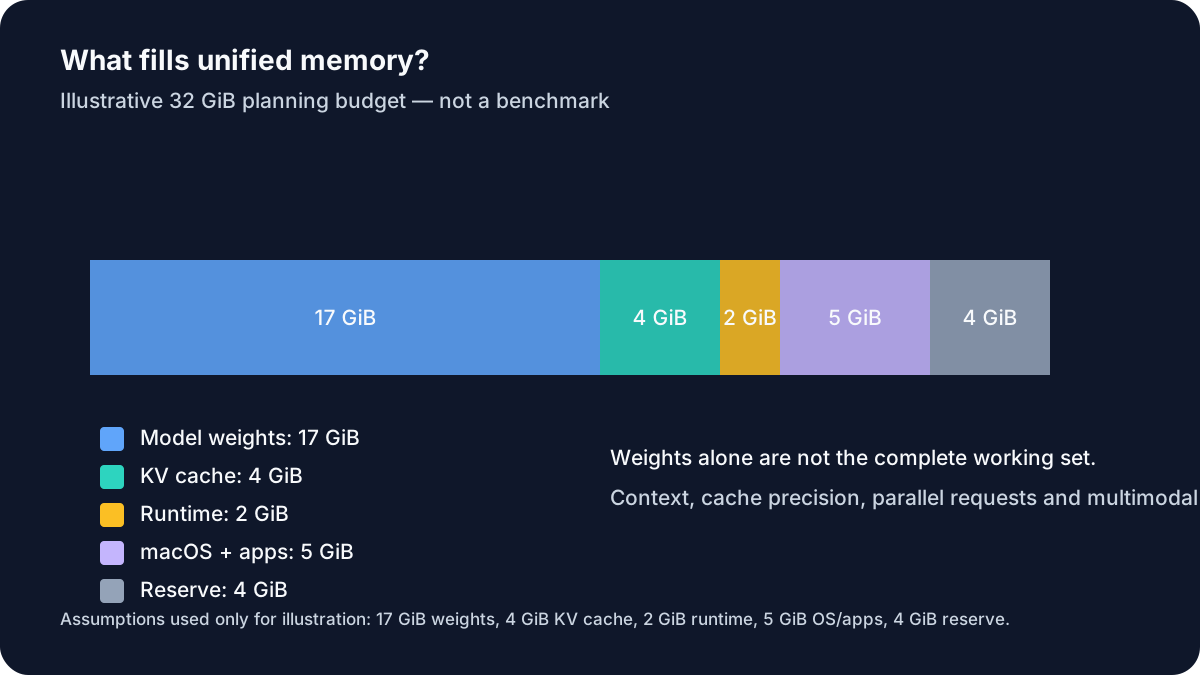
Figure 2: Illustrative memory components. Assumptions are printed in the diagram; not a benchmark.
Calculating model-weight memory
Use this simplified equation:
weight bytes ≈ parameter count × bits per parameter ÷ 8For parameter count expressed in billions:
decimal GB ≈ parameters in billions × bits ÷ 8An ideal 8B, 4-bit model is therefore:
8 × 4 ÷ 8 = 4.0 GB
4.0 decimal GB = 3.73 GiB
GB versus GiB
- 1 GB: 1,000,000,000 bytes
- 1 GiB: 1,073,741,824 bytes
Model hosts often quote decimal GB. System tools may display binary units or label them inconsistently. A comparison should state the unit.
Ideal weight sizes by model class
| Model class | FP16 | 8 Bit | 6 Bit | 5 Bit | 4 Bit |
|---|---|---|---|---|---|
| 1B | 2.0 GB / 1.9 GiB | 1.0 GB / 0.9 GiB | 0.8 GB / 0.7 GiB | 0.6 GB / 0.6 GiB | 0.5 GB / 0.5 GiB |
| 3B | 6.0 GB / 5.6 GiB | 3.0 GB / 2.8 GiB | 2.2 GB / 2.1 GiB | 1.9 GB / 1.7 GiB | 1.5 GB / 1.4 GiB |
| 8B | 16.0 GB / 14.9 GiB | 8.0 GB / 7.5 GiB | 6.0 GB / 5.6 GiB | 5.0 GB / 4.7 GiB | 4.0 GB / 3.7 GiB |
| 14B | 28.0 GB / 26.1 GiB | 14.0 GB / 13.0 GiB | 10.5 GB / 9.8 GiB | 8.8 GB / 8.1 GiB | 7.0 GB / 6.5 GiB |
| 22B | 44.0 GB / 41.0 GiB | 22.0 GB / 20.5 GiB | 16.5 GB / 15.4 GiB | 13.8 GB / 12.8 GiB | 11.0 GB / 10.2 GiB |
| 32B | 64.0 GB / 59.6 GiB | 32.0 GB / 29.8 GiB | 24.0 GB / 22.4 GiB | 20.0 GB / 18.6 GiB | 16.0 GB / 14.9 GiB |
| 70B | 140.0 GB / 130.4 GiB | 70.0 GB / 65.2 GiB | 52.5 GB / 48.9 GiB | 43.8 GB / 40.7 GiB | 35.0 GB / 32.6 GiB |
| 120B | 240.0 GB / 223.5 GiB | 120.0 GB / 111.8 GiB | 90.0 GB / 83.8 GiB | 75.0 GB / 69.8 GiB | 60.0 GB / 55.9 GiB |
| 405B | 810.0 GB / 754.4 GiB | 405.0 GB / 377.2 GiB | 303.8 GB / 282.9 GiB | 253.1 GB / 235.7 GiB | 202.5 GB / 188.6 GiB |
This table is a lower-level mathematical reference. It excludes quantization overhead, runtime memory, the KV cache and system headroom.
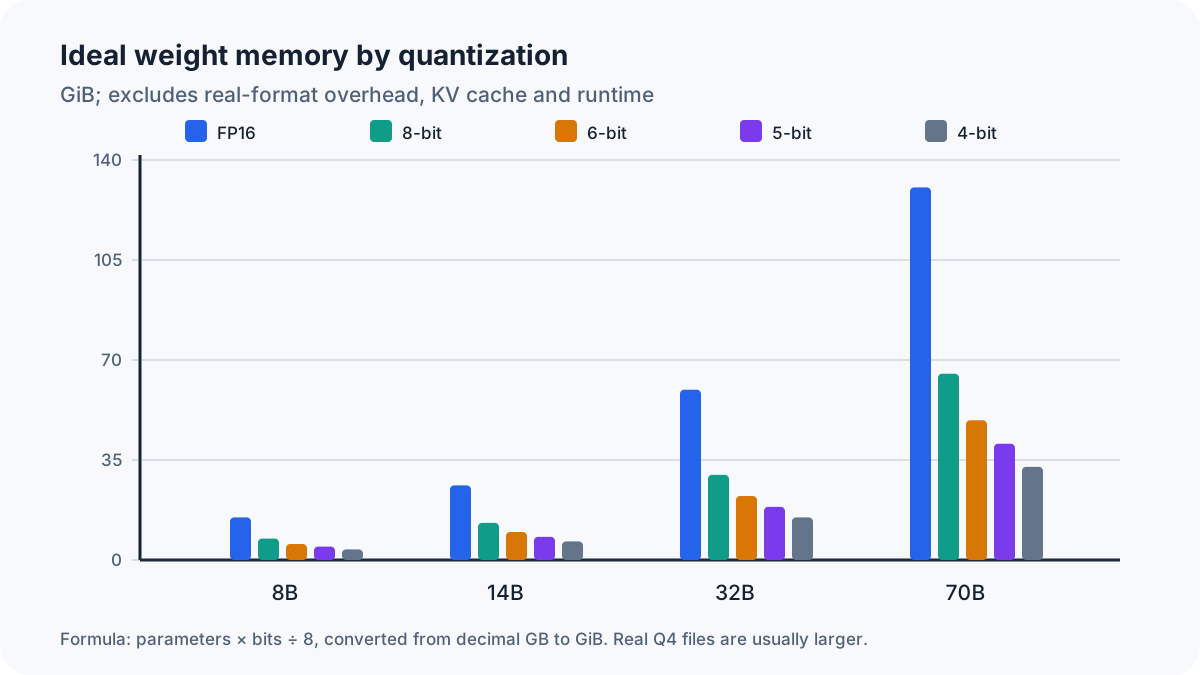
Figure 3: Ideal values from parameter count and bit width; real quantized files are usually larger.
Worked examples by parameter count
1B and 3B
A 1B model is 2GB in FP16 and 0.5GB at ideal 4-bit. A 3B model is 6GB in FP16 and 1.5GB at ideal 4-bit. These sizes are well suited to an 8GB Mac, although useful context and concurrent apps still need room.
7B–8B
For an 8B model:
- FP16: 16GB / 14.90GiB
- 8-bit: 8GB / 7.45GiB
- 6-bit: 6GB / 5.59GiB
- 5-bit: 5GB / 4.66GiB
- ideal 4-bit: 4GB / 3.73GiB
- documented Q4_K_M example: 4.9GB
This is the natural 16GB-Mac class. Q4 or Q5 leaves enough space for a moderate cache and macOS. FP16 does not.
12B–14B
A 14B model needs 28GB in FP16, 14GB at 8-bit and 7GB at ideal 4-bit. A 16GB Mac may load a real Q4 build, but the experience becomes sensitive to context length and every open application. At 24GB, the same model has useful operating headroom.
20B–24B
A representative 22B model is 44GB in FP16, 22GB at 8-bit, 16.5GB at 6-bit, 13.75GB at 5-bit and 11GB at ideal 4-bit. This is possible on 24GB in Q4, but 32GB is the more stable tier.
27B–32B
A 32B model is 64GB in FP16 and 16GB at ideal 4-bit. Real files plus a long cache can consume most of a 32GB machine. A 36GB or 48GB Mac is a better match for daily use, especially with a development environment.
70B–72B
A 70B model is:
- 140GB in FP16
- 70GB at 8-bit
- 52.5GB at 6-bit
- 43.75GB at 5-bit
- 35GB at ideal 4-bit
- 43.1GB in llama.cpp’s documented Q4_K_M example
The last line is the useful one for purchasing decisions. A 64GB Mac can support this class with a moderate context and disciplined headroom. A 48GB system sits too close to the edge for a typical Q4_K_M file.
Models above 100B
A 120B model is 60GB at ideal 4-bit and 75GB at ideal 5-bit. Q4 may be feasible on 96GB, while 128GB offers a safer production margin.
At 405B, ideal 4-bit would be 202.5GB. The documented Q4_K_M size is 249.1GB, before any cache or runtime allocations. A 256GB machine is therefore not a comfortable 405B-Q4 target; a 512GB Mac Studio is the realistic class.
Context length can change the answer
A model that works at 4k tokens may fail at 64k because the weight allocation is constant while the KV cache keeps growing.
Approximate KV-cache equation
For a conventional transformer cache:
KV bytes =
batch
× token count
× number of layers
× 2
× number of KV heads
× head dimension
× bytes per cache element
The 2 represents keys and values.
Example A: a mid-size GQA architecture
Assumptions:
- 32 transformer layers
- 8 key/value heads
- head dimension 128
- FP16 cache, 2 bytes per element
- batch size 1
bytes per token
= 32 × 2 × 8 × 128 × 2
= 131,072 bytes
= 128 KiB
That produces:
- 4k: 0.5GiB
- 8k: 1.0GiB
- 32k: 4.0GiB
- 64k: 8.0GiB
- 128k: 16.0GiB
Example B: a large GQA architecture
Assumptions:
- 80 layers
- 8 KV heads
- head dimension 128
- FP16 cache
- batch size 1
The result is 320KiB per token:
- 4k: 1.25GiB
- 8k: 2.5GiB
- 32k: 10GiB
- 64k: 20GiB
- 128k: 40GiB
| Context | Example A: 32 layers, 8 KV heads | Example B: 80 layers, 8 KV heads | Practical implication |
|---|---|---|---|
| 4k | 0.5 GiB | 1.25 GiB | Short chat / small documents |
| 8k | 1.0 GiB | 2.5 GiB | Normal chat and coding |
| 32k | 4.0 GiB | 10.0 GiB | Large documents / RAG |
| 64k | 8.0 GiB | 20.0 GiB | Agent and repository workflows |
| 128k | 16.0 GiB | 40.0 GiB | Only with substantial memory |
These are calculated examples, not benchmark measurements. Cache quantization can reduce the raw storage. Flash Attention can reduce intermediate memory use. Ollama explicitly notes that larger context consumes more memory and documents quantized K/V caches when the backend supports them.
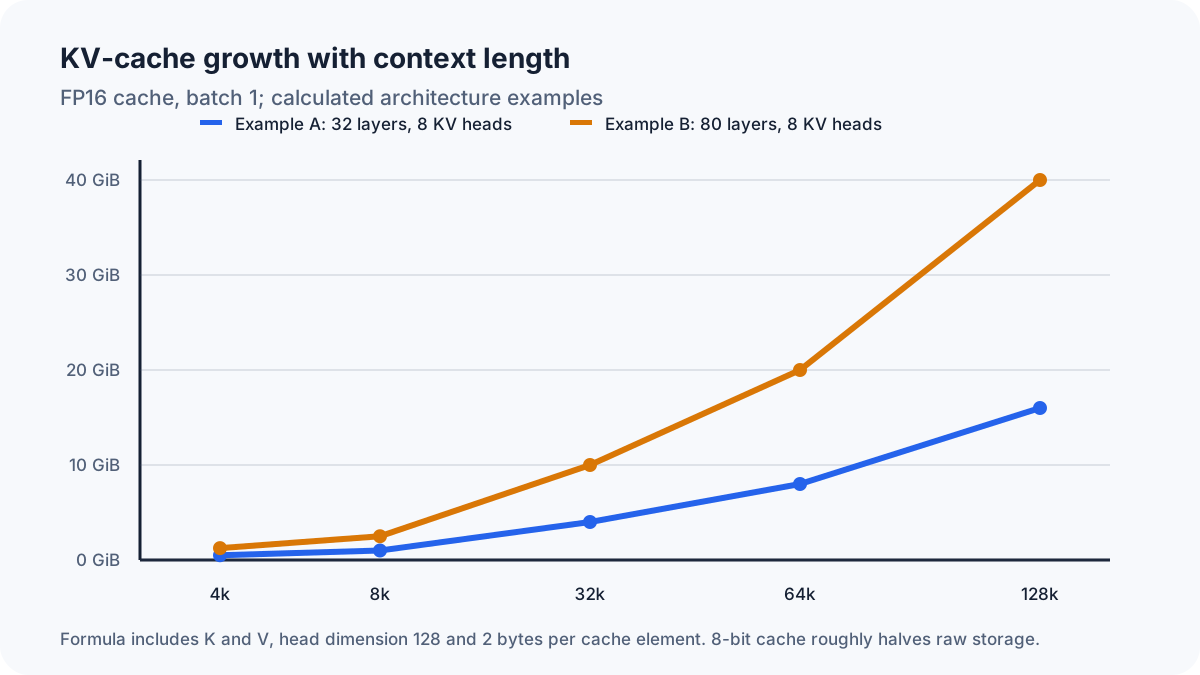
Figure 4: Calculated KV-cache growth at FP16, batch one and eight KV heads.
Why GQA and MQA matter
Grouped-query attention lets groups of query heads share key/value heads. Multi-query attention goes further and shares one set of keys and values across query heads. Both reduce cache size and memory traffic compared with full multi-head attention.
Context marketing versus practical context
A model card may advertise 128k or more. That number does not guarantee:
- strong answer quality across the entire window;
- reasonable prompt-processing time;
- enough memory on a specific Mac;
- support for the full window in every conversion or runtime;
- useful speed at batch sizes above one.
Choose the shortest context that reliably covers the task.
Unified-memory recommendations
| Unified memory | Practical model class | Typical context | Positioning | Free headroom |
|---|---|---|---|---|
| 8GB | 1–3B, usually 4-bit | 2k–4k | Experimentation only; close heavy apps | 3–4 GiB |
| 16GB | 7–8B Q4/Q5; 12–14B Q4 is tight | 4k–8k | Chat, summaries, light coding | 5–7 GiB |
| 18GB | 8B Q5/Q6; 12–14B Q4 | 4k–8k | A little more breathing room | 6–7 GiB |
| 24GB | 12–14B Q4/Q5; 20–24B Q4 tight | 8k–16k | Strong entry point | 7–9 GiB |
| 32GB | 20–24B Q4/Q5; 27–32B Q4 | 8k–32k | Development, RAG, mid-size models | 8–10 GiB |
| 36GB | 27–32B Q4 with better headroom | 8k–32k | Balanced Pro/Max tier | 9–11 GiB |
| 48GB | 32B Q5/Q6; 70B only low-bit/tight | 16k–32k | Coding, RAG, several tools | 10–13 GiB |
| 64GB | 70B Q4 at moderate context; 32B higher precision | 8k–32k | Large single-model work | 12–16 GiB |
| 96GB | 70B Q5/Q6; roughly 100–120B Q4 | 16k–64k | Long context, multimodal, research | 14–20 GiB |
| 128GB | 70B Q8 or 120B Q4/Q5 | 32k–128k, architecture-dependent | Professional local workflows | 16–24 GiB |
| 192GB | 120B Q8; about 200B Q4; multiple models | 32k–128k | Mac Pro / older Ultra tier | 20–30 GiB |
| 256GB | 200–300B Q4; 405B low-bit or tight | 32k–128k | Very large models and concurrency | 24–40 GiB |
| 512GB | 405B Q4 with headroom; large MoE/multi-model setups | 64k+ | Extreme local inference | 32–64 GiB |
The free-headroom column is a planning assumption. A headless server can reserve less. A laptop used with a browser, IDE, containers and RAG services should reserve more.
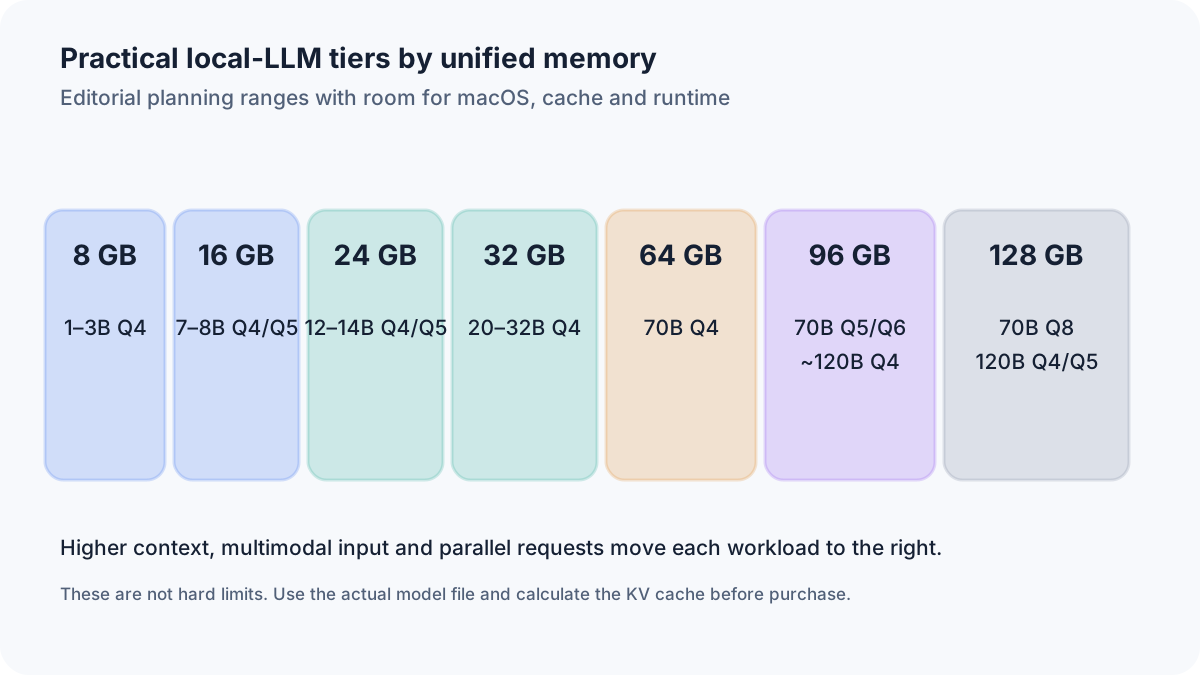
Figure 5: Planning ranges, not hard compatibility limits.
Recommendations by workload
| Workload | Sensible memory | Typical model range | Main pressure |
|---|---|---|---|
| Casual private chat | 16–24GB | 7B–14B Q4/Q5 | Weights and modest cache |
| Summarization | 24–32GB | 14B–24B Q4 | Input length |
| Coding assistant | 32–64GB | 14B–32B, sometimes 70B Q4 | Repository context plus IDE |
| RAG | 32–64GB | 14B–32B | LLM, embeddings, vector store |
| Long documents | 64–128GB | 32B–70B | KV cache and prefill |
| Local agents | 48–128GB | 24B–70B | History, tools, parallel services |
| Vision-language use | 32–96GB | 12B–32B plus vision stack | Encoder and image tokens |
| Multiple loaded models | 96GB+ | Several 14B–70B models | Additive weights and caches |
| Professional R&D | 128–512GB | 70B to hundreds of billions | Precision, context, concurrency |
A model that is excellent for a short chat on 24GB may require 64GB when it is used as an agent with a 64k history, browser tools and an embedding service.
Current Mac product classes
MacBook Air
Apple’s current MacBook Air tech-specs page lists the M5 generation with 16GB of unified memory standard, configurable to 24GB or 32GB, and memory bandwidth of 153GB/s. Its fanless design is attractive for silent use, but sustained LLM loads may not hold the same long-duration performance as an actively cooled system. It is a strong 7B–14B machine and a workable 20B–24B Q4 machine at the higher memory tiers.
MacBook Pro
The MacBook Pro tech-specs page lists the current 14- and 16-inch lineup with M5, M5 Pro and M5 Max. Apple lists 307GB/s memory bandwidth for M5 Pro and up to 614GB/s for M5 Max, and the 128GB unified-memory tier is offered on the M5 Max with 40-core GPU configuration. A 64GB Max configuration can therefore generate from a memory-bound model substantially faster than a lower-bandwidth system with the same capacity.
Mac mini
Apple’s Mac mini tech specs (checked October 2026) describe the current lineup with M6 or M5 Pro. The M6 ships with 16GB of unified memory, configurable to 32GB, and 170GB/s of memory bandwidth. The M5 Pro starts at 24GB, goes up to 64GB and reaches 307GB/s. The M5 Pro is the more balanced desktop for 20B–32B models because both capacity and bandwidth matter.
U.S. hardware comparison: A new Mac mini with 24GB can be a useful local-model entry point, but 24GB is a planning range, not a guarantee that a specific 14B model will fit with your requested context. Check available U.S. configurations on Apple’s Mac mini page and measure real memory pressure before deciding.
Mac Studio
Apple’s Mac Studio tech specs (checked October 2026) list the current generation with M5 Max and M5 Ultra. The M5 Max delivers 460GB/s (32-core GPU) or 614GB/s (40-core GPU) with 36GB to 128GB of unified memory. The M5 Ultra reaches 1.2TB/s and is offered with 96GB to 512GB of unified memory. That makes it the main single-Mac platform for models in the hundreds-of-billions class.
Mac Pro
The current Apple-silicon Mac Pro uses M2 Ultra, supports up to 192GB and provides 800GB/s of memory bandwidth according to Apple’s support document 111343. It remains relevant when PCIe expansion is required. For pure local-LLM capacity, the newer high-memory Mac Studio is generally the more direct fit.
Which model class fits which budget?
| Model working-set budget | Model class | Quantization | Context range | Practical target |
|---|---|---|---|---|
| 2–4GiB | 1B–3B | Q4–Q8 | 2k–8k | 8GB Mac |
| 5–9GiB | 7B–8B | Q4–Q6 | 4k–16k | 16GB Mac |
| 8–15GiB | 12B–14B | Q4–Q6 | 8k–32k | 24GB Mac |
| 14–24GiB | 20B–32B | Q4–Q5 | 8k–32k | 32–48GB Mac |
| 40–52GiB | 70B | Q4–Q5 | 8k–32k | 64–96GB Mac |
| 60–90GiB | 100B–120B | Q4–Q6 | 16k–64k | 96–128GB Mac |
| 120–220GiB | 200B–400B | low to medium bit | architecture-dependent | 192–512GB |
| about 232GiB file alone | documented 405B Q4_K_M | Q4_K_M | extra cache required | 512GB recommended |
Ollama, LM Studio, MLX and llama.cpp
| Runtime | Common format | Apple-silicon path | Memory controls | Best fit |
|---|---|---|---|---|
| Ollama | Managed local models, commonly GGUF-backed | Metal-capable backend | Context, Flash Attention and KV-cache settings where supported | Simple CLI/API service |
| LM Studio | GGUF and supported engines | Adjustable GPU offload | Context length, offload, model lifecycle | Desktop UI and local API |
| MLX-LM | MLX/Safetensors | Native Apple-silicon framework | Quantization, rotating KV cache, prompt cache | Python and Apple-specific workflows |
| llama.cpp | GGUF | Metal in supported macOS builds | GPU layers, cache types, mmap/mlock, server options | Fine-grained control |
Ollama
Ollama is straightforward for running a background service and switching models. Its documentation warns that context length increases memory use. Flash Attention and cache quantization can lower the context cost on supported combinations.
LM Studio
LM Studio provides a GUI and local server. The loader exposes context length and GPU-offload controls. Its current system requirements recommend 16GB or more on macOS, while noting that 8GB Macs should use small models and modest contexts.
MLX-LM
MLX-LM is built for Apple silicon. It supports model conversion and quantization, prompt caches and a fixed-size rotating KV cache. A smaller cache cap saves memory but may degrade output when relevant older tokens are dropped.
llama.cpp
llama.cpp is the foundation for much of the GGUF ecosystem. It supports Metal, a broad set of low-bit tensor encodings and detailed controls. GGUF stores model tensors and metadata in one extensible format.
Memory mapping is not free RAM
Memory mapping allows the operating system to map model-file pages into the process address space and load pages on demand. It can improve startup and file-cache behavior. It does not provide unified-memory bandwidth from the SSD. If active pages are repeatedly faulted in and out, generation becomes slow and inconsistent.
Avoid blanket performance claims
The most efficient runtime can change with the model architecture, conversion, quantization and release. A useful benchmark must hold constant:
- exact weights and tokenizer;
- quantization;
- context size;
- prompt;
- output length;
- cache type;
- GPU-offload setting;
- runtime version;
- thermal state.
macOS memory compression and swap
macOS compresses inactive pages as memory pressure rises and uses storage-backed swap when physical memory is insufficient. Activity Monitor reports both compressed memory and swap usage.
Swap can make a marginal model launch, but it is not a replacement for enough unified memory:
- SSD access has higher latency;
- prefill and first-token latency can increase sharply;
- active weight-page churn can destroy decode speed;
- other applications become less responsive;
- performance becomes difficult to reproduce.
Additional writes do occur, but an unsupported claim that ordinary LLM swapping will rapidly kill a modern SSD is not justified. The immediate reason to avoid constant swap is performance and stability.
Why RAM is not the only speed metric
Time to first token
TTFT includes model setup and prompt processing. Long documents can produce a slow TTFT even when generation speed is acceptable.
Prefill throughput
Prefill measures how fast input tokens are processed. It is influenced by compute, attention implementation and prompt length.
Decode throughput
Output tokens are generated one at a time. For large models, each token requires reading a large fraction of the weights, which makes memory bandwidth a dominant constraint.
Cooling and sustained power
A fanless MacBook Air and a Mac Studio may post different sustained results even with the same nominal model and enough memory.
Capacity first, speed second
A faster chip with insufficient memory cannot run the target model well. Once capacity and headroom are satisfied, spend the remaining budget on bandwidth and GPU capability.
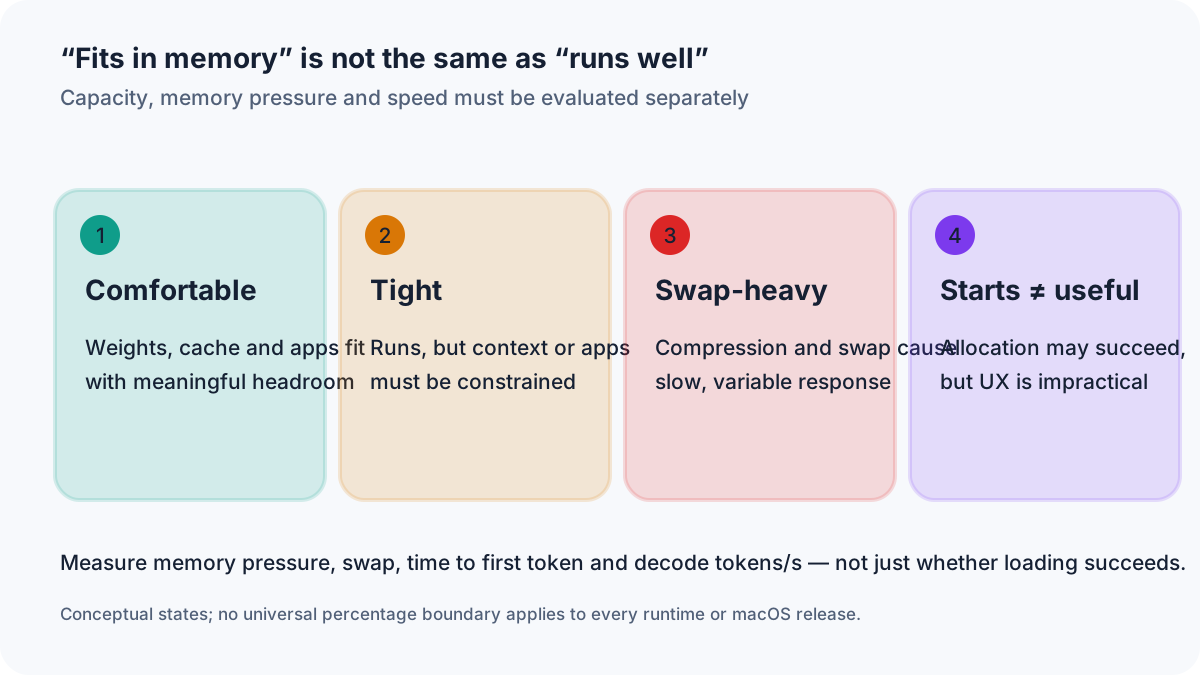
Figure 6: Successfully loading a model does not prove good usability.
Buying advice
Is 16GB enough for local LLMs?
Yes for 7B–8B Q4/Q5, normal chat and short coding prompts. No as a comfortable long-term choice for 14B+, RAG, long documents or heavy multitasking.
Is 24GB enough?
For many users, yes. It is a good 12B–14B tier and leaves more room for context. It is still restrictive for 32B models and large agent histories.
Why choose 32GB?
32GB is the most balanced general recommendation for a new Mac used for local AI. It supports a broader 20B–32B range and tolerates development tools much better than 24GB.
When do 48GB or 64GB pay off?
Choose 48GB for 32B models, larger contexts and parallel developer tools. Choose 64GB only after checking the specific 70B Q4 weights, KV cache and working headroom; 96GB is a more forgiving tier for recurring 70B use.
Who needs 96GB or 128GB?
Users running 70B at higher precision, 100B–120B Q4, 64k+ contexts, several services or multimodal pipelines. It is unnecessary for ordinary private chat.
More memory or a stronger chip?
Use this order:
- Define the largest normal model and context.
- Select enough memory for the complete working set plus headroom.
- Then choose the highest-bandwidth chip that fits the budget.
A lower-priced Mac with more memory is better when the faster alternative cannot fit the required model. A faster chip is better only after both machines clear the capacity requirement.
Suggested configurations by user type
- Students and first-time users: 24GB, or 32GB for coding and a longer ownership cycle.
- Software developers: 32–64GB.
- Serious local-AI users: 64–128GB.
- Research and very large local serving: 128–512GB.
Unified memory is not user-upgradeable on most current Macs, so buying exactly at today’s limit is risky.
Common misconceptions
“A 7B model needs 7GB.”
Parameter count is not byte count. A 7B model is roughly 14GB in FP16 and 3.5GB at ideal 4-bit, before overhead.
“4-bit is always exactly half the size of 8-bit.”
Only in the simplest equation. Real quant formats store scales and often mix tensor precisions.
“A 10GB model file needs 10GB of memory.”
The file does not include the complete live KV cache, runtime workspace and OS budget.
“The model can use all installed unified memory.”
No. The operating system and applications share it.
“Maximum context is always best.”
Large context increases cache memory, prompt-processing time and sometimes reduces effective answer quality.
“Swap completely solves low memory.”
It can prevent an immediate allocation failure but often makes interactive inference impractical.
“More parameters always produce better results.”
Training data, architecture, post-training, task fit and quantization quality matter.
“All Q4 models have equal quality and size.”
Q4 formats use different block structures and mixed-precision rules.
“If it loads, it runs well.”
Loading proves allocation, not good TTFT, throughput or stability.
“RAM alone determines tokens per second.”
Bandwidth, GPU, runtime, context and thermals also matter.
Practical checklist
- Confirm total and active parameter counts.
- Check the exact quantization and actual file size.
- Decide the context length needed for the real task.
- Estimate the KV cache from layers, KV heads and cache precision.
- Reserve runtime workspace.
- Leave memory for macOS and other applications.
- Find benchmarks for the exact Mac and runtime combination.
- Test a smaller quant and shorter context first.
- Watch memory pressure, compressed memory and swap in Activity Monitor.
- Record TTFT, prompt-processing rate and decode tokens per second separately.
Practical limits
- Use the real model file, not ideal 4-bit math, as the starting point.
- Long context can add tens of GiB through the KV cache.
- 24GB–32GB is the best broad entry tier; 64GB is a conditional starting point for selected 70B Q4 files with bounded context; some workloads need more.
- Capacity determines whether the workload is viable; bandwidth strongly influences speed.
- Plan roughly 20–30% operating margin for a new machine where possible.
A practical capacity test before upgrading
For a real buying decision, do not stop at the model’s nominal parameter count. Record the exact file size or memory-mapped weight allocation, your desired context length, KV-cache format, macOS memory pressure, and whether the runtime spills into swap. Compare first-token latency and sustained decoding on the actual Mac. A system that merely loads a model has not passed a useful workstation test.
Final recommendation
For most buyers who want useful local AI without moving into workstation pricing, choose 24GB or 32GB. Developers should treat 32GB as the baseline and consider 48GB or 64GB when 32B models, RAG or local agents are central. A 64GB Mac can run some 70B Q4 configurations with constrained context, but only after checking the specific GGUF/MLX file size, cache footprint and macOS headroom. 96GB or 128GB offers a more reliable planning margin for longer context and other applications.
At the top end, capacity must be paired with bandwidth. The current Mac Studio’s Ultra tier is the relevant single-machine platform for models that require hundreds of gigabytes. A 256GB configuration can still be too small for a real 405B Q4 file once the cache, runtime and macOS are included; 512GB is the appropriate planning tier.
Further reading
- Mac AI Matchmaker: calculate memory and compatible hardware
- The best open-weight LLMs for your Mac
- Set up Ollama on a Mac mini M4
- LM Studio vs. Ollama on Mac
- Compare all Mac hardware profiles
Sources
Frequently Asked Questions
How much RAM does a 7B LLM need on a Mac?
A 7B model is roughly 14GB in FP16, 7GB at 8-bit and 3.5GB at ideal 4-bit. Real Q4 files are larger, and the system also needs a KV cache and runtime memory. A 16GB Mac is the practical minimum.
How much RAM does a 13B or 14B model need?
A 14B model is 28GB in FP16, 14GB at 8-bit and 7GB at ideal 4-bit. For a real Q4/Q5 build, 24GB unified memory is a much safer target than 16GB.
Can a 70B model run on a Mac?
Possibly. A documented 70B Q4_K_M file is about 43.1GB, but total runtime memory also includes model metadata, KV cache, temporary buffers and macOS. Test the exact 70B build and chosen context; 64GB is not a general guarantee, and 96GB provides more headroom.
Is 16GB unified memory enough for Ollama?
Usually for 7B–8B Q4/Q5 models and moderate context. It becomes restrictive for 14B models, long documents, RAG and heavy developer tools.
Is 24GB enough for local AI?
Yes for many 12B–14B models and everyday local inference. Some 20B–24B Q4 models can run, but context and multitasking need to be controlled.
How much unified memory should a Mac have for local LLMs?
24GB–32GB is the best broad starting point. Choose 48GB–64GB for larger models and development. Choose 96GB–128GB for higher-precision 70B, long context or multiple models.
Why does an LLM use more memory than its model file?
The live process also allocates a KV cache, runtime buffers, temporary tensors and memory for macOS and other applications.
How much does a longer context window increase memory use?
For a conventional transformer, KV-cache storage grows approximately linearly with token count. In the large GQA example, the cache rises from about 2.5GiB at 8k to 20GiB at 64k.
What happens when unified memory is insufficient?
macOS may compress pages and use swap. The model may still launch, but first-token latency, generation speed and system responsiveness can deteriorate sharply. Allocation can also fail.
Can macOS use swap for local LLMs?
Yes, but storage-backed swap is not equivalent to unified memory. Frequent page movement produces slow and inconsistent inference.
What is better: more RAM or a faster Apple chip?
First buy enough memory for the target model and context with headroom. Once both choices fit the workload, the faster chip and higher memory bandwidth improve performance.
Can Mac unified memory be upgraded later?
On most current Apple-silicon Macs, unified memory is integrated into the package and cannot be upgraded after purchase.
Which quantization should I use on a Mac?
Q4 or Q5 is a common starting point. Q6 and Q8 use more memory but preserve more precision. Q2 and Q3 save memory at a potentially larger quality cost.
How can I check a local model's memory use?
Use the Memory tab in Activity Monitor to inspect memory pressure, app memory, compressed memory and swap. Runtime logs may also report weights, cache and offload allocations.
Do multimodal models need more RAM?
Usually. Vision or audio encoders, projectors, image tokens and extra workspaces add to the language-model allocation.
Do mixture-of-experts models need less RAM?
No. MoE models such as Gemma 4 26B A4B or Qwen 3.6 35B A3B activate only 3B–4B parameters per token, which reduces computation but does not guarantee faster inference. The full quantized expert weight set still needs to be accessible; plan for total parameters, context and runtime overhead.
Why do Gemma 4 and Qwen 3.6 need less memory for long context?
Most of their layers do not keep a full KV cache. Gemma 4 uses sliding-window layers and Qwen 3.6 uses Gated DeltaNet layers with a fixed-size state, so at 32K context they need about 2GB of cache instead of the 10GB a full-attention 70B model needs.
Is 32GB enough for local LLMs on a Mac?
For most users, yes: 32GB is the most balanced general recommendation for a new Mac used for local AI. It covers 20B–32B models at Q4 and leaves room for development tools; a 70B Q4 model needs the 64GB tier.