A model running locally keeps inference on the Mac only when cloud features are disabled and no plugin, extension or exposed local endpoint forwards data. Apple Intelligence is more integrated and can use Private Cloud Compute for complex requests; ChatGPT is a separate third-party path. PCC is not local inference. Since June 2026, Apple has described an expansion of its PCC architecture to Google Cloud/NVIDIA infrastructure under its own privacy and attestation design; that is not equivalent to calling the public Gemini API.123
Apple Intelligence as a system feature
On the Mac, Apple Intelligence combines system features such as Writing Tools, summaries, Siri improvements, Smart Reply, Shortcuts actions and optional ChatGPT access.1
At the model level, Apple describes a roughly 3B-parameter on-device foundation language model and a larger server model for Private Cloud Compute.1 Newer Apple Intelligence models are multilingual and multimodal, and Apple’s developer framework adds guided generation, constrained tool calling and LoRA adapter fine-tuning.4
For normal users, however, Apple Intelligence remains a curated system feature: you do not freely choose arbitrary open-weight models like you do in Ollama or LM Studio.567
Current U.S. system requirements (October 8, 2026):
- A compatible Apple Silicon Mac (not an Intel Mac).
- macOS 27 Golden Gate for the updated system features released September 2026. Previous macOS releases can keep older features, but do not necessarily offer the 27-only additions.
- Model storage is no longer a flat 7 GB: Apple lists up to 8 GB on several earlier supported Macs and up to 14 GB on M3-or-newer Macs with at least 12 GB of unified memory.
- Device and Siri language must match and be supported. Some new functions are English-only.
- Some server-backed features, including Siri AI and advanced photo editing, have daily usage caps; expanded paid access has been mentioned, but no single U.S. subscription price has been announced.89
United States: Siri AI beta has launched on supported devices
Checked October 8, 2026: Apple’s U.S. support page covers the current iOS 27, iPadOS 27 and macOS 27 generation. Siri AI beta began in English on supported devices with the September release. Feature availability still depends on the exact hardware, OS release, supported language and task. The EU iPhone/iPad restriction does not apply automatically to the United States; it should not appear in a U.S. availability table as a universal Siri limitation. Apple U.S. support.
A U.S. account, English prompt or American device does not guarantee that every Apple Intelligence request stays on-device or that any cloud processing is U.S.-only. Distinguish on-device processing, Private Cloud Compute and the optional ChatGPT extension.11011
Usage limits: included does not mean unlimited
Checked October 11, 2026: Apple says some server-based Apple Intelligence features have daily usage limits, specifically naming Siri AI, intelligent photo editing, Image Playground and AFM 3 Cloud models in Shortcuts. Limits can depend on the feature, request complexity, demand and policy. Apple’s U.S. support article does not publish one universal number of requests per day across all features.
Apple says expanded access will be offered for a fee in the future. That does not establish a paid Apple Intelligence tier that can already be purchased, or a verified U.S. dollar price. A connected ChatGPT subscription and separately billed model API are different products. If you need predictable throughput for an agent, don’t assume uncapped PCC usage; for local open-weight inference, the cost instead falls on hardware, energy and maintenance. Apple announcement, September 14, 2026.
Three Data Paths: On-Device, PCC, ChatGPT
Apple Intelligence has three different privacy paths:
1. On-device processing: Simple or supported tasks can run on your Mac. This path does not require server inference; the request can remain on the device.
2. Private Cloud Compute: For more complex requests, Apple can send relevant request data to attested PCC execution environments. Apple has announced a Google Cloud/NVIDIA extension alongside its original Apple-silicon infrastructure; that does not mean every PCC request already uses the extension. Apple says the data is used only for the request, not stored, not made available to Apple staff, and deleted after processing.10 PCC also uses attestation, OHTTP relay and target diffusion.212
3. ChatGPT integration: Some Apple Intelligence features can ask ChatGPT. This is separate from PCC. Apple says that, without an account, no Apple Account data is sent to OpenAI, the IP address is obscured from ChatGPT, and OpenAI must not store the request or use it to train its models. With a connected ChatGPT account, OpenAI’s account settings apply; Apple notes that requests, attachments and session history may then be logged and used to train or improve models under those settings.1113
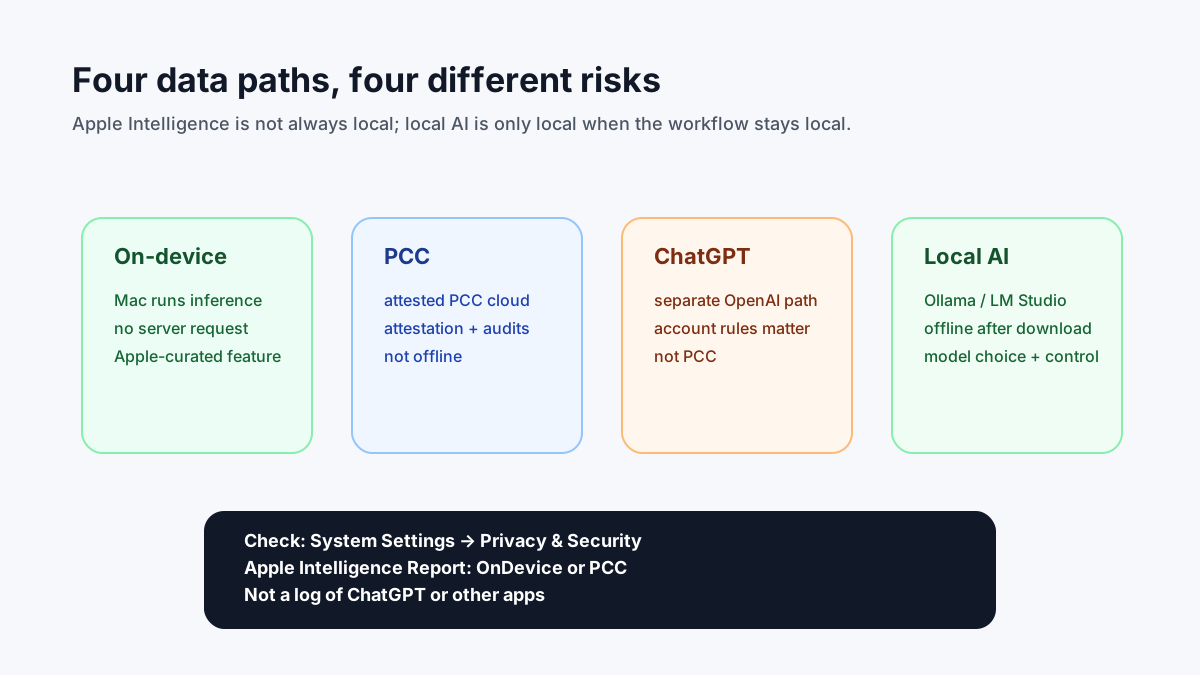
The diagram separates on-device processing, PCC, ChatGPT and local models by data path.
Check whether an Apple Intelligence request ran locally
On your Mac, open System Settings → Privacy & Security → Apple Intelligence Report. Select the past 15 minutes or 7 days, then export activity as Apple_Intelligence_Report.json.
Apple’s technical documentation distinguishes two sections: modelRequests includes Apple Intelligence model requests processed on-device or by Private Cloud Compute; privateCloudComputeRequests adds PCC-specific metadata, including attestation information. The export is not a transcript of prompts and responses. It covers the enabled reporting window, not every historical request, and does not audit all third-party apps or the separate ChatGPT extension. An empty PCC section therefore does not prove that an entire workflow stayed offline.14
Inspect the Apple Intelligence Report locally
Apple’s technical report appendix documents the modelRequests JSON array and its executionEnvironment values, OnDevice and PrivateCloudCompute. First export your activity from macOS System Settings, then use Terminal. Change the local file path if you saved it elsewhere:
python3 - "$HOME/Downloads/Apple_Intelligence_Report.json" <<'PY'
import json
import sys
from collections import Counter
from pathlib import Path

path = Path(sys.argv[1]).expanduser()
with path.open(encoding="utf-8") as handle:
    report = json.load(handle)
requests = report.get("modelRequests", [])
if not isinstance(requests, list):
    raise SystemExit("Invalid export: modelRequests is not a list.")
counts = Counter(
    str(item.get("executionEnvironment", "Unknown"))
    for item in requests if isinstance(item, dict)
)
print("On-device:", counts["OnDevice"])
print("Private Cloud Compute:", counts["PrivateCloudCompute"])
print("Other/missing values:", sum(counts.values()) - counts["OnDevice"] - counts["PrivateCloudCompute"])
print("Recorded model requests:", sum(counts.values()))
PY
Interpretation: These counts describe Apple Intelligence model requests in the report’s selected window, not a global usage percentage and not a complete network audit. Optional ChatGPT integration, Ollama, browser extensions and external apps are not all represented. A zero count may simply mean no relevant request was recorded. privateCloudComputeRequests holds PCC-related metadata and attestations, not a transcript of prompts.14
Privacy and format changes: This command reads the exported JSON locally and prints aggregated counts. The original report may include sensitive usage metadata; do not upload it blindly to third-party analyzers. Since macOS 26.4, Apple encodes attestation bundles as Base64 Protobuf rather than JSON. That changes some attestation-inspection workflows but does not affect this simple environment count.14
What Private Cloud Compute Protects — and What It Doesn’t
PCC processes requests in the cloud, but uses its own architecture rather than a standard cloud API. PCC uses several technical controls described in Apple’s security documentation:21215
- Attestation: Every PCC request is verified against a trusted, verified server build.
- Public Transparency Log: PCC transparency logs allow external reviewers to monitor the infrastructure.
- OHTTP Relay: Your IP address is not forwarded to PCC nodes.
- Target Diffusion: Requests are distributed across multiple nodes to obscure patterns.
- Published production images: Apple publishes parts of the PCC infrastructure as open source.
- Private Cloud Compute Virtual Research Environment: Researchers can independently audit parts of the PCC infrastructure.
- Security Bounty: Apple rewards PCC security research through a public bug bounty program.
On June 8, 2026, Apple announced a PCC extension to Google Cloud using NVIDIA GPUs, Intel TDX and Google’s Titan chip. The original Apple-silicon PCC infrastructure is supplemented, not automatically replaced. Apple’s security requirements remain its stated target, while its announcement described a gradual preview rollout, not completed coverage of every deployment.3
What PCC still cannot do: An individual user cannot fully inspect a specific request in real time. The architecture provides published audit paths, but it still requires trust in Apple.
Local AI and its data paths
Local AI means the model weights are on your Mac and inference runs on your CPU/GPU or the local Apple Silicon stack instead of a third-party inference API. With tools such as Ollama, LM Studio, llama.cpp and MLX, this can be fully offline after model download.567
Running a local model is not a complete privacy boundary. Downloads, cloud models, web search, browser extensions and network listeners can create additional data paths. For Ollama local-only mode, set "disable_ollama_cloud": true in ~/.ollama/server.json, restart the app and check for Ollama cloud disabled: true in its logs. OLLAMA_NO_CLOUD=1 is an alternative but must apply to the actual running server; a macOS GUI app requires environment setup with launchctl setenv. Disabling cloud also disables Ollama’s integrated web search.5
Start Ollama:
brew install ollama
ollama pull qwen3:4b
ollama run qwen3:4b
Privacy Matrix for Mac Users
| Criterion | Apple Intelligence on-device | Apple PCC | ChatGPT integration | Local AI local-only |
|---|---|---|---|---|
| Data leaves Mac? | No | Yes, relevant request data | Yes, to OpenAI | No, after model download |
| Who runs inference? | Your Mac | Attested PCC cloud (Apple silicon; Google/NVIDIA extension) | OpenAI | Your Mac |
| Offline? | Partly, feature-dependent | No | No | Yes, if model is downloaded |
| Model choice | Apple curated | Apple server model | OpenAI model, account-dependent | Broad (Ollama/LM Studio/MLX) |
| Verifiability | OS/device trust | Attestation, logs and VRE per Apple documentation | Depends on OpenAI/Apple terms | Depends on local setup |
| Sensitive documents | Good for light personal workflows | Cloud processing; see Apple’s privacy documentation | Only if acceptable under your policy | Suitable when truly local and the device is secured |
| Costs and limits | Included on eligible devices; some features have limits | Included where supported, with daily limits on some features; paid expanded access announced for the future | Depends on ChatGPT account and terms | No per-token charge; you pay for hardware, storage, electricity and maintenance |
Choose by actual data exposure
| Situation | Starting point | Decision criterion |
|---|---|---|
| Rewrite text inside Mail or Notes | Apple Intelligence | System integration matters more than selecting a model; check the report for on-device or PCC execution. |
| Process confidential records with no permitted server request | Downloaded local model | Test offline, disable cloud features and plugins, and inspect network connections. Apple Intelligence is not an unconditional offline guarantee when PCC may be used. |
| Build a script against a pinned model | Ollama, MLX or llama.cpp | Record model tag, context, quantization and API binding. A localhost endpoint does not prevent other tools from contacting external services. |
| Intentionally use ChatGPT from an Apple feature | Optional ChatGPT integration | This is a separate provider path, not PCC. Check account settings and data terms before sending material. |
For a self-managed runtime, use Ollama on Mac and LM Studio vs. Ollama. The unified-memory guide helps estimate capacity. The companion Apple Intelligence architecture guide covers model generations and the Foundation Models framework. Our focus here centers on verifiable data paths, contrasting operating-system routing with fully offline inference.
Checklist: Make Local AI Actually Private
- Download the model, then test it offline.
- Add
"disable_ollama_cloud": trueto~/.ollama/server.jsonwithout deleting other settings, then fully restart the Ollama macOS app. Alternatively setlaunchctl setenv OLLAMA_NO_CLOUD 1for the app and restart it, or launch a terminal-managed server withOLLAMA_NO_CLOUD=1 ollama serve. VerifyOllama cloud disabled: truein logs.5 - Keep Ollama/LM Studio bound to localhost unless you intentionally need LAN access.
- Do not expose port 11434 or LM Studio’s local server to the internet.
- Avoid browser extensions or editor plugins that forward prompts to cloud services.
- Use reputable model sources and avoid random unsigned model files.
- Remember that local chat histories, logs, RAG documents and backups can still contain sensitive data.
- Keep FileVault on and lock the device.
More info: Privacy Policy.
Match the tool to the data path
For integrated writing, Siri and system features, Apple Intelligence is convenient, but an individual request may run through PCC. The optional ChatGPT integration adds another provider path. For work that must stay offline, run a downloaded local model and check network access, plugins, model-server settings and local logs.
An Ollama service on localhost does not prove that its cloud features are disabled. Check your configuration using a non-sensitive test file first. With Apple Intelligence, use Apple’s documentation to understand which service may handle the request.153
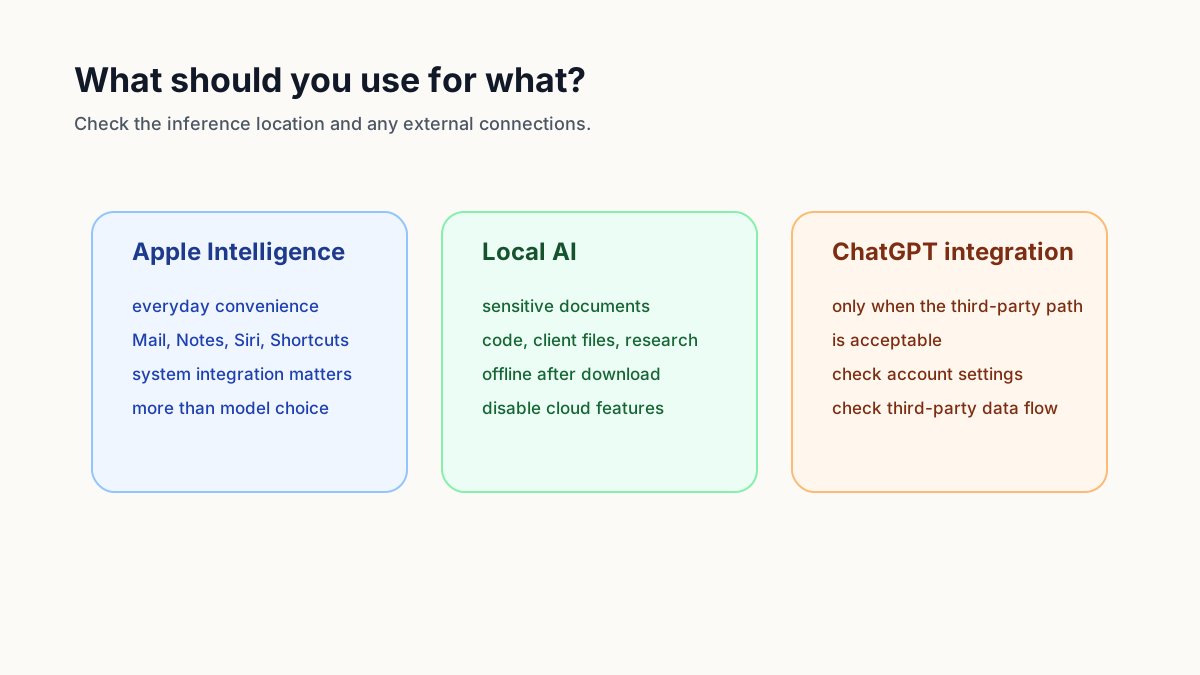
The diagram separates execution paths; it cannot certify the privacy of your complete workflow.
Sources
Footnotes
-
https://support.apple.com/guide/mac-help/apple-intelligence-and-privacy-mchlfc0d4779/mac ↩ ↩2 ↩3 ↩4 ↩5
-
https://security.apple.com/blog/private-cloud-compute ↩ ↩2 ↩3
-
https://machinelearning.apple.com/research/apple-foundation-models-tech-report-2025 ↩
-
https://github.com/ml-explore/mlx-examples/tree/main/lora ↩ ↩2
-
https://www.apple.com/legal/privacy/data/en/intelligence-engine ↩ ↩2
-
https://www.apple.com/legal/privacy/data/en/chatgpt-extension ↩ ↩2
-
https://help.openai.com/en/articles/9737562-how-your-data-is-handled-when-you-use-chatgpt-through-apples-integrations ↩
-
https://security.apple.com/documentation/private-cloud-compute/appendix_appleintelligencereport ↩ ↩2 ↩3
-
https://security.apple.com/documentation/private-cloud-compute ↩
Frequently Asked Questions
Do my Apple Intelligence data really stay local?
Apple Intelligence processes requests on device when possible. Complex requests can use Private Cloud Compute. The optional ChatGPT integration is a separate path to OpenAI. Within the selected reporting window, the Apple Intelligence Report can list both on-device and Private Cloud Compute model requests. It is not a complete log of ChatGPT activity or other apps.
How is Apple Intelligence different from Ollama on the Mac?
Apple Intelligence is tightly integrated into macOS/iOS (Siri, Writing Tools, image generation), but you cannot customize the model, configuration, or processing. Ollama gives you full control: model choice, quantization, local API and your own firewall. If you want privacy plus control, Ollama, LM Studio, or MLX is more flexible.
What is Apple Private Cloud Compute (PCC)?
PCC is a protected cloud execution path for selected Apple Intelligence requests. Apple built it first with Apple silicon and announced a Google Cloud/NVIDIA expansion in June 2026. Its design requires attestation, stateless processing and external inspectability. Apple does not publish a general percentage for how often PCC is used.
Are Apple Intelligence and ChatGPT on Mac the same thing?
No. Apple Intelligence uses on-device processing and PCC for certain requests. ChatGPT in Siri and Writing Tools is a separate optional integration. Processing and retention depend partly on whether you are signed in to ChatGPT and on your account settings.
When is Ollama more private than Apple Intelligence?
A fully offline local model avoids PCC and third-party APIs. Model weights can be stored locally, but license and transparency depend on the selected model. Cloud models, web search, plugins or an exposed local server can still create data paths.
Do I need an M-chip for Apple Intelligence?
Yes, Apple Intelligence only runs on Macs with Apple Silicon and on newer iPhones and iPads, according to Apple. The on-device model therefore requires a compatible Apple Silicon device. On Intel Macs, Apple Intelligence is not available; the path there leads to local models such as Ollama or LM Studio.
Is Apple Intelligence free and unlimited in the United States?
Not unlimited. Apple lists daily usage limits for certain server-based features, including Siri AI, Image Playground and AFM 3 Cloud models in Shortcuts. Apple says expanded access will be available for a fee in the future, but its published support article does not give one universal daily request quota or a currently available paid-access price.
Is Siri AI available on iPhone and Mac in the United States?
Apple rolled out the English-language Siri AI beta with the September 2026 OS releases on eligible U.S. devices. Exact availability depends on software, hardware and feature. The EU-specific iOS/iPadOS restriction is not a U.S. restriction.