DeepSeek V4 Pro vs Flash on Mac: API Costs, 1M Context and Cloud Reality
DeepSeek V4 Pro and Flash explained for Mac users: 1M context, API pricing, thinking modes, benchmarks, Ollama Cloud and why neither is a normal local Mac model.
DeepSeek V4 Pro vs Flash on Mac: API Costs, 1M Context and Cloud Reality
Quick answer: DeepSeek V4 Flash is the better starting point for most Mac users who want to test DeepSeek through the API, OpenRouter-style tooling or Ollama Cloud. It is much cheaper and gets close to Pro on several coding and reasoning results. DeepSeek V4 Pro is the stronger choice for difficult knowledge tasks, large codebases, long-context analysis and agent workflows where the higher cost is justified. But neither model is a normal local Mac model: on Apple Silicon, you realistically use them as API or cloud models, not like a 7B, 14B or 27B model in Ollama, LM Studio or MLX.
This is not a hype comparison. The useful question is: when is Flash enough, when is Pro worth it, and what does that mean for Mac users?
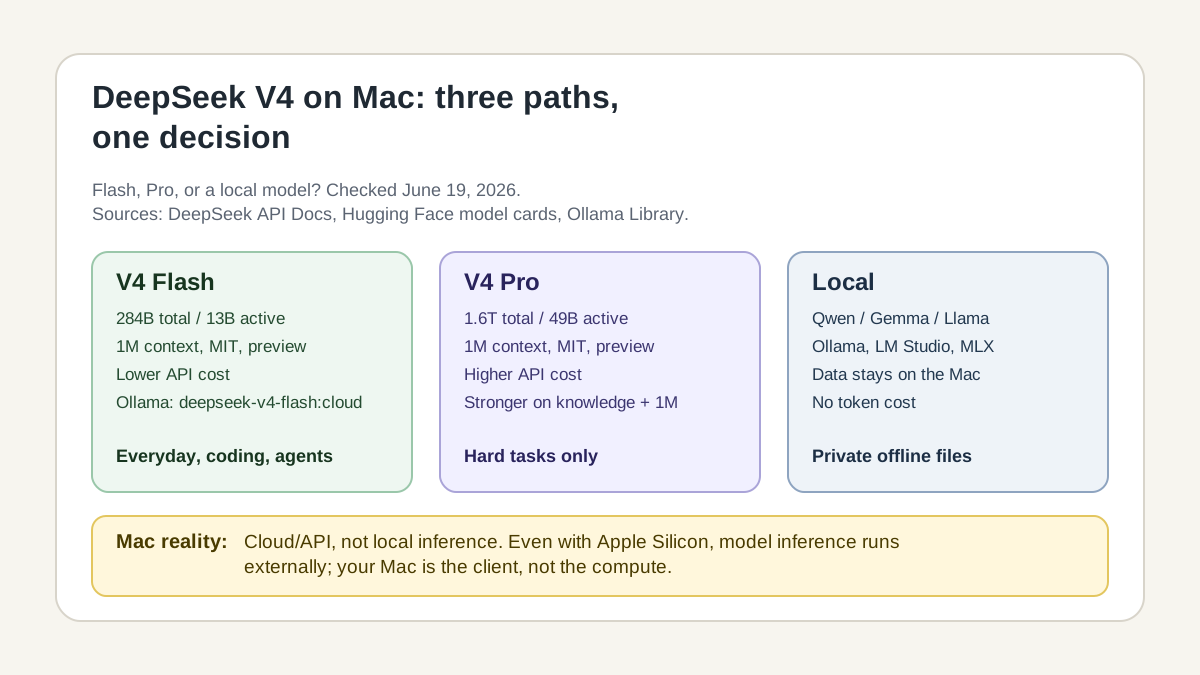
Graphic suggestion: a decision map with three paths: Flash for price/everyday/agent entry, Pro for hard long-context and knowledge work, local models for private offline work. Sources: DeepSeek API Docs, Hugging Face model cards, Ollama Library. Checked June 19, 2026.
Why DeepSeek V4 matters for Mac users
DeepSeek V4 is not interesting because it suddenly runs locally on every Mac. It does not. It matters because it combines three things that are useful for modern AI workflows:
- 1M context for long documents, large repositories and agent runs.
- Thinking and non-thinking modes for either fast answers or deeper reasoning.
- Very aggressive API pricing, especially for Flash.
That fits a Mac workflow well: you develop, write, research or organize locally on macOS, use smaller local models for private files and bring in DeepSeek V4 only when context, reasoning or agent behavior matters more than fully offline processing.
DeepSeek V4 in one sentence
DeepSeek V4 is a preview series of two large Mixture-of-Experts text models:
| Model | Total parameters | Active per token | Context | Role |
|---|---|---|---|---|
| DeepSeek V4 Flash | 284B | 13B | 1M | cheaper, faster, efficient entry point |
| DeepSeek V4 Pro | 1.6T | 49B | 1M | stronger for knowledge, long context, agents and hard coding |
Both are text models. They should not be presented as vision, audio or normal local Mac models.
Official facts
| Property | DeepSeek V4 Flash | DeepSeek V4 Pro |
|---|---|---|
| Release | April 24, 2026 | April 24, 2026 |
| Status | Preview | Preview |
| Model type | MoE text model | MoE text model |
| Total parameters | 284B | 1.6T |
| Active parameters per token | 13B | 49B |
| Context window | 1M tokens | 1M tokens |
| Max output in API docs | up to 384K tokens | up to 384K tokens |
| API model name | deepseek-v4-flash | deepseek-v4-pro |
| OpenAI-compatible API | yes | yes |
| Anthropic-compatible API | yes | yes |
| JSON output | yes | yes |
| Tool calls | yes | yes |
| FIM completion | non-thinking only | non-thinking only |
| Weight license | MIT | MIT |
| Normal local Mac use | no | no |
| Ollama use | deepseek-v4-flash:cloud | deepseek-v4-pro:cloud |
Important: deepseek-chat and deepseek-reasoner are transition names. DeepSeek currently maps them to V4 Flash: deepseek-chat corresponds to non-thinking mode and deepseek-reasoner to thinking mode. Both legacy names are scheduled for deprecation on July 24, 2026. New integrations should use deepseek-v4-flash or deepseek-v4-pro directly.
Three claims that should be visible in the article
“1M context is now the default across all official DeepSeek services.”
DeepSeek clearly positions V4 as a long-context model. That does not mean 1M context is always cheap, fast or useful.
“The thinking toggle defaults to enabled.”
Thinking is not just an optional add-on in DeepSeek V4. It is enabled by default and should be disabled deliberately when you need faster, cheaper answers.
“The model weights are licensed under the MIT License.”
That is strong for open research and infrastructure. But open weights do not mean “runs conveniently on a normal Mac.”
API pricing: Flash is the value choice
Checked June 19, 2026. Prices can change.
| Price per 1M tokens | V4 Flash | V4 Pro | Ratio |
|---|---|---|---|
| Input, cache hit | $0.0028 | $0.003625 | Pro about 1.3× higher |
| Input, cache miss | $0.14 | $0.435 | Pro about 3.1× higher |
| Output | $0.28 | $0.87 | Pro about 3.1× higher |
| Concurrency limit | 2500 | 500 | Flash is much higher |
The main cost rule is simple:
If you do not know that Pro solves your task better, start with Flash.
Pro becomes worthwhile when Flash shows real weaknesses: wrong conclusions over long contexts, poor browse/research results, unstable agent runs or too many bad decisions in a large codebase.
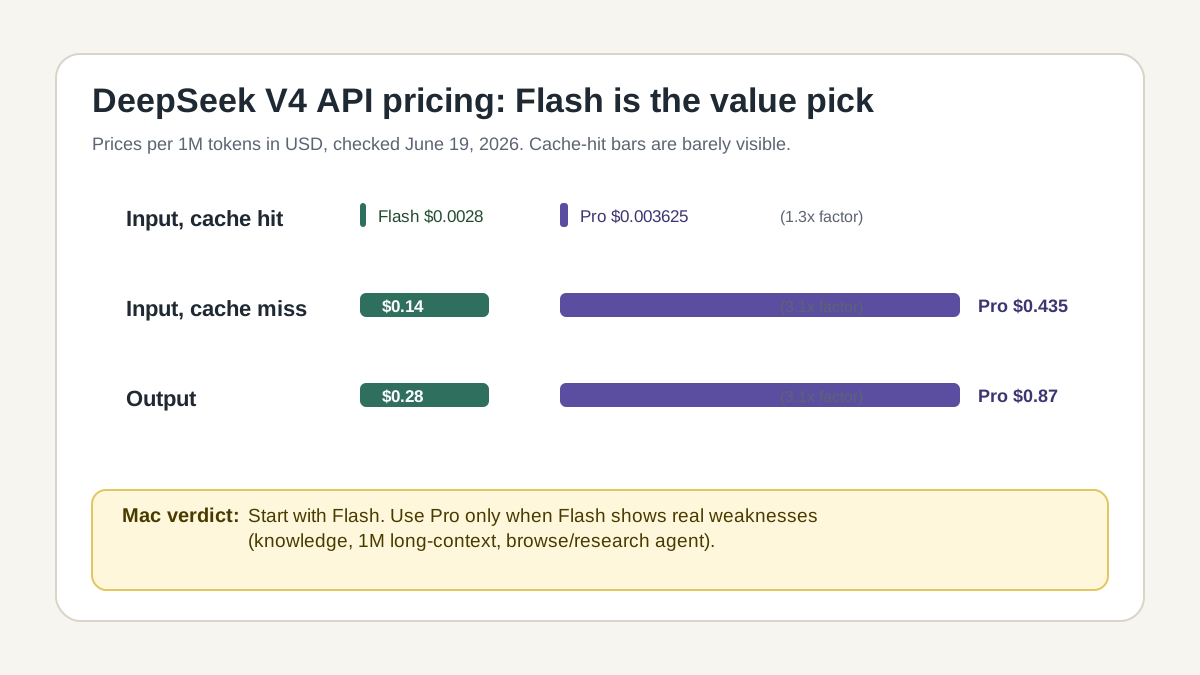
Graphic suggestion: bar chart for cache-hit input, cache-miss input and output. Add a small note: cache hits can change the cost profile dramatically.
Mini cost example: 200K input, 8K output
A small example makes the difference clearer than a price table alone.
| Scenario | Flash | Pro |
|---|---|---|
| 200K cache-miss input | about $0.028 | about $0.087 |
| 8K output | about $0.0022 | about $0.0070 |
| Total | about $0.030 | about $0.094 |
This example excludes tool calls, repeated agent steps, retries and cache hits. Long agent runs can widen the difference. For one important refactor, Pro may still be cheap enough. For many daily requests, Flash is much more sensible.
Benchmarks: vendor values, not our own Mac tests
The following numbers come from official DeepSeek/Hugging Face material. They are useful, but they are not ai-on-mac.com benchmarks. Do not compare them blindly with Claude, Gemini, Qwen or local Ollama values if setup, tool access, shot count, harness or reasoning mode differ.
Selected max-reasoning results
| Benchmark | Flash Max | Pro Max | What it suggests |
|---|---|---|---|
| LiveCodeBench | 91.6 | 93.5 | Flash is very close on this coding metric |
| SWE Verified | 79.0 | 80.6 | small gap in this setup |
| Terminal Bench 2.0 | 56.9 | 67.9 | Pro is much stronger for terminal/agent tasks |
| SimpleQA Verified | 34.1 | 57.9 | Pro is much stronger on factual knowledge |
| BrowseComp | 73.2 | 83.4 | Pro is stronger for browse/research tasks |
| MRCR 1M | 78.7 | 83.5 | Pro is better on 1M long-context work |
| CorpusQA 1M | 60.5 | 62.0 | Pro is only slightly ahead |
| HLE w/ tools | 45.1 | 48.2 | Pro is ahead, but not by a huge margin |
The broad claim “Flash is only 1–2 percent behind Pro” would be wrong. It is only true for some coding values such as LiveCodeBench or SWE Verified. On SimpleQA, BrowseComp and Terminal Bench, Pro is meaningfully stronger.
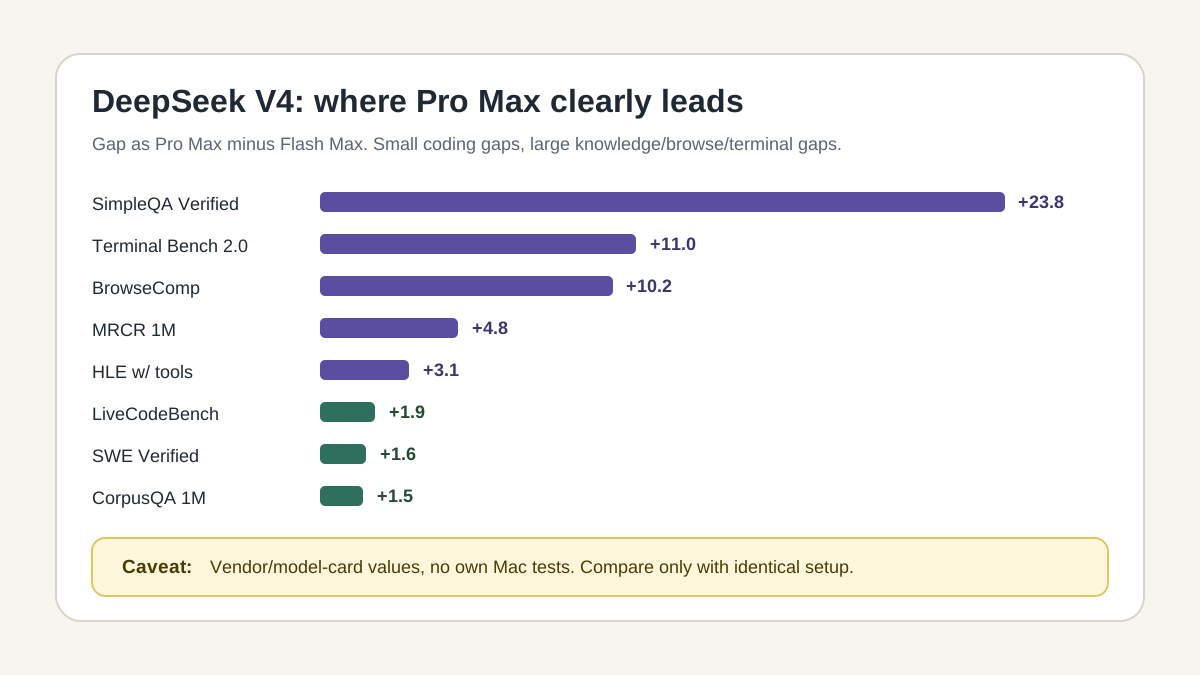
Graphic suggestion: horizontal bars showing Pro minus Flash. Mark small gaps for coding and larger gaps for knowledge/browse/terminal work.
Base models: Pro is not just a larger label
| Benchmark | Shots | V4 Flash Base | V4 Pro Base |
|---|---|---|---|
| MMLU | 5-shot | 88.7 | 90.1 |
| MMLU-Pro | 5-shot | 68.3 | 73.5 |
| SimpleQA verified | 25-shot | 30.1 | 55.2 |
| HumanEval | 0-shot | 69.5 | 76.8 |
| MATH | 4-shot | 57.4 | 64.5 |
| LongBench-V2 | 1-shot | 44.7 | 51.5 |
The direction is clear: Flash is efficient and strong, but Pro is not just a more expensive badge. The gap is especially relevant for knowledge and long-context tasks.
Thinking Mode: more is not automatically better
DeepSeek V4 can run in non-thinking mode or thinking mode. Thinking is enabled by default. Effort is controlled with reasoning_effort:
high: default for normal thinking requestsmax: for difficult tasks and some agent workflowslowandmedium: mapped tohighfor compatibilityxhigh: mapped tomax
In Thinking Mode, DeepSeek says temperature, top_p, presence_penalty and frequency_penalty have no effect. That matters because many users try to control reasoning models with temperature. Here, that is not the right lever.
OpenAI-compatible API example
import os
from openai import OpenAI

client = OpenAI(
    api_key=os.environ["DEEPSEEK_API_KEY"],
    base_url="https://api.deepseek.com",
)

response = client.chat.completions.create(
    model="deepseek-v4-flash",
    messages=[
        {
            "role": "user",
            "content": "Review this refactoring plan for risks and return only concrete objections."
        }
    ],
    reasoning_effort="high",
    extra_body={"thinking": {"type": "enabled"}},
)

print(response.choices[0].message.content)
Non-thinking for fast answers
response = client.chat.completions.create(
    model="deepseek-v4-flash",
    messages=[
        {
            "role": "user",
            "content": "Summarize these release notes in five bullet points."
        }
    ],
    extra_body={"thinking": {"type": "disabled"}},
)
Non-thinking is useful for summaries, simple rewrites, short classification and quick chat answers. Thinking is more useful for debugging, architecture decisions, hard math, tool use and agent chains.
Which variant should you use?
| Task | Recommendation | Why |
|---|---|---|
| short chat answers | Flash non-thinking | cheap, fast, sufficient |
| summaries | Flash non-thinking or high | depends on length and risk |
| coding questions | start with Flash High | good price/performance |
| difficult debugging | Flash High, then Pro High if needed | test cheaply first |
| large codebase | Pro High or Pro Max | stronger long-context and agent results |
| research/browse agent | Pro Max | BrowseComp gap is meaningful |
| factual knowledge | Pro | SimpleQA gap is large |
| many batch tasks | Flash | cost and concurrency favor Flash |
| private offline files | local models | data stays on the Mac |
| Mac experiment without cloud | local Qwen/Gemma/Llama | DeepSeek V4 is too large for that role |
Mac reality: Apple Silicon does not accelerate DeepSeek V4 through the API
When you use DeepSeek V4 through an API, your M1, M2, M3 or M4 is not doing the model inference. Your Mac is the client: it sends prompts, receives outputs and may run local tools. The model inference runs at DeepSeek, Ollama Cloud or another provider.
That is fine if you choose it deliberately. It becomes misleading when an article presents DeepSeek V4 like a normal local Ollama model.
Keep local and cloud workflows separate
| Workflow | Local? | Data flow | Recommendation |
|---|---|---|---|
ollama run llama3.2:3b | yes | on your Mac | good for private local work |
ollama run deepseek-v4-flash:cloud | no | Ollama Cloud | convenient, but cloud |
| DeepSeek API | no | DeepSeek API | good for coding, agents, 1M context |
| self-hosted server inference | theoretically | your own server | only with serious infrastructure |
| LM Studio/MLX on Mac | yes for smaller models | on your Mac | better for offline privacy |
Rule of thumb: Local is not the app interface. Local is where inference happens.
Ollama Cloud: convenient, but not local
Ollama lists DeepSeek V4 Flash and Pro with :cloud tags. That is convenient because the workflow looks like Ollama:
ollama run deepseek-v4-flash:cloudor:
ollama run deepseek-v4-pro:cloudBut this does not mean your Mac has loaded the weights. The local Ollama client starts the workflow, while the actual model inference runs in the cloud.
This should be obvious in the article, otherwise users get the wrong impression: “I am using Ollama, therefore it is local.” With :cloud, that is not true.
Privacy: DeepSeek V4 is not a replacement for local models
DeepSeek V4 can be technically strong. It is still a cloud/API workflow. For sensitive data, clarify the setup first:
- Are the data allowed to leave the Mac?
- Which API platform are you using?
- Which logging and retention rules apply?
- Are you using DeepSeek directly, Ollama Cloud, OpenRouter or another provider?
- Are tool outputs, files or terminal logs being sent?
- Are customer data, personal data or unpublished code involved?
For private notes, confidential documents, client files or unpublished code, local AI on Mac is often the better default. DeepSeek V4 is powerful, but not automatically more private than other cloud AI.
How I would use DeepSeek V4 on a Mac
A good workflow is hybrid:
- Use a local model for the first private pass — for example, a smaller Qwen, Gemma or Llama model through Ollama, LM Studio or MLX.
- Use Flash for cheap cloud escalation — when the local model is too weak or the context is too large.
- Use Pro only for the hard cases — large codebase, complex agent, difficult knowledge question or browse/research task.
- Do not upload sensitive raw data blindly — reduce, anonymize or use test data first.
- Measure cost per task — do not just look at token prices. Count real agent loops, retries, tool calls and output.
What the old comparison was missing
The previous article had many correct basic facts, but it read too much like a model sheet. For a better user experience, the article needs:
- a clearer quick answer at the top,
- a visible “Flash or Pro?” decision path,
- a cost example instead of only a pricing table,
- a stronger warning against false local Mac framing,
- benchmark gaps instead of a wall of numbers,
- a cloud/privacy matrix,
- code examples for thinking and non-thinking modes,
- better image/SVG placeholders,
- a clear source date in the bottom section.
FAQ
What is DeepSeek V4?
DeepSeek V4 is a preview series of two large MoE text models: DeepSeek V4 Flash and DeepSeek V4 Pro. Both support 1M context and thinking/non-thinking modes. Flash is cheaper and more efficient; Pro is stronger on difficult knowledge, agentic and long-context tasks.
What is the difference between Pro and Flash?
Flash has 284B total parameters and 13B active parameters per token. Pro has 1.6T total parameters and 49B active parameters per token. That makes Pro more expensive, but stronger on several hard benchmarks.
How much does DeepSeek V4 cost?
As of June 19, 2026, Flash costs $0.14 per 1M cache-miss input tokens and $0.28 per 1M output tokens on the official pricing page. Pro costs $0.435 per 1M cache-miss input tokens and $0.87 per 1M output tokens. Cache hits are much cheaper.
Does DeepSeek V4 run locally on Mac?
For normal Mac users, practically no. The weights are available, but the model sizes are too large for typical MacBook, Mac mini or Mac Studio setups. In Ollama, DeepSeek V4 Flash and Pro are available as cloud models.
Is DeepSeek V4 open source?
DeepSeek calls V4 open-sourced, and the model cards list the weights under the MIT license. For users, the more precise phrase is MIT-licensed open weights. That does not mean consumer hardware is enough for local inference.
Is Flash almost as good as Pro?
On some coding metrics, Flash is close to Pro. On knowledge, browse/research tasks, Terminal Bench and some long-context values, Pro is much stronger. Flash is not “basically the same”; it depends on the task.
When should I use Pro?
Use Pro when Flash fails on your actual task or when the task has high error cost: large codebase, difficult research, long-context analysis, complex agent run or knowledge tasks where accuracy matters.
When is local AI better?
Local AI is better for private files, offline work, reproducible experiments without token costs and workflows where data should not leave the Mac. DeepSeek V4 is better when 1M context and strong cloud reasoning matter more.
Bottom line
DeepSeek V4 Flash is the right starting point for most Mac users who want to test DeepSeek: cheaper, strong enough for many coding and agent tasks, and much more flexible than classic chat models because of the 1M context window.
DeepSeek V4 Pro is not necessary for every task. It is worth it where the official results show real advantages: knowledge, browse/research, terminal/agent tasks and difficult long-context analysis.
For ai-on-mac.com, the most important framing is clear: DeepSeek V4 is not a normal local Apple Silicon model. Use local models for private offline work. Use Flash as the cheap cloud escalation. Use Pro for tasks where one wrong answer costs more than the higher token price.
Sources and status
Checked June 19, 2026.
- DeepSeek V4 Preview Release: https://api-docs.deepseek.com/news/news260424
- DeepSeek Transparency Center: https://www.deepseek.com/en/transparency/
- DeepSeek API Models & Pricing: https://api-docs.deepseek.com/quick_start/pricing/
- DeepSeek Thinking Mode Docs: https://api-docs.deepseek.com/guides/thinking_mode
- DeepSeek-V4-Pro on Hugging Face: https://huggingface.co/deepseek-ai/DeepSeek-V4-Pro
- DeepSeek-V4-Flash on Hugging Face: https://huggingface.co/deepseek-ai/DeepSeek-V4-Flash
- Ollama DeepSeek V4 Flash: https://ollama.com/library/deepseek-v4-flash
- Ollama DeepSeek V4 Pro: https://ollama.com/library/deepseek-v4-pro
Frequently Asked Questions
What is the difference between DeepSeek V4 Pro and Flash?
DeepSeek V4 Pro is the larger model with 1.6T total parameters and 49B active parameters per token. Flash is smaller and cheaper with 284B total parameters and 13B active parameters. Both support 1M context and thinking/non-thinking modes, but Pro is stronger on difficult knowledge, long-context and agentic tasks.
How much does DeepSeek V4 cost?
As of June 19, 2026, the official DeepSeek pricing page lists Flash at $0.0028 per 1M cache-hit input tokens, $0.14 per 1M cache-miss input tokens and $0.28 per 1M output tokens. Pro costs $0.003625, $0.435 and $0.87. Prices can change.
Does DeepSeek V4 run locally on Mac?
For normal Mac users, practically no. The weights are available under the MIT license, but Pro and Flash are very large MoE models. In Ollama they are used as cloud models with the `:cloud` tag. That is convenient, but not local Apple Silicon inference.
Is DeepSeek V4 open source?
DeepSeek calls V4 open-sourced, and the Hugging Face model cards list the repository and model weights under the MIT license. For users, the cleaner phrase is MIT-licensed open weights. That does not automatically mean the model is easy to run on a normal Mac.
What is Thinking Mode in DeepSeek V4?
Thinking Mode is enabled by default in DeepSeek V4. In the API, thinking can be enabled or disabled, and `reasoning_effort` can be set to `high` or `max`. In Thinking Mode, parameters such as `temperature` or `top_p` have no effect according to DeepSeek's documentation.
Should I use Flash or Pro?
Flash is the best starting point for cost control, chat, many coding tasks and agent runs. Pro is worth it when long-context understanding, difficult knowledge tasks, browse/agent benchmarks or higher success rate matter more than price.