Important update — October 19, 2026: M2.7 is being retired. MiniMax has scheduled November 18, 2026 as the end of its hosted M2.5 and M2.7 model families. New customers lose access on October 19. From that date M Plan and Token Plan requests using M2.5/M2.7 names are automatically routed to M3.1 Flash; existing identifiers remain temporarily compatible and plan allowances remain unchanged. Existing pay-as-you-go customers can call the older MiniMax API models only until November 18. Downloaded open weights are not disabled by the cloud API retirement. M3.1 Flash has always-on reasoning, so regression-test tools and output budgets when switching. MiniMax’s official retirement notice and our updated M3.1 Flash release guide explain the distinction.
Newer version: This article covers MiniMax M2.7. The newer MiniMax M3.1 Flash is now available.
Sources checked October 12, 2026: MiniMax currently has separate official pages for M Plan (Go / Explore / Build) and Token Plan (Plus / Max / Ultra). The M Plan FAQ explicitly preserves existing Token Plan subscriptions, and the Token Plan page is still publicly accessible. Neither establishes new-purchase eligibility for every account. The M2.7 pay-as-you-go API is billed separately by tokens. USD list rates exclude applicable taxes; an Ollama cloud client is not local inference.
The three Mac access paths
MiniMax M2.7 targets coding, agent, and office workflows. On a Mac, three different access patterns need to be kept separate:
- MiniMax API: A standard pay-as-you-go API key bills hosted inference by tokens. A Subscription Key only covers models actually included in your plan; M2.7 is not explicitly named in the current M Plan model matrix.
- Ollama Cloud:
ollama run minimax-m2.7:clouduses Ollama as a local client while the computation runs in the cloud. - Self-hosted weights: Hugging Face lists M2.7 as an open-weight model and points to SGLang, vLLM, and Transformers. That does not amount to an officially tested Apple Silicon or MLX workflow.
The speed and benchmark figures below come from MiniMax; no independent tokens-per-second measurements on Apple Silicon are available.
What makes MiniMax M2.7 different
The official MiniMax pages and model card position M2.7 as an agentic model for complex productivity tasks. They mention Agent Teams, complex Skills, dynamic tool search, software engineering, and office documents. MiniMax model page M2.7 announcement
Context and speed
| Variant | Context window | Vendor-listed speed |
|---|---|---|
| MiniMax-M2.7 | 204,800 tokens total | approximately 60 output tokens/s |
| MiniMax-M2.7-highspeed | 204,800 tokens total | approximately 100 output tokens/s |
The API documentation explicitly says that the maximum token count refers to input and output combined. The speed figures are not measurements by this publication. API overview
How to read the benchmarks
MiniMax publishes the following results for M2.7, among others:
- SWE-Pro: 56.22%
- VIBE-Pro: 55.6%
- Terminal Bench 2: 57.0%
- SWE Multilingual: 76.5
- Multi SWE Bench: 52.7
- GDPval-AA: 1495 ELO
- MLE Bench Lite: 66.6% medal rate across 22 competitions
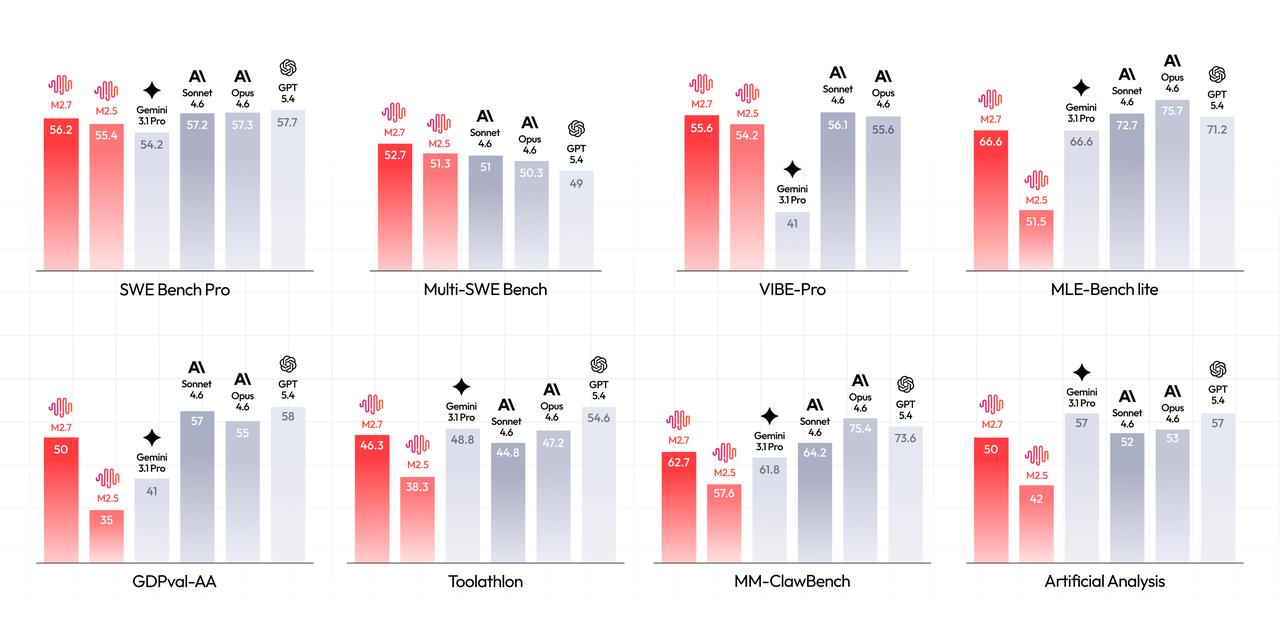
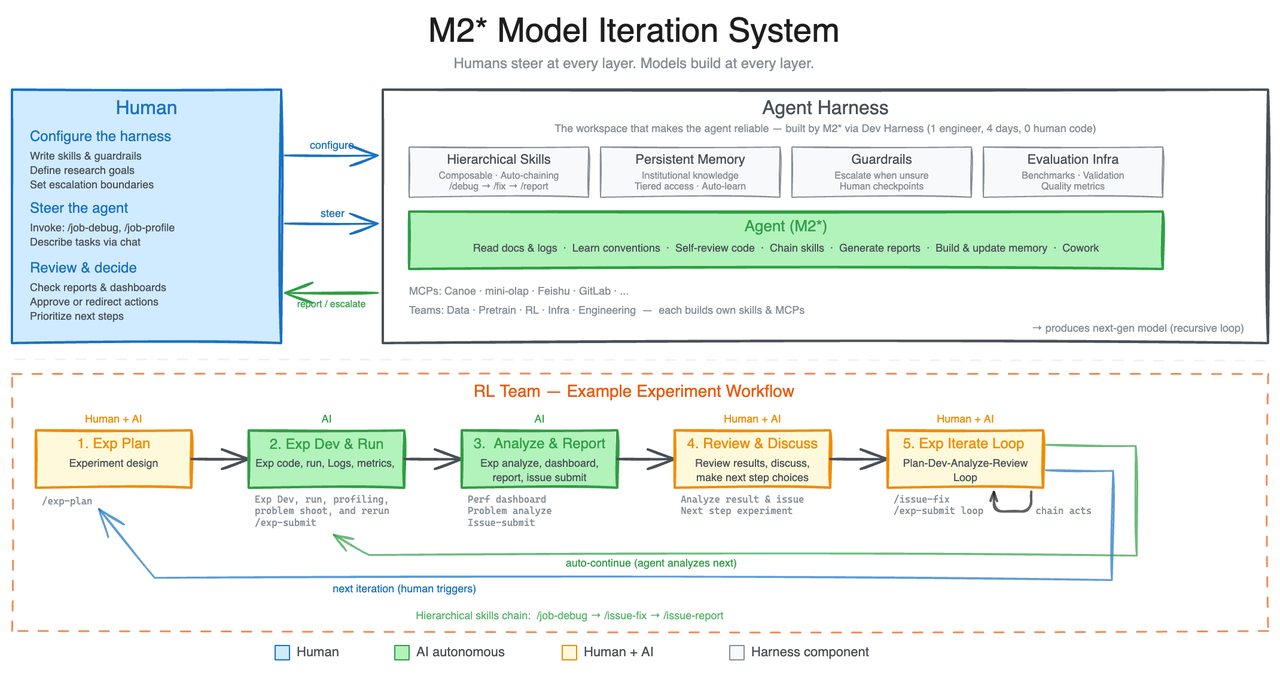
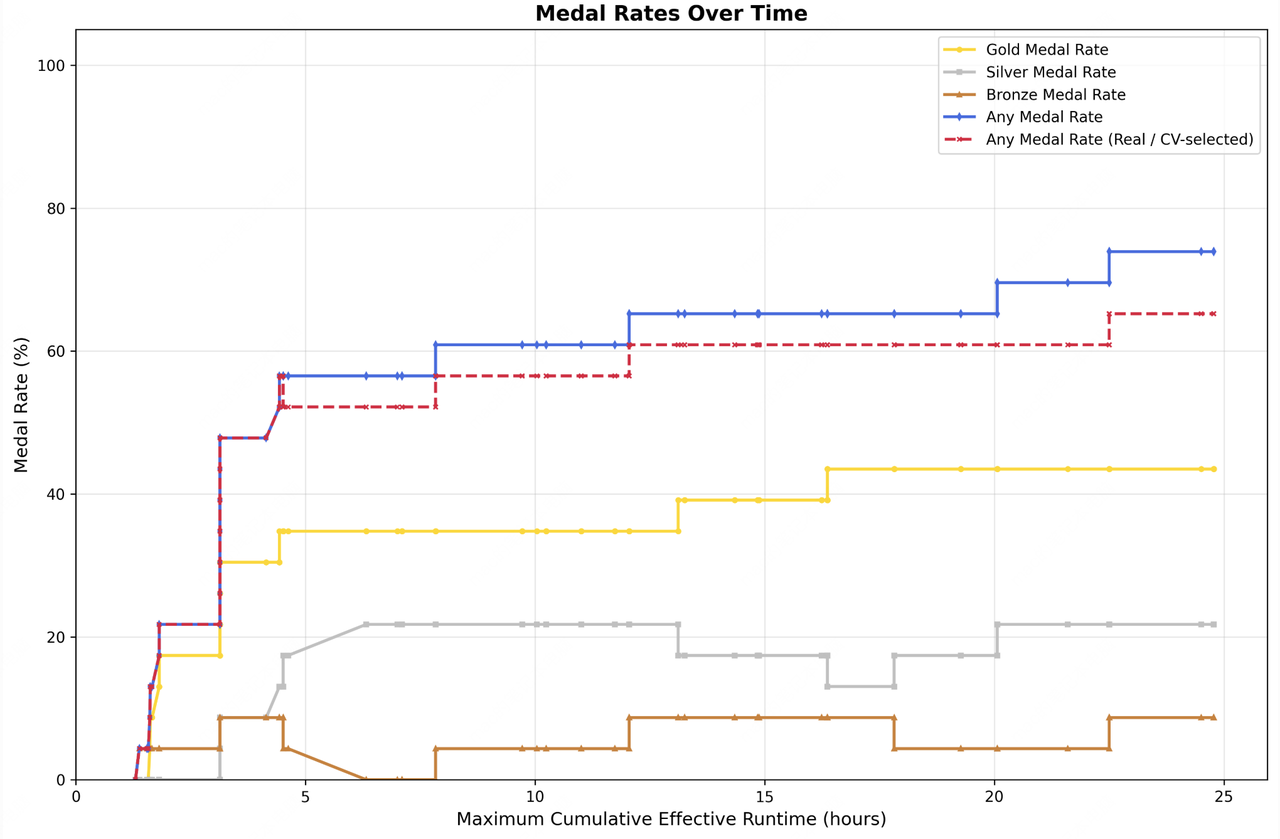
These are published vendor results. They show how MiniMax positions the model; they do not replace an independent test with your repository, agent harness, or Mac. MiniMax announcement Hugging Face model card
MiniMax also describes internal experiments in which M2.7 optimized a programming scaffold and worked with agent harnesses. Treat those statements as the manufacturer’s report, not as reproducible Mac experience. M2.7 announcement
Using MiniMax M2.7 on a Mac
1. API access
The current MiniMax developer guide documents https://api.minimax.io/v1/chat/completions for OpenAI-compatible calls. This sample uses a pay-as-you-go key and can incur token charges. Install python3 -m pip install requests and store MINIMAX_API_KEY in a secret environment variable. The script checks the key before making a request and prints only final content and token counters, not the full JSON response that may include reasoning:
import os
import requests

key = os.getenv("MINIMAX_API_KEY")
if not key:
    raise SystemExit("MINIMAX_API_KEY missing – no API request sent")

response = requests.post(
    "https://api.minimax.io/v1/chat/completions",
    headers={"Authorization": f"Bearer {key}"},
    json={
        "model": "MiniMax-M2.7",
        "messages": [{"role": "user", "content": "List three CSV parser regression tests."}],
        "max_tokens": 2048,
        "stream": False,
    },
    timeout=90,
)
response.raise_for_status()
data = response.json()
if not data.get("choices"):
    raise RuntimeError("API returned no choices")
print(data["choices"][0]["message"].get("content", ""))
usage = data.get("usage") or {}
print("Token counters:", {
    "input": usage.get("prompt_tokens"),
    "output": usage.get("completion_tokens"),
})
This is not an independent benchmark. A successful smoke test does not prove an agent fixes bugs reliably. Token counters alone do not identify billed caching; use account billing records for actual charges.
The API overview also lists HTTP, the Anthropic SDK, and the OpenAI SDK. A standard pay-as-you-go API key consumes your account balance. An M Plan Subscription Key spends eligible M Plan usage and then applicable credit packs, but not your pay-as-you-go balance. Use the correct key in your Mac agent. API overview
2. Ollama Cloud
Ollama lists M2.7 as minimax-m2.7:cloud:
ollama run minimax-m2.7:cloudThe :cloud suffix is the important part. Ollama is the local invocation or client; the model is not running as local Apple Silicon inference on the Mac. The Ollama page explicitly describes the access as commercially licensed cloud usage. Ollama Cloud listing
3. Self-hosted server
The Hugging Face model card provides weights and points to:
- SGLang
- vLLM
- Transformers
- ModelScope and an NVIDIA NIM endpoint as additional routes
The checked sources do not provide an official, tested MLX, llama.cpp, or Apple Silicon installation path for M2.7. The defensible Mac statement is therefore: cloud use is documented; local Mac execution remains a separate experiment whose hardware and runtime need validation. No specific RAM floor or Mac token rate is invented here. Hugging Face model card
MiniMax API pricing versus the new M Plan
Checked October 12, 2026 against MiniMax pricing, M Plan FAQ and the still-accessible Token Plan page: There are now three different billing paths to distinguish: pay-as-you-go API usage, M Plan with a Subscription Key, and a separately listed Token Plan (legacy subscriptions continue; verify new-purchase eligibility). Their rates and access terms are not interchangeable. MiniMax API pricing · M Plan docs.
Pay-as-you-go: M2.7, Highspeed, and M3
These are official USD API list rates per million tokens, not the cost of a Claude Code or MiniMax Code subscription.
| Model | Input | Output | Cache read | Cache write |
|---|---|---|---|---|
| MiniMax-M2.7 | $0.30 | $1.20 | $0.06 | $0.375 |
| MiniMax-M2.7-highspeed | $0.60 | $2.40 | $0.06 | $0.375 |
| MiniMax-M3 Standard, ≤512K input | $0.30 | $1.20 | $0.06 | see API docs |
| MiniMax-M3 Standard, >512K input | $0.60 | $2.40 | $0.12 | see API docs |
Worked API cost example (calculation, not a measured session): 2M uncached input tokens, 8M eligible cache-read tokens, 1M output tokens, plus 0.5M billed cache-write tokens cost 2 × $0.30 + 8 × $0.06 + 1 × $1.20 + 0.5 × $0.375 = $2.4675 at the published M2.7 API rates. If all 10M input tokens instead miss the cache, 10 × $0.30 + 1 × $1.20 = $4.20 before separate extras. This assumes the specified cache hits and writes actually occur; a new M Plan subscription cannot be priced by simply applying those API rates.


Correction to earlier guidance: M2.7 is not cheaper than standard M3 below the 512K-input threshold. Above that, M3 has higher rates. For M2.7, 500 RPM / 20 million TPM refers to the documented API tier, not to the M Plan subscription. Vendor speed claims are not measured Mac throughput. Pricing overview · Rate limits.
M Plan is not a discounted M2.7 API key
MiniMax promotes Go / Explore / Build on the M Plan overview while maintaining a separate Token Plan page with Plus / Max / Ultra. Existing Token Plan subscriptions can continue on their original terms if renewed, per the FAQ. Whether the displayed purchase options are actually available to a new account requires checkout verification. International M Plan monthly list prices:
| M Plan tier | Regular monthly USD list price | Relative shared usage |
|---|---|---|
| Go | $22 | 1× baseline |
| Explore | $55 | 3× Go |
| Build | $132 | 7.5× Go |


Model access needs an explicit check: The new M Plan model matrix names M3.1 Flash in all three tiers, and H3 video in Explore/Build, not Go. It does not explicitly list M2.7 among the included text models. Do not promise free M2.7 calls on a new M Plan Subscription Key without checking that model is eligible in your actual account. Existing Token Plan customers may have different M2.7 access.
Promotions are not recurring prices. An earlier short-lived first-month offer was advertised through October 14, 2026, but the cited FAQ does not itself guarantee eligibility, discounts or renewal cost. This guide uses regular list prices only; check your checkout for any temporary offer.
Token Plan vs M Plan: same vendor, different model eligibility
| Public page (Oct 12, 2026) | USD monthly list | Documented text coverage |
|---|---|---|
| M Plan Go / Explore / Build | $22 / $55 / $132 | M3.1 Flash; M2.7 not explicitly in this model matrix |
| Token Plan Plus / Max / Ultra | $20 / $50 / $120 | MiniMax explicitly names M3 and M2.7 on the Token Plan page |
| Pay-as-you-go M2.7 | token-based, not a monthly plan | M2.7 via standard API key; $0.30 / $1.20 per 1M uncached input/output tokens |
The Token Plan page remains visible with pricing and purchase controls. This is not proof that every new account is eligible to buy it. Check the model actually enabled, Subscription Key type and quota before subscribing. For Hermes integration with the newer preview, see the MiniMax M3.1 guide.
Usage windows, shared quotas and credits: what actually resets
MiniMax’s current M Plan FAQ specifies the following. These are not unlimited subscriptions, and the 1×/3×/7.5× marketing multipliers are not a fixed number of messages or autonomous agent runs:
- Text, image, audio and other non-video tasks: shared allowance with one 5-hour and one 7-day window; both start on first use and reset independently at their own end. A five-hour reset does not restore weekly usage.
- Video (Explore/Build): shares eligible subscription usage but is subject to the weekly window only, not the five-hour window. Video usually uses much more allowance than text.
- One allowance across compatible tools: calls from MiniMax Code, Claude Code, Codex, Hermes Agent and other supported tools count against the same subscription usage. More agents can exhaust it sooner.
- No rollover: unused allowance does not carry to another window or billing cycle. Credit packs can cover supported overflow automatically; they are valid for one year from purchase.
- Your pay-as-you-go balance is not silently charged by a Subscription Key. To spend that balance, you must actively use a standard API Key instead. Changing keys changes the billing route.
Check before and after an agent session:
mmx quota
# Or use the M Plan Subscription Key:
curl --fail-with-body -sS 'https://www.minimax.io/v1/token_plan/remains' \
  -H "Authorization: Bearer $MINIMAX_SUBSCRIPTION_KEY"
Test against your own quota/credits screen; this article has not accessed any subscriber account. MiniMax recommends pay-as-you-go for production because M Plan can throttle requests and is intended primarily for individual interactive use. Official M Plan FAQ.
United States: The prices above are USD list amounts, not necessarily sales-tax-inclusive checkout totals. An English prompt or U.S. billing address is not proof of U.S.-only inference; check region, data handling, storage and subprocessors when processing customer content.
M2.7 or M3?
MiniMax lists M3 as a standard cloud API model with up to 1,000,000 tokens of context. The newer M3.1 Flash is separately documented inside the M Plan; do not assume the same model ID, pay-as-you-go rate, or API access. M Plan. M2.7 remains in the API catalog but is not lower-priced than M3 under M3’s 512K input threshold: both list $0.30 input and $1.20 output per million tokens, while longer M3 inputs have a separate higher rate. API overview
For a new workflow, the task matters:
- M2.7: worth considering for its particular coding and agent behavior, or to retain a pinned existing integration; its API list rate does not undercut standard M3 below 512K input.
- M2.7-highspeed: worth considering when the higher vendor-listed speed justifies the premium.
- M3: worth checking when very long context, multimodality, or the current M-series flagship matters more than M2.7 pricing.
OpenRoom and Agent Teams
MiniMax released OpenRoom, a Web GUI demo that shows agent interaction in an interactive environment. It is a product or research demo, not evidence of local inference on Apple Silicon. The graphic and video embedded below illustrate the Agent Teams approach described by MiniMax. M2.7 announcement
*Visualization of Agent Teams in M2.7; the graphic is a vendor illustration, not an independent Mac test.*Privacy and the practical decision
With API and Ollama Cloud usage, code, prompts, and potentially files leave the Mac. Before using M2.7 in a production workflow, check at least:
- Which data your agent sends to the API or server-side tools.
- Whether the API key is supplied only through an environment variable or secret manager.
- Whether the actual billing path is pay-as-you-go, Subscription Key, or Credits.
- Whether a local model with a documented Apple Silicon path is better suited to private data.
For M2.7, the defensible short decision is: cloud first; local Mac use only as a specialist project that still needs validation.
Conclusion: Usable from the Mac — as a cloud model
MiniMax M2.7 works well on a Mac when “on Mac” means the local client, editor, or API workflow. In the standard setup, the model itself runs in MiniMax or Ollama Cloud. The official model card provides weights and server paths, but no tested Apple Silicon route. Compare pay-as-you-go, the new M Plan, and grandfathered Token Plan subscriptions separately. Token prices, membership keys, usage windows and model eligibility follow different rules.
Sources and review date
API rates, model eligibility and both subscription product pages checked October 12, 2026. No paid API calls or Mac inference tests were conducted for this update. Prices, limits, model catalogs, and product terms can change. Before paid use, re-check the linked original pages and your own MiniMax account.
Frequently Asked Questions
Is MiniMax M2.7 a local Mac model?
Not in the sense of an officially supported Apple Silicon workflow. MiniMax provides weights and server paths for SGLang, vLLM, and Transformers, but the checked sources do not document a tested MLX or Mac path. Ollama labels minimax-m2.7:cloud as a cloud model.
How large is the MiniMax M2.7 context window?
MiniMax's API documentation lists 204,800 tokens for MiniMax-M2.7 and MiniMax-M2.7-highspeed. This is the maximum combined input and output, not automatically 204,800 output tokens.
What is the difference between MiniMax-M2.7 and MiniMax-M2.7-highspeed?
MiniMax describes both variants as producing the same results. M2.7 is listed at roughly 60 output tokens per second, while M2.7-highspeed is listed at roughly 100 output tokens per second. The highspeed variant also has separate API pricing.
How much does MiniMax M2.7 cost?
M2.7 pay-as-you-go costs $0.30 input, $0.06 cache reads, $0.375 cache writes and $1.20 output per million tokens. The separate M Plan costs $22 Go, $55 Explore or $132 Build monthly. Its promoted text model is M3.1 Flash, so verify M2.7 eligibility for your subscription key before buying.