Updated October 9, 2026 against Ollama’s tag catalog and API documentation. Gemma 4 is an open model family from Google DeepMind with five sizes: E2B, E4B, 12B, 26B A4B and 31B. The largest variant does not fit every Mac. Unified memory, context, image/audio input and the number of applications running in parallel determine the fit.
Candidates by unified memory
| Mac | First candidate | Why |
|---|---|---|
| 8 GB | gemma4:e2b-it-q4_K_M | specific 4.6GB Q4 package; keep context short and close background apps |
| 16 GB | gemma4:e4b or gemma4:12b | Q4 can start, but keep context controlled, close large apps and expect little headroom |
| 24 GB | gemma4:12b | more headroom than 26B; suitable local starting point |
| 32 GB | gemma4:26b with bounded context | 18 GB package, MoE with 3.8B active parameters |
| 48 GB+ | gemma4:31b or 26b | 20 GB or 18 GB package, more room for context |
Ollama package size and actual memory use are not the same. KV cache, runtime, images, macOS and background applications add to the working set.
Current Ollama tags: the default points to changing builds
Ollama’s live Gemma 4 tag catalog, checked October 9, 2026, now groups some floating aliases into file-size ranges. Quoting a single static download size for gemma4:e2b or gemma4:e4b is therefore misleading. To reproduce a benchmark, record an explicit quantized tag and its digest.
| Tag / specific quantization | Listed download | Advertised model context | Ollama input |
|---|---|---|---|
gemma4:e2b (floating) | 4.6–7.5 GB | 128K | text, image |
gemma4:e2b-it-q4_K_M | 4.6 GB | 128K | text, image |
gemma4:e4b (floating) | 6.6–9.5 GB | 128K | text, image |
gemma4:e4b-it-q4_K_M | 6.6 GB | 128K | text, image |
gemma4:12b | 7.7–8.0 GB | 256K | text, image |
gemma4:26b (26B A4B MoE) | 16–19 GB | 256K | text, image |
gemma4:31b | 19–20 GB | 256K | text, image |
gemma4:e2b-mlx | 7.5 GB | 128K | text, image |
gemma4:e4b-mlx | 9.5 GB | 128K | text, image |
gemma4:12b-mlx | 7.7 GB | 256K | text, image |
Context figures are checkpoint ceilings, not Mac defaults. Actual usable context depends on the KV cache, available unified memory, and other running processes. Google describes audio support for selected Gemma 4 models, but these specific Ollama entries list text/image input; check a compatible runtime before advertising working audio input on macOS.
Install and start Gemma 4
# lighter starting point
ollama pull gemma4:e4b
ollama run gemma4:e4b

# 12B: a larger variant at a moderate package size
ollama pull gemma4:12b
ollama run gemma4:12b
For larger Macs:
ollama pull gemma4:26b
ollama run gemma4:26b

ollama pull gemma4:31b
ollama run gemma4:31b
An image can be passed through the Ollama app or a compatible client together with a question. The model does not make every frontend multimodal automatically; the client must support image input.
What Google documents about the variants
The current Google model card lists five sizes. The launch post gives a four-size overview and mentions native audio input for E2B and E4B; the current model card is therefore the source for the additional 12B detail.
Google’s model card describes:
- E2B and E4B as small models with 128K context;
- 12B and 31B as dense variants with 256K context;
- 26B A4B as an MoE model with 25.2B total and 3.8B active parameters;
- text and image processing across the family;
- native audio support on E2B, E4B and 12B;
- configurable thinking modes and native function-calling support.
The audio statement comes from Google. A model supporting audio does not automatically mean that the Ollama tag or your client accepts an audio file. Verify that connection separately.
Memory limits for 12B, 26B and 31B
gemma4:26b may start on a 24 GB Mac, but an 18 GB package leaves little room for the operating system, runtime and context. For a cautious local starting point, gemma4:12b is therefore the more defensible choice.
On 32 GB, 26B fits better with bounded context. 31B dense is listed at 20 GB and needs more free resources. Actual usability depends on context, image resolution, parallel applications and runtime.
Inspect the allocation after starting:
ollama psIf Ollama offloads part of the model to the CPU or macOS reports memory pressure, reduce context and close applications. A large model with a short context can be more useful than the same model at a nominal maximum context that constantly swaps or offloads.
Use thinking mode deliberately
Gemma 4 supports configurable thinking modes. More internal reasoning can help with mathematics, planning and complex coding, but it increases response time and token use. For short questions, a shorter mode is often a better user experience.
Thinking is not a quality guarantee. The relevant question is whether the extra compute reduces errors in your workflow. When comparing variants locally, keep mode, context and tasks consistent.
Gemma 4 versus Qwen3.6
Both families provide local Mac tags and multimodal variants. A blanket rule such as “Qwen for coding, Gemma for images” is too coarse. Compare:
- exact model tag and package size;
- image and audio support in the client;
- context and KV cache;
- license and data path;
- performance on your own task set.
Vendor benchmarks are useful signals, but they are not directly comparable without the same runtime, prompts and evaluation method. For a head-to-head comparison of both families, see the Gemma 4 vs. Qwen3.6 comparison, and the Gemma 4 12B article for the compact 12B rundown.
Reproducible 8GB/16GB Mac check
Start from a versioned quantization, not a floating model alias:
ollama pull gemma4:e2b-it-q4_K_M
ollama show gemma4:e2b-it-q4_K_M
ollama run gemma4:e2b-it-q4_K_M
Use a modest working context at first (for example 4K in your Ollama client). During the same prompt and image task, record the Ollama tag/digest, processing speed, response rate, and Activity Monitor → Memory pressure and swap. ollama ps can show loaded model placement, not the entire Mac’s actual memory pressure. To compare against a heavier model, hold context and prompt constant and run gemma4:12b separately.
A measurable Mac benchmark: Gemma 4 using Ollama’s local API
Download size is not a performance measurement. Ollama’s official Generate API reports output tokens and three distinct timing fields: load_duration, prompt_eval_duration, and eval_duration (all in nanoseconds). These let you calculate your own tokens per second rather than repeating unverified Mac benchmarks.
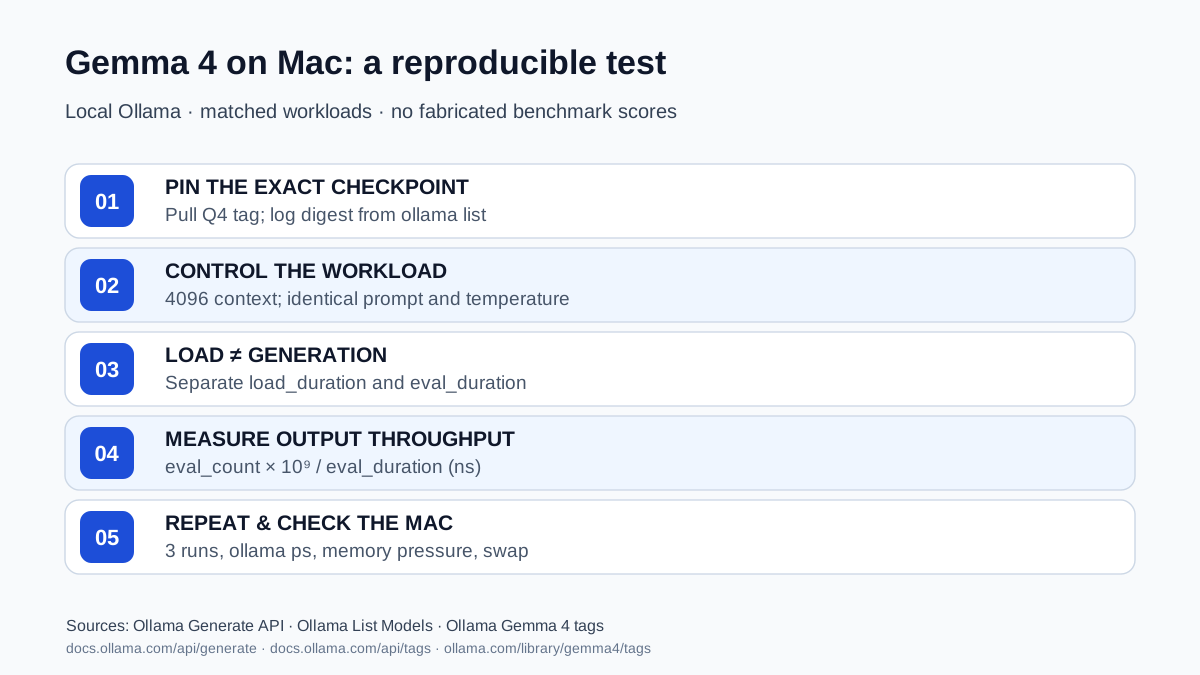
Repeatable protocol for an 8GB or 16GB Mac
- Freeze the model: pull
gemma4:e2b-it-q4_K_M, then record the actual local digest/model ID usingollama list. A readable tag can be updated over time. The Ollama tags catalog lists a 4.6GB download for this Q4 variant; that is not a promise of 4.6GB working RAM. - Hold context and tasks steady: start at
num_ctx: 4096; use the same benchmark prompts, temperature, and context settings across models. Temperature zero is not a guarantee of bit-for-bit deterministic responses. - Separate loading from generation: send a warm-up request, then measure additional identical runs. The first request may include model loading; log other running applications and macOS memory pressure.
- Repeat: collect at least three runs per model rather than reporting the fastest single response. Evaluate image input separately, and only when your client/runtime supports it.
Prerequisites: a running local Ollama instance and the pulled tag. The compact report below optionally requires jq (for example brew install jq). Requests go only to 127.0.0.1:11434. Run ollama pull gemma4:e2b-it-q4_K_M first if needed.
ollama list
ollama show gemma4:e2b-it-q4_K_M

# Save one complete local response with its official timing fields.
curl -fsS http://127.0.0.1:11434/api/generate \
  -H 'Content-Type: application/json' \
  -d '{"model":"gemma4:e2b-it-q4_K_M","prompt":"List three concrete reasons to review code.","stream":false,"options":{"num_ctx":4096,"temperature":0}}' \
  > gemma4-mac-test.json

# Optional: use jq to calculate output throughput.
jq '{model, load_seconds:(.load_duration / 1000000000), prompt_tokens:.prompt_eval_count, output_tokens:.eval_count, output_tokens_per_second:(if (.eval_duration // 0) > 0 then (.eval_count * 1000000000 / .eval_duration) else null end)}' gemma4-mac-test.json
ollama ps
Interpretation: eval_count / (eval_duration / 1,000,000,000) calculates generated output tokens per second. It does not include model load time or prompt processing. Use load_duration to distinguish cold starts, and prompt_eval_count to understand prefill work. Also inspect Activity Monitor → Memory for pressure and swap. The JSON file contains your prompt and model response; do not commit potentially private output to a public repository.
| What to record | Why |
|---|---|
| Apple chip, unified memory, macOS, Ollama version | Hardware/runtime conditions |
Model tag and digest from ollama list | Precise checkpoint identification |
num_ctx, temperature, prompt and modality | Comparable workload |
load_duration, prompt_eval_duration, eval_duration | Separate load, prefill and generation |
eval_count, tokens/sec, three repeated runs | Measurement, not guessed speed |
ollama ps, memory pressure and swap | Real-world usability beyond download size |
Scope: These commands form a reproducible measurement protocol, not a benchmark result reported by this site. They do not establish that a Mac will handle the model’s entire advertised 128K/256K context window or that all clients accept audio and images. Local model inference avoids per-request cloud API charges but still uses energy and hardware resources.
Test Gemma 4 on your Mac
A reproducible local comparison should record:
- Mac model and unified memory;
- macOS and Ollama versions;
- tag and backend, including MLX or QAT;
- context and image resolution;
- response time and tokens per second;
- CPU/GPU split from
ollama ps; - memory pressure during a realistic task.
Practical choice
The five model sizes cover several local Mac memory tiers. E2B/E4B are the small options; 12B can be tested in Q4 on 16 GB with controlled context and has more headroom at 24 GB; 26B A4B fits a planned 32 GB setup and 31B needs more headroom.
Start with the smallest tag that meets the task. Increase model size or context one variable at a time and check ollama ps after each change. This bases the choice on the tested tag and the Mac’s memory limit.
Sources
- Google Gemma 4 Model Card — sizes, modalities, context, architecture and benchmarks.
- Google: Gemma 4 — positioning and license.
- Ollama: Gemma 4 — current tags, package sizes and context values.
- Ollama: List local models — names, digests and quantization.
- Ollama: Generate API —
stream:false, nanosecond timing fields, token counts.
Frequently Asked Questions
Which Gemma 4 variant fits a 24 GB Mac?
`gemma4:12b` is the cautious starting point with more headroom. `gemma4:26b` has an 18 GB package and leaves little room after macOS, runtime and context.
Can Gemma 4 process audio?
Google lists native audio support for E2B, E4B and 12B. Whether your specific Ollama tag or client accepts audio files still needs checking; the tag listing primarily shows text and image.
What is 26B A4B in Gemma 4?
A MoE model with 25.2 billion total parameters, of which about 3.8 billion are active per token. More efficient than a dense 31B, but not memory free — the package is still around 18 GB.
Should I always enable thinking mode?
No. More internal reasoning helps with math, planning and complex coding, but costs compute time and tokens. For short questions a lean mode is often the better choice.
How do I compare Gemma 4 with Qwen3.6 sensibly?
Not with blanket slogans but with the same tag, the same runtime, the same prompts and your own tasks. Vendor benchmarks are not directly comparable without identical conditions.