macOS 27 Golden Gate draws a hard line through Apple’s Mac transition: no Intel Mac can install the new operating system. Macs with Apple silicon, starting with M1, are supported. If your Mac’s About screen says Intel, macOS 27 is not in your upgrade path. macOS 27 was released on September 14, 2026. Apple’s compatibility list covers seven Mac families including the A18 Pro-based MacBook Neo. Siri AI started its separate English-language beta rollout on the same date.
That is not the same as your Intel Mac suddenly becoming unusable. It will continue to run the version of macOS already installed. But it will no longer receive a new major macOS release, and the gap between Intel and Apple silicon will become much more visible.
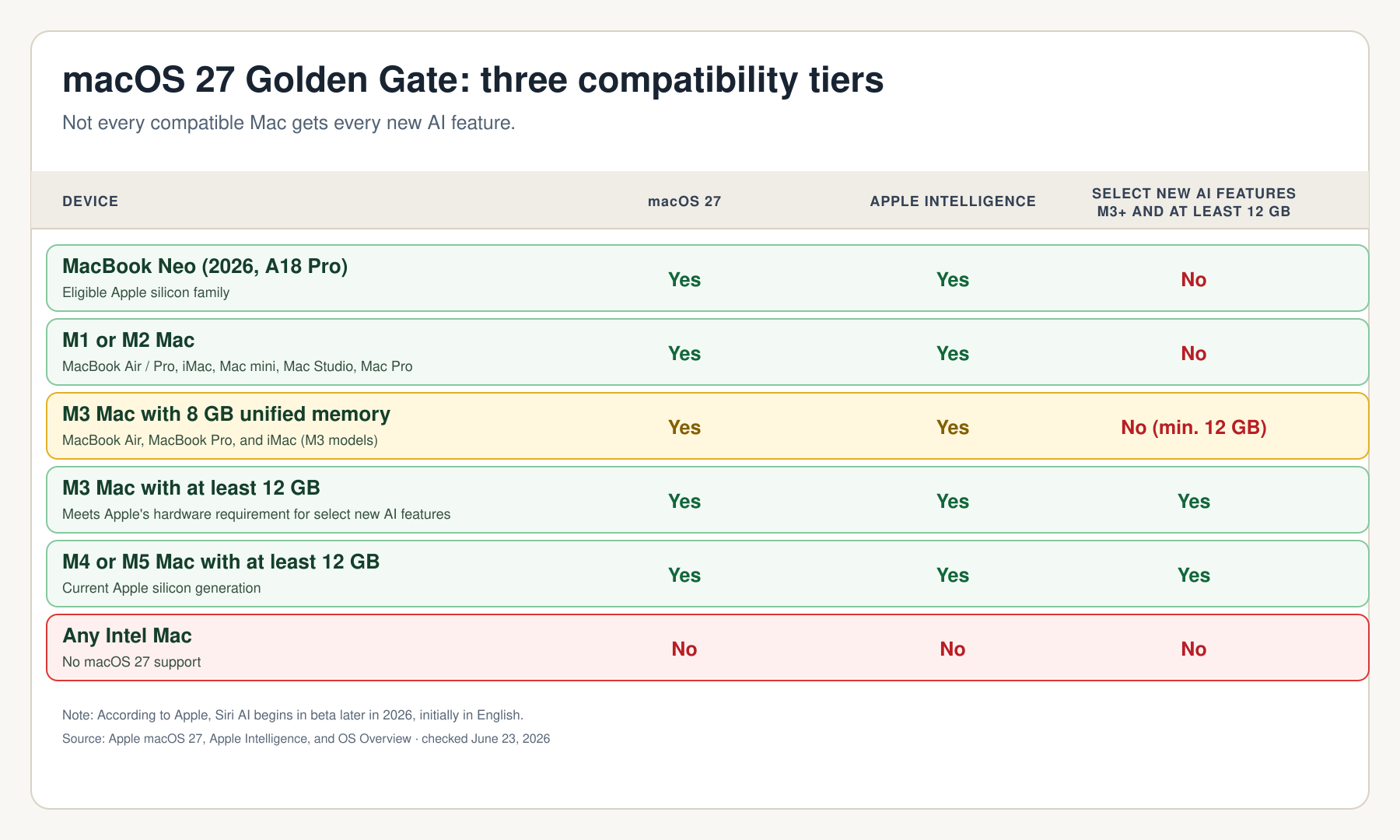
Two hardware thresholds matter here: Siri AI is not an M3-only feature. Apple lists Apple Intelligence on Macs from M1 onward. The M3 plus 12GB unified-memory requirement applies to specific new features, including Siri voice customization and improved Dictation, rather than the complete Siri AI experience.
The two hardware thresholds:
Intel Mac: no macOS 27.
Apple silicon from M1: macOS 27 supported.
M1 and M2: Apple Intelligence and Siri AI supported, with limits on some new extras.
M3 with 8GB: macOS 27 and Siri AI supported, but not every M3-and-12GB feature.
Which Macs support macOS 27 Golden Gate?
Apple’s official list contains seven supported Mac families. The processor matters more than the year alone, especially for 2020 models that were sold in both Intel and Apple-silicon versions.
| Mac family | macOS 27 supported? | What to watch for |
|---|---|---|
| MacBook Neo (2026) | Yes | Uses A18 Pro rather than an M-series chip |
| MacBook Air with Apple silicon (2020 and later) | Yes | The first compatible Air is the M1 model |
| MacBook Pro with Apple silicon (2020 and later) | Yes | Some 2020 MacBook Pros are Intel machines |
| iMac with Apple silicon (2021 and later) | Yes | Intel iMacs are excluded |
| Mac mini with Apple silicon (2020 and later) | Yes | The 2020 mini was sold with both Intel and M1 |
| Mac Studio (2022 and later) | Yes | Every Mac Studio generation qualifies |
| Mac Pro with Apple silicon (2023) | Yes | The Intel Mac Pro from 2019 is excluded |
| Any Intel Mac | No | macOS 27 will not be offered |
Apple’s list includes Apple-silicon Macs and the A18 Pro-based MacBook Neo. It does not make an exception for an Intel MacBook Pro, iMac, Mac mini, iMac Pro, or Mac Pro.
How to check your Mac in under a minute
- Open the Apple menu in the top-left corner.
- Choose About This Mac.
- Look for the chip or processor entry.
- An entry such as Apple M1, Apple M2, Apple M3, or newer means your Mac supports macOS 27.
- An Intel processor means it does not.
- Note the memory amount too. Some new AI features require at least 12GB of unified memory.
Do not rely on the model year alone. A 2020 MacBook Pro or Mac mini can be either Intel or Apple silicon, and only the Apple-silicon model qualifies.
What macOS 27 means for Intel Mac owners
No macOS 27 upgrade does not mean an Intel Mac turns off, loses its files, or stops launching its existing applications. It means the Mac is no longer part of Apple’s next major macOS generation.
The practical consequences are more gradual:
- New macOS 27 features, including the next generation of Apple Intelligence, stay out of reach.
- New applications and major app updates may increasingly expect Apple silicon.
- Older drivers, plug-ins, and specialist software deserve more attention before your next Mac purchase.
- Your upgrade decision should be based on the work you actually need the Mac to do, not on fear alone.
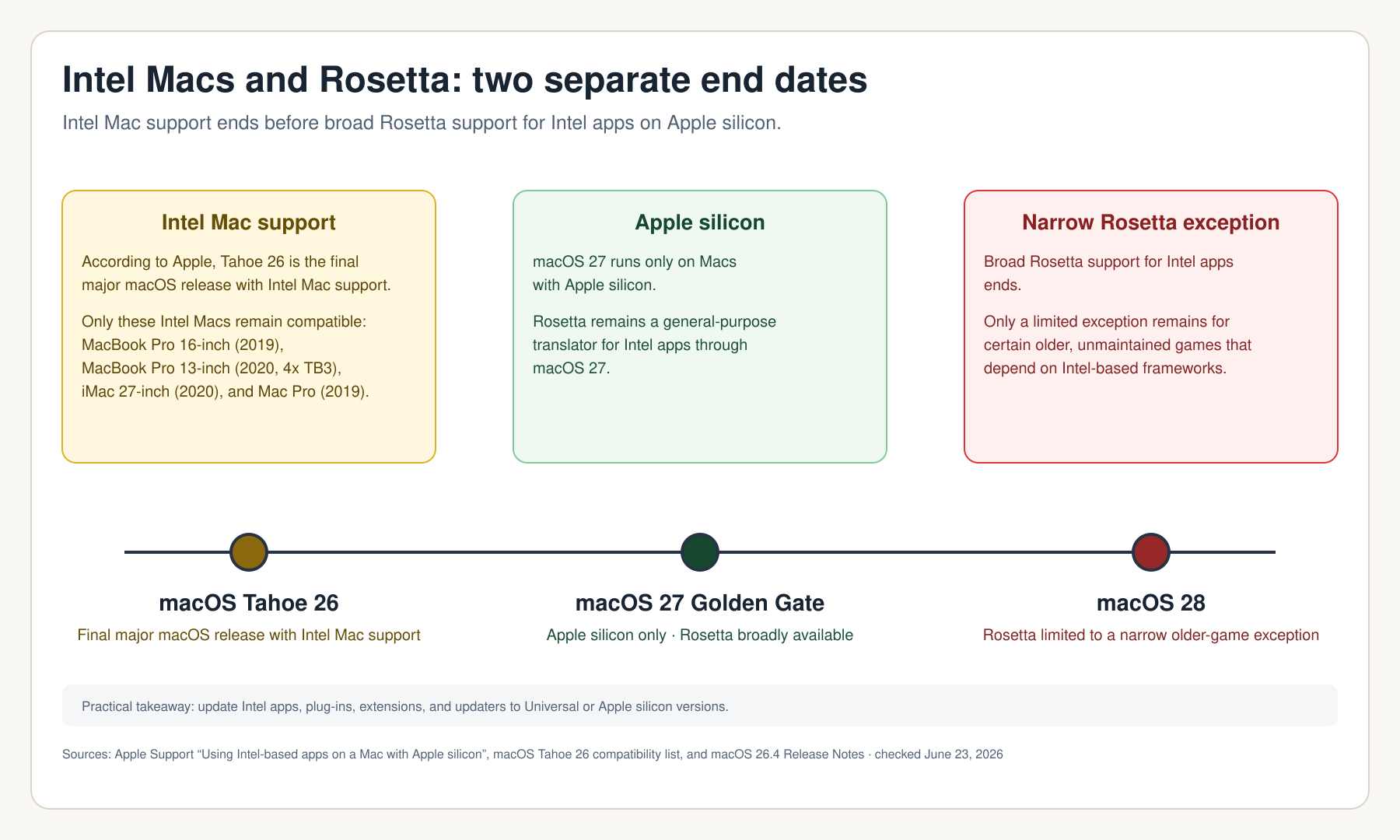
Apple had already identified macOS Tahoe 26 as the final major macOS release for Intel Macs. Golden Gate is the completed transition, not a sudden reversal.
Intel Macs versus Intel apps: two separate transitions
An Intel Mac is a computer built around an Intel processor. It cannot run macOS 27.
An Intel app is older software compiled for Intel processors. That app can still run on an Apple-silicon Mac through Rosetta 2, provided the application is compatible.
Apple’s Tahoe 26.4 release notes say that Rosetta support for apps will end after macOS 27. The macOS 27 beta notes add that Intel-based software will no longer be compatible with macOS 28, except for legacy games.
That matters most to people who rely on old audio plug-ins, printer software, hardware utilities, specialist scientific tools, or abandoned creative applications. Before moving from an Intel Mac to Apple silicon, make an inventory of the apps and plug-ins you cannot replace.
Siri AI on Mac: what is actually new?
Golden Gate is more than a compatibility update. Apple is turning Siri into a conversational, context-aware assistant integrated into Spotlight and system context menus on the Mac.
Apple’s announced capabilities include:
- Natural conversations: Ask follow-up questions without restarting from scratch.
- Personal context: Find relevant information in messages, mail, notes, and photos when Siri AI is permitted to access it.
- Onscreen awareness: Use a screenshot as context for a question, search, or action.
- App actions: Work across supported apps to find information, prepare content, or carry out actions.
- A dedicated Siri app: Continue and revisit conversations across Apple devices.
The distinction matters. This is not just a redesigned Siri animation. It is a broader assistant layer that can use personal context, screen content, and web knowledge. Siri AI began its English-language beta rollout September 14, 2026, inside the released operating system. Language coverage and features still vary; the OS itself is no longer a developer beta.
Is Siri AI available in the EU on Mac?
Yes, according to Apple’s current announcement, Mac and Apple Vision Pro users in the EU can access Siri AI with a supported language enabled.
Apple separately says that Siri AI will not initially be available in the EU on iOS, iPadOS, and watchOS. That restriction should not be copied over to Macs. For Mac users in Germany, France, Italy, or elsewhere in the EU, the practical issue at launch is language support: Apple says Siri AI begins in English.
Does Siri AI require M3 and 12GB of memory?
No. That claim is too broad.
Apple lists Apple Intelligence on Macs with M1 and later, as well as on MacBook Neo with A18 Pro. Siri AI requires an Apple-Intelligence-enabled device and a supported language.
Apple does specify an M3-plus-12GB threshold for selected features:
| Feature | Mac requirement |
|---|---|
| macOS 27 Golden Gate | Supported Apple-silicon Mac family |
| Apple Intelligence | M1 or later, plus MacBook Neo with A18 Pro |
| Siri AI beta | Apple-Intelligence-enabled Mac and supported language |
| Siri voice customization, including expressivity and pace | M3 or later with at least 12GB unified memory |
| Improved Dictation with a new on-device model | M3 or later with at least 12GB unified memory |
This creates a more nuanced picture than an “M1 and M2 are excluded” headline:
- An M1 Mac can run Golden Gate and use the core Apple Intelligence and Siri AI experience.
- An M2 Mac is in the same position.
- An M3 Mac with 8GB can run Golden Gate and Siri AI, but does not meet Apple’s stated 12GB requirement for those selected features.
- An M3 Mac with 16GB clears both the chip and memory threshold.
- An M1 or M2 Mac with 16GB or 24GB has more memory for everyday work and local AI, but does not satisfy a feature requirement that explicitly starts at M3.
Why unified memory matters
On Apple silicon, CPU, GPU, and Neural Engine share one pool of memory. Apple calls this unified memory. The company is therefore setting a combined hardware condition for the selected advanced features: the right chip generation and enough shared memory.
This is also a useful reminder for buying decisions. The chip label alone does not answer every compatibility question. An M3 Mac with 8GB and an M3 Mac with 16GB can receive a different set of features.
M1, M2, and M3: what your Mac receives
| Your Mac | macOS 27 | Apple Intelligence and Siri AI | Siri voice customization and improved Dictation |
|---|---|---|---|
| Intel Mac | No | No | No |
| M1 | Yes | Yes | No |
| M2 | Yes | Yes | No |
| M3 with 8GB | Yes | Yes | No |
| M3 with at least 12GB | Yes | Yes | Yes |
| M4 or M5 with at least 12GB | Yes | Yes | Yes |
| MacBook Neo with A18 Pro | Yes | Yes | Not covered by Apple’s M3-Mac requirement |
This is a requirements chart, not a performance ranking. An M1 or M2 Mac can remain perfectly capable for many workflows. The newest hardware matters most when you need the specific advanced AI features, extra memory headroom, or demanding local AI workloads.
Should you replace an Intel Mac because of macOS 27?
Not automatically.
Replacing an Intel Mac makes sense when one or more of these are true:
- You need current macOS features or Apple Intelligence features unavailable on Intel.
- Essential apps, drivers, or tools are beginning to drop Intel support.
- Battery health, storage, performance, or repair needs already make the computer a poor fit.
- You want to run local AI models, work with media, or develop software in ways that now exceed the Mac’s limits.
It is less urgent when your Intel Mac has one stable job, the software you need still works, and Golden Gate’s features do not solve a problem you actually have.
For M1 and M2 owners, the story is much calmer. Golden Gate and the core Siri AI experience remain available. Replacing an otherwise good Mac solely for Siri voice controls or improved Dictation rarely justifies the cost.
Before installing macOS 27
macOS 27 is a public release, not a developer beta. Check the chip via Apple menu → About This Mac, then use System Settings → General → Software Update. Check the official Apple compatibility list.
- Make a fresh Time Machine backup and save irreplaceable work to a second location.
- Verify VPN software, audio plug-ins, printer drivers and Intel apps that rely on Rosetta.
- Confirm disk space and any organization’s update policy before upgrading.
- Check vendor support for critical applications. A supported Mac does not automatically mean every third-party app works.
- Siri AI began as an English-language beta on September 14. Its language rollout is separate from availability of the released macOS 27 OS.
Feature compatibility by Mac generation
macOS 27 Golden Gate ends the road for Intel Macs, but it does not abandon every older Apple-silicon Mac. M1 and M2 owners remain inside the supported platform and receive the core Apple Intelligence and Siri AI experience.
The important new split is within the Apple-silicon lineup. Some new features require M3 or later and at least 12GB of unified memory. Check both values before assuming a newer Mac gets every AI feature.
For the simple question, “Can I install macOS 27?”, check the chip. For the harder question, “Which new AI features will I actually receive?”, check the memory too.
What Apple Intelligence handles locally and where cloud models come in is covered in the Apple Intelligence comparison, and memory limits in the unified memory guide.
Sources and update policy
Updated October 8, 2026 following the September 14 public release. Siri AI remains a separately rolling out beta feature; Apple’s live compatibility documentation determines eligible Macs.
-
Apple: macOS 27 Golden Gate – features, timing, and compatible Macs
https://www.apple.com/os/macos/ -
Apple: Apple Intelligence and Siri AI – compatible devices and feature requirements
https://www.apple.com/apple-intelligence/ -
Apple Newsroom: Siri AI announcement and EU availability on Mac
https://www.apple.com/newsroom/2026/06/apple-introduces-siri-ai-a-profoundly-more-capable-and-personal-assistant/ -
Apple Developer: macOS Tahoe 26 as the final major Intel-Mac release and Rosetta transition
https://developer.apple.com/documentation/macos-release-notes/macos-26_4-release-notes -
Apple Developer: Intel software compatibility notes for macOS 28
https://developer.apple.com/documentation/macos-release-notes/macos-27-release-notes -
Apple Support: finding your Mac model and serial number
https://support.apple.com/en-us/102767
Frequently Asked Questions
Does macOS 27 run on a 2020 MacBook Pro?
Only if that MacBook Pro has Apple silicon. A 2020 Intel MacBook Pro is not supported.
Does an M1 Mac get Siri AI?
Yes. Apple lists Apple Intelligence on Macs with M1 and later, and Siri AI requires an Apple-Intelligence-enabled device. Some selected new features remain unavailable.
Do I need M3 for Apple Intelligence?
No. Apple Intelligence is available on M1 and later Macs. M3 plus 12GB unified memory applies to selected features, not the full Apple Intelligence platform.
Does an M3 Mac with 8GB get every new AI feature?
No. Apple requires at least 12GB of unified memory for the listed Siri voice and improved Dictation features.
Is Siri AI available on Macs in the EU?
Apple says Mac users in the EU can use Siri AI with a supported language. Siri AI begins in English, while other languages may arrive later.
When will macOS 27 Golden Gate be released?
macOS 27 Golden Gate was released on September 14, 2026. Siri AI began rolling out in English beta on the same day, with more languages following separately. Apple publishes a current supported-Mac list.
Does macOS 27 support Intel Macs?
No. macOS 27 Golden Gate is not offered for any Intel Mac. Apple's list covers Apple-silicon Macs from the 2020 M1 models onward plus the A18 Pro-based MacBook Neo.
Will an Intel Mac stop working after macOS 27?
No. It keeps running the macOS version already installed, but it no longer receives a new major macOS release.