Local Vision LLMs on Mac: Which Models Are Actually Worth It?
Gemma 3, Qwen2.5-VL, Llama 3.2 Vision, and Moondream compared on Apple Silicon: OCR, screenshots, documents, benchmarks, RAM, and solid prompts.
Local vision LLMs on a Mac are useful when you want to analyse screenshots, receipts, diagrams, or photos without uploading every image to a cloud service. They are not magic, though: some models read text well, others describe scenes well, and small models can look impressive at first while quietly failing on details.
The short recommendation: Gemma 3 12B is the best all-rounder for most Mac users. Qwen2.5-VL 7B is the better choice for OCR, documents, tables, and layouts. Llama 3.2 Vision 11B is strong, but not always the most natural pick for German-language image dialogues. Moondream is interesting when your Mac has little RAM or you only need simple image questions.
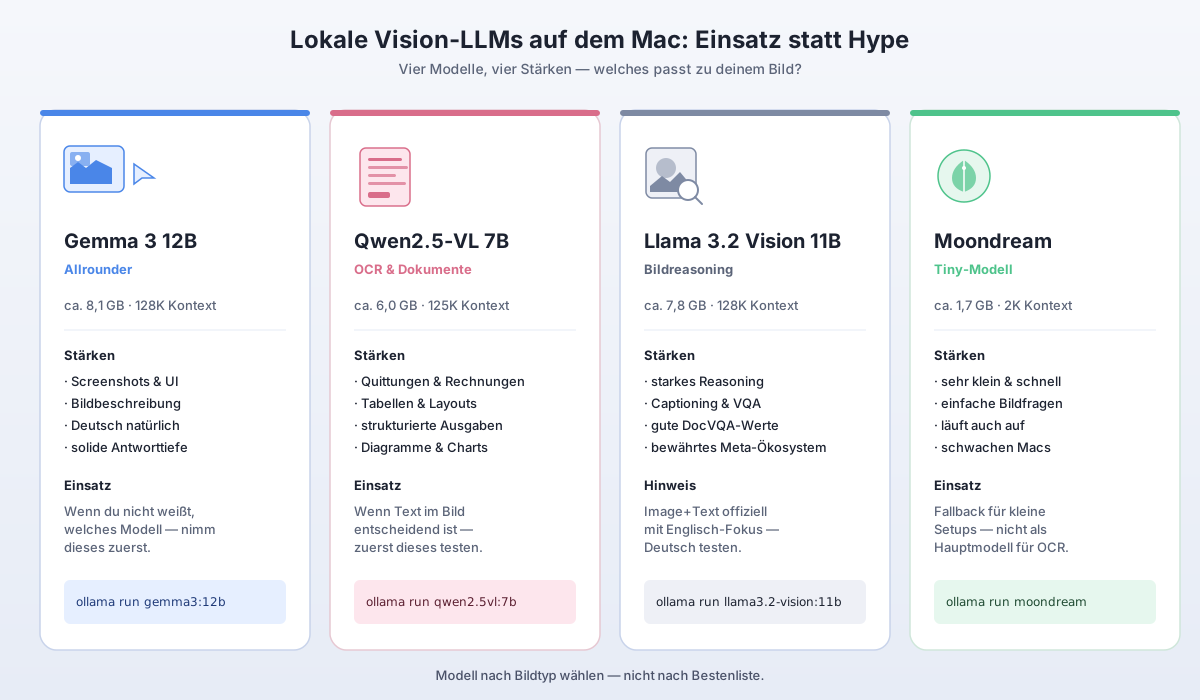
Quick decision: which vision model for which purpose?
| You want to … | Start with | Why |
|---|---|---|
| Get screenshots explained | Gemma 3 12B | good mix of image understanding, language quality, and model size |
| Get German answers | Gemma 3 12B | Gemma 3 is multilingual and usually answers more naturally in German |
| Read receipts, invoices, tables | Qwen2.5-VL 7B | strong with text, layouts, documents, and structured output |
| Analyse diagrams and UI elements | Qwen2.5-VL 7B or Llama 3.2 Vision 11B | both work for visual analysis; Qwen is often better at text in images |
| Run on a small Mac with little RAM | Moondream | very small, but noticeably less capable |
| Get a solid all-round local stack | Gemma 3 12B | good compromise between quality, size, and everyday usefulness |
If you only want to install one model, pick Gemma 3 12B. If you often scan documents or pull text out of images, add Qwen2.5-VL 7B. If Ollama is not set up yet, start with the Ollama setup guide for Apple Silicon.
What local vision LLMs can really do
A vision LLM does not only receive text, it also receives an image. With Ollama you can pass a file and a question to a vision model. Typical tasks are:
- describe a screenshot
- find UI errors
- summarise text from images
- loosely structure receipts
- explain diagrams
- search photos by visible objects
- write alt text for images
- get learning material explained from screenshots
This is especially useful when you do not want to upload private images, university material, or internal screenshots to a cloud provider. You still have to verify the results. Vision LLMs can confuse text, misread numbers, or produce confident answers from blurry images.
The most important models at a glance
| Model | Ollama size | Context (Ollama) | Strengths | Limits |
|---|---|---|---|---|
| Gemma 3 12B | ~8.1 GB | 128K | all-rounder, German, screenshots, image description | not specialised on OCR |
| Qwen2.5-VL 7B | ~6.0 GB | 125K | OCR, documents, tables, layouts, structured output | answers can feel more technical |
| Llama 3.2 Vision 11B | ~7.8 GB | 128K | image reasoning, captioning, VQA | image+text officially English-focused |
| Moondream | ~1.7 GB | 2K | small, fast to start, simple questions | limited context, less reliable on details |
Important: the download size is not the full RAM footprint at runtime. For vision tasks you also need to budget image processing, context, KV cache, and macOS overhead. A model with an 8 GB download can noticeably occupy more unified memory in practice.
My recommendation by Mac configuration
8 GB unified memory
On 8 GB Macs I would only use vision LLMs very carefully. Moondream is the most realistic option. It fits simple questions like “What is on this image?” or “Which UI elements do you see?”. For OCR, long answers, or multiple images the setup quickly hits its limits.
Recommendation:
ollama pull moondream
ollama run moondream ./screenshot.png "Briefly describe what is on this screenshot."
16 GB unified memory
With 16 GB it gets interesting. Qwen2.5-VL 7B and Gemma 3 12B can run depending on the rest of your system load, but do not expect wonders. Browser, IDE, Docker, and many open apps can quickly degrade the experience.
Recommendation:
- For documents: Qwen2.5-VL 7B
- For general image analysis: test Gemma 3 12B
- On memory pressure: fall back to Moondream
24 GB or 32 GB unified memory
This is where it becomes comfortable. Gemma 3 12B is the solid default for many Mac users. Qwen2.5-VL 7B complements it sensibly for OCR and documents. On a Mac mini M4 with 32 GB this is a realistic local setup.
Recommendation:
ollama pull gemma3:12b
ollama pull qwen2.5vl:7b
64 GB and more
With 64 GB or more you can test larger models, for example Gemma 3 27B or Qwen2.5-VL 32B. That only pays off if you really need higher quality and are willing to accept longer response times. For most everyday tasks a good 7B to 12B model is more pleasant.
Benchmark context: what the numbers say — and what they do not
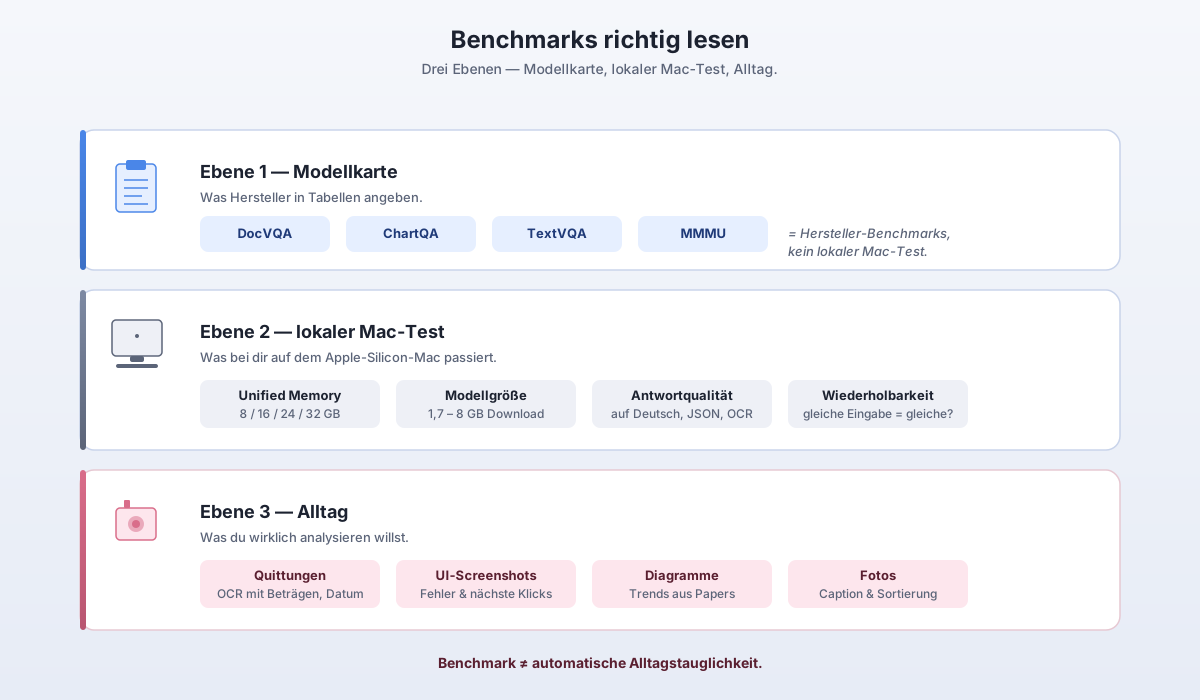
Benchmarks help, but they do not replace a local practical test. DocVQA measures document understanding. ChartQA measures questions about charts. TextVQA measures text in images. MMMU checks multimodal reasoning across subjects.
These numbers come from official model cards or model pages. They are not measurements on a Mac mini M4.
| Model | DocVQA | ChartQA | TextVQA | MMMU | Read this as |
|---|---|---|---|---|---|
| Gemma 3 12B | 82.3 | 60.9 | 66.5 | 50.3 | solid all-rounder, but not an OCR leader |
| Qwen2.5-VL 7B | 95.7 | 87.3 | 84.9 | 58.6 | very strong on documents, charts, and text in images |
| Llama 3.2 Vision 11B Instruct | 88.4 | 83.4 | — | 50.7 | strong on DocVQA/ChartQA, mind the language note |
| Moondream | — | — | — | — | not meaningfully comparable to the large models above |
The table is fairly clear: if your main problem is text in the image, a lot speaks for Qwen2.5-VL 7B. If you want a model that answers German prompts nicely and also handles general image description, Gemma 3 12B is usually the better first pick.
Practical test: how you should really compare vision models
Many model comparisons are useless because they show one image once and then pick the result that “sounds better”. A small reproducible test is better.
Pick five image types:
- Screenshot of an app or website
- Receipt or invoice
- Diagram or chart
- Photo with multiple objects
- Blurry or small text snippet
Ask every model the same questions:
Describe the image in at most five sentences.
Separate visible facts from guesses.
When you read text, mark uncertain spots with [?].
For OCR:
Read the visible text from the image.
Output it as a markdown table.
Mark unreadable or uncertain spots with [?].
Do not invent missing numbers.
For diagrams:
Analyse the diagram.
First name axes, units, and legend.
Then summarise the trend.
Do not calculate anything if the values are not clearly readable.
For UI screenshots:
Analyse this UI screenshot.
What is the likely next sensible click?
Name possible error sources.
Distinguish visible UI elements from guesses.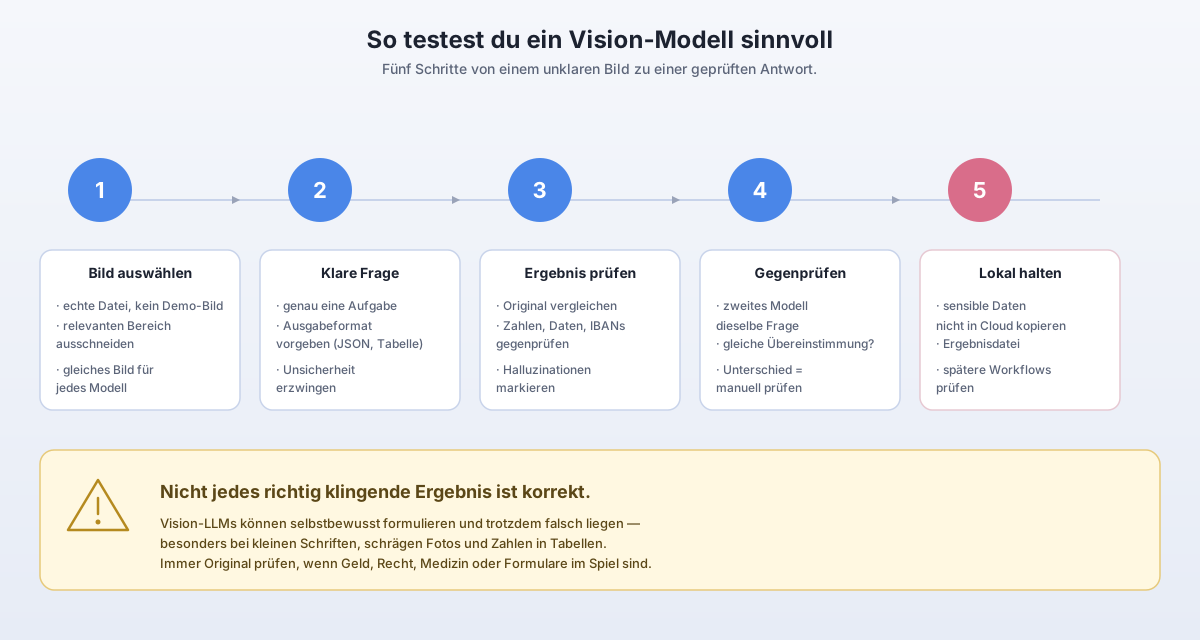
Gemma 3 12B: best all-rounder for local vision on the Mac
Gemma 3 12B is the obvious default recommendation for me. It is large enough to not immediately fail on simple image tasks, but still small enough to run realistically on many Apple Silicon Macs.
Strengths:
- good general image description
- usable for screenshots and UI questions
- pleasant German answers
- 12B is a good compromise between quality and memory footprint
- very easy to use with Ollama
Weaknesses:
- not always the best choice for exact OCR
- tables and small numbers must be verified
- on complex documents less convincing than Qwen2.5-VL
Good starter prompt:
ollama run gemma3:12b ./screenshot.png "Analyse this screenshot. First name only visible facts, then possible interpretation. Do not invent details."Qwen2.5-VL 7B: best choice for OCR, documents, and layouts
Qwen2.5-VL 7B is the model I would test first for receipts, tables, documents, and screenshots with a lot of text. The official benchmarks and the model description match exactly this use case: text, charts, icons, graphics, layouts, and structured output.
Strengths:
- very strong with text in images
- good for receipts, invoices, and forms
- solid structured output
- strong on diagrams and layouts
- 7B / 6.0 GB is still realistic for many Macs
Weaknesses:
- not automatically better for every normal image description
- German answers can feel drier
- numbers must be verified here too
Good OCR prompt:
ollama run qwen2.5vl:7b ./invoice.jpg "Extract all visible fields. Output amount, date, vendor, taxes, and line items as a markdown table. Mark uncertain values with [?]."For website screenshots:
ollama run qwen2.5vl:7b ./website.png "Analyse this website screenshot from a UX perspective. Name visible problems, unclear elements, and concrete improvement suggestions."Llama 3.2 Vision 11B: strong, but not always the best Mac recommendation
Llama 3.2 Vision 11B is a serious vision model. It is designed for visual recognition, image reasoning, captioning, and general image questions. The official DocVQA and ChartQA benchmarks are strong.
Still, I would not automatically place it first for German-speaking Mac users. The important caveat: the model card notes that for image+text applications English is officially supported. That does not mean German prompts never work. It means you should test more carefully when using it in German.
Strengths:
- strong image reasoning
- strong official DocVQA and ChartQA scores
- useful for general VQA tasks
- established Meta ecosystem
Weaknesses:
- larger than Qwen2.5-VL 7B
- image+text officially English-focused
- for everyday German use not always as pleasant as Gemma 3
Good test prompt in English:
ollama run llama3.2-vision:11b ./chart.png "Analyse this chart. First list the axes and legend, then summarise the visible trend. Do not infer values that are not readable."Moondream: small, practical, but no replacement for bigger models
Moondream is interesting because it is very small. That makes it attractive for older or memory-tight Macs. But you should not treat it as a direct competitor to Gemma 3 12B or Qwen2.5-VL 7B.
Strengths:
- very small model size
- installs quickly
- good for simple image questions
- useful as fallback on small Macs
Weaknesses:
- short context
- less reliable on details
- not ideal for OCR or complex documents
- can answer confidently and still be wrong
Good prompt:
ollama run moondream ./image.jpg "What is on this image? Answer briefly and only name things that are visible."Local vision LLMs and data privacy
The biggest advantage of local vision models is not always speed. It is control. A screenshot can contain private data: emails, file names, invoice numbers, health information, university material, or internal website data.
When you analyse such images locally, they do not leave your Mac through an external API. That is a clear advantage over cloud vision models. But local does not automatically mean “safe”. You still need to watch where the files live, whether other apps have access, and whether you copy results into cloud tools later.
Practical rule:
- analyse private screenshots locally
- do not reuse sensitive OCR results unchecked
- delete or properly file receipts and documents after the test
- do not put auto-generated statements unchecked into official documents
Common mistakes with vision LLMs
Mistake 1: Prompts that are too generic
Bad:
What do you see?Better:
Describe only visible elements. Do not add guesses. Mark uncertain text spots.Mistake 2: Blindly trusting OCR results
Vision LLMs can confuse numbers and letters. Especially critical are amounts, IBANs, invoice numbers, dosages, and dates.
Mistake 3: Confusing benchmarks with everyday use
A model can be strong on DocVQA and still get your poorly lit store receipt wrong. Benchmarks are a hint, not a guarantee.
Mistake 4: Huge images without a clear task
A huge screenshot with many details overwhelms smaller models faster. Crop the relevant region when you need an exact answer.
Mistake 5: Multiple images without structure
When you analyse several images, give the model clear labels:
Image 1: invoice
Image 2: error screenshot
Compare them only if there are visible overlaps.
My final recommendation
For most Mac users this combination makes the most sense:
- Gemma 3 12B as the default model for screenshots, image description, and German answers.
- Qwen2.5-VL 7B as a specialist for OCR, documents, tables, and layouts.
- Moondream as a small fallback for weaker Macs.
- Llama 3.2 Vision 11B as an alternative when you want to test image reasoning and English prompts.
If you have a Mac with 24 GB or 32 GB unified memory, start with Gemma 3 12B and Qwen2.5-VL 7B. That is currently the most practical local vision stack for Apple Silicon.
FAQ
Which local vision LLM is best on a Mac?
For most users Gemma 3 12B is the best all-rounder. For OCR, receipts, tables, and documents Qwen2.5-VL 7B is the better specialist.
Can Ollama analyse images locally?
Yes. Ollama supports vision models that receive an image together with a text prompt. You can use this to analyse screenshots or photos locally, for example.
Is Qwen2.5-VL better than Gemma 3?
Often yes for OCR, documents, and layouts. For general German answers and normal screenshot explanations Gemma 3 12B is usually more pleasant.
Is 8 GB RAM enough for local vision models?
Only to a limited extent. Moondream is realistic, larger vision models can be very tight. For Gemma 3 12B or Qwen2.5-VL 7B, 16 GB is the minimum for testing, 24 GB or 32 GB are noticeably more comfortable.
Can local vision LLMs analyse videos?
Not directly the way a real video model would in a normal Ollama workflow. In practice you extract individual frames from a video and analyse those images one after the other.
Are local vision LLMs reliable for OCR?
They are useful, but not perfect. Amounts, small numbers, invoice numbers, and tables should always be double-checked. Qwen2.5-VL 7B is particularly interesting for OCR-adjacent tasks, but even here the rule is: do not trust blindly.
Transparency
Sources and review basis
These primary and reference sources form the basis of the technical assessment. Vendor claims and external benchmarks are identified as such in the article.