OpenAI used DevDay on September 29, 2026 to announce more than 20 major changes across ChatGPT, Codex, the API and new agent workflows. The common direction is clearer than any single product: OpenAI is turning ChatGPT from a chat interface into a platform for persistent agents, cloud execution, shared workspaces and connected apps. 12
Research refreshed October 9, 2026; DevDay announcements dated September 29. Below is a direct cross-check of the event recap against OpenAI’s product pages, API documentation and current rollout information, separating what is available now, rolling out, beta/preview, and announced for later.
OpenAI DevDay 2026: the key facts
| Product | Status on Sep. 30, 2026 | Confirmed detail |
|---|---|---|
| Dots | Rollout / beta by plan | Always-on GPT‑6 Astra agents, own cloud computer, 4,000+ app connections |
| GPT‑6.1 Sol | Available | API, ChatGPT Work and Codex; not yet regular Chat |
| GPT‑6.1 Sol API | Available | $2/M input, $0.10/M cached input, $10/M output |
| GPT‑6 Astra Ultrafast | Available | Premium speed tier in API and Work/Codex on Pro 500 and Enterprise |
| GPT‑6.1 Sol Ultrafast | Announced | Coming soon / announced for the coming days |
| Codex Cloud | Available | Reusable remote environments for asynchronous coding tasks |
| Decisions API | Limited preview | Model chooses from finite predefined outcomes |
| Agents API + computer use | Available | Computer use, multi-agent, tool search/calling, compaction |
| ChatGPT Space + Pages | Available | Shared context and persistent collaborative documents |
| Pro 500 | Available | $500/month; OpenAI says 25× Plus allowance and Ultrafast |
Sources: OpenAI DevDay recap, Dots launch, GPT‑6.1 Sol documentation and API pricing. 1234
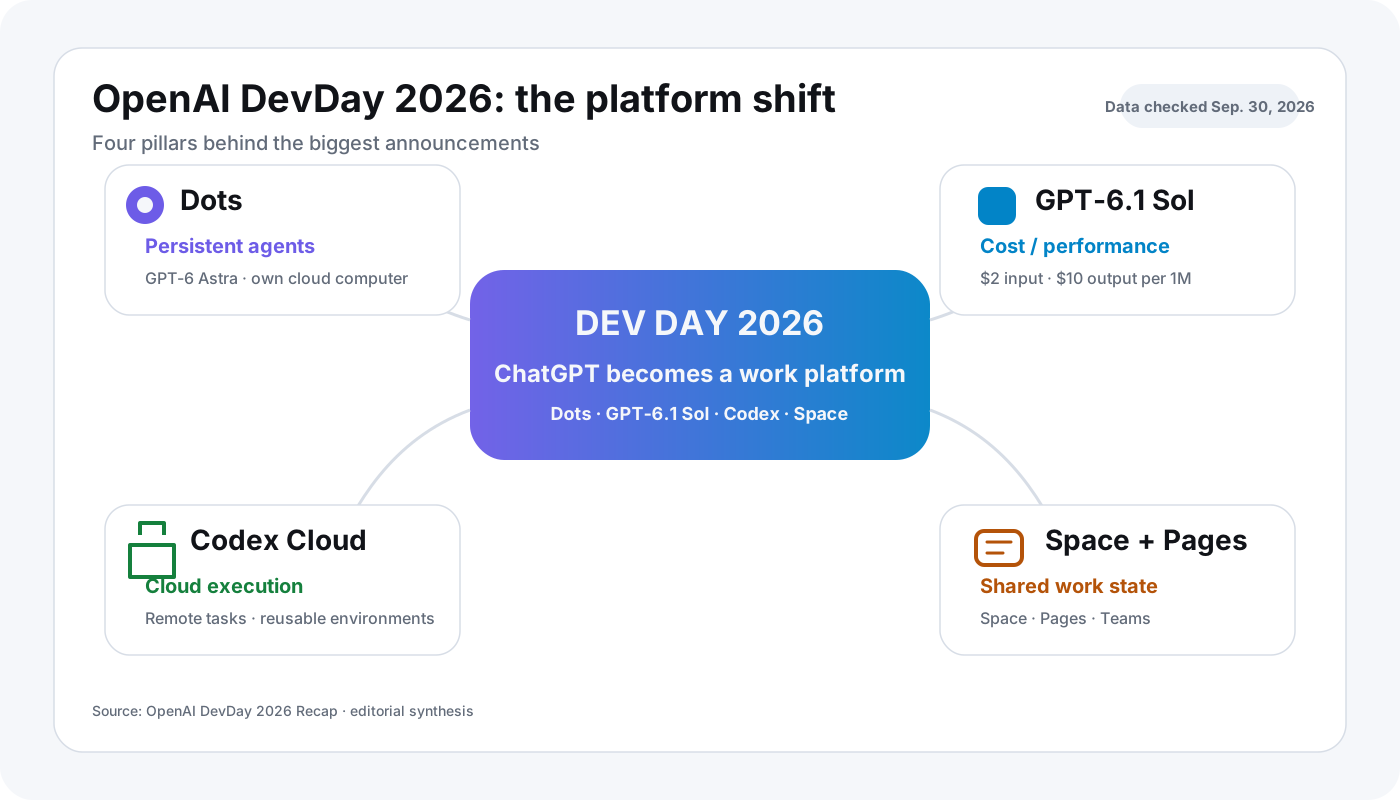
What was OpenAI DevDay 2026?
OpenAI DevDay 2026 was OpenAI’s developer conference held on September 29, 2026 at Fort Mason in San Francisco. OpenAI targeted developers, technical founders, researchers and technical leaders, with a public keynote livestream. 2
OpenAI called it its biggest DevDay yet and grouped more than 20 major announcements across new ways of working, Codex and the API, plugins, human-AI collaboration and expanded subscription use. 1
For readers, the useful questions are therefore not just “what was announced?” but:
- What can I use today?
- What does it cost?
- What is still preview or rollout-only?
- Which performance claims are vendor benchmarks rather than independent tests?
Dots: what are OpenAI’s always-on agents?
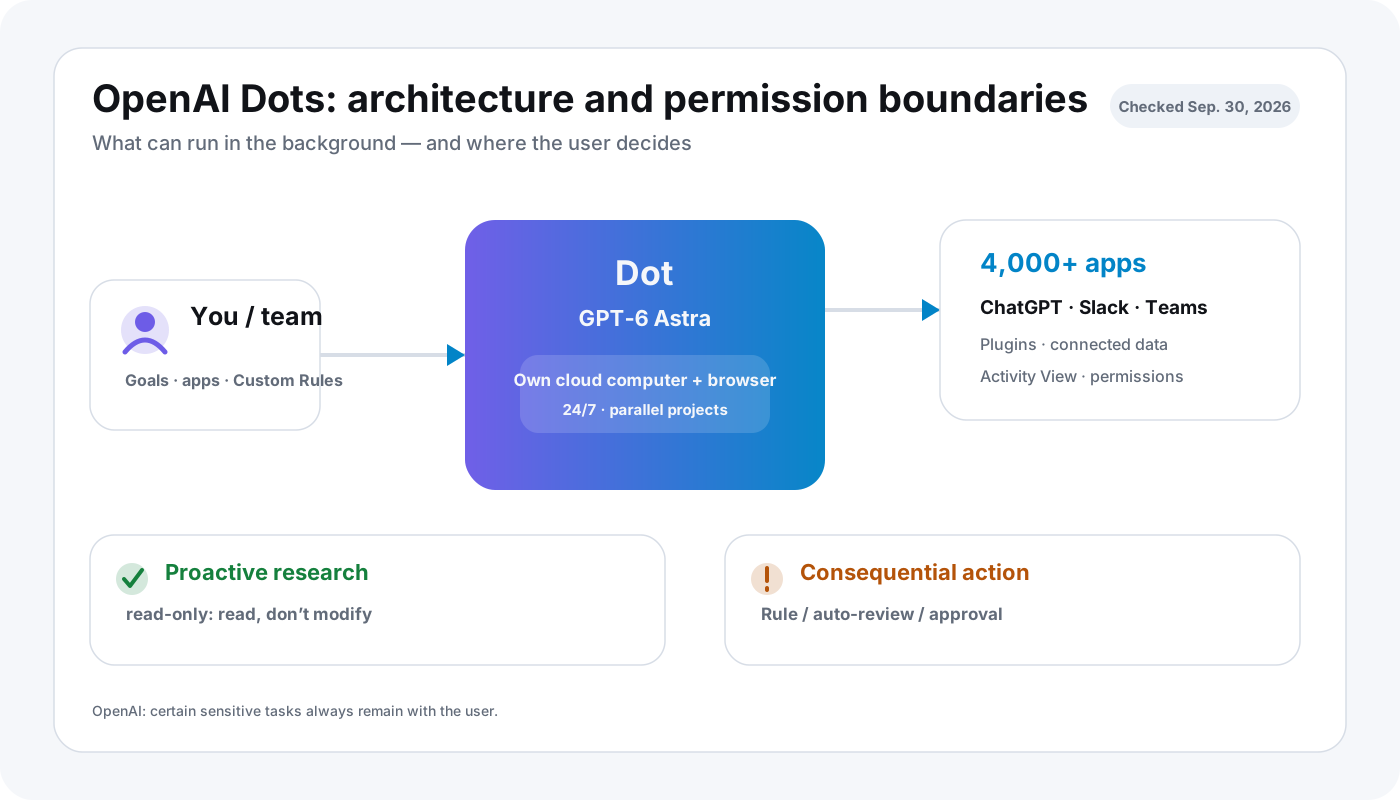
Dots are persistent OpenAI agents powered by GPT‑6 Astra. Each Dot has its own cloud computer and can pursue work over time rather than waiting for a new prompt. OpenAI says Dots can connect to more than 4,000 apps through plugins and can be reached through ChatGPT, Slack and Microsoft Teams, with texting planned later. 5
A Dot can run multiple projects, use its own browser and cloud computer, and optionally connect to a user’s laptop with permission. 5
What can a Dot do without approval?
OpenAI draws an important boundary between background research and consequential actions:
- Proactive research uses connected tools restricted to read-only. In that mode a Dot cannot send messages, change app content or control a browser/computer. 5
- Custom Rules can allow, block or require approval for specific actions. 5
- Some sensitive tasks remain user-only; OpenAI gives password changes as an example. 5
That permission model matters more than the generic phrase “autonomous agent.” Real utility depends on which actions can run unattended and which require review.
Who can actually use Dots?
Rollout differs by plan and region as of October 9, 2026. OpenAI’s current dot eligibility page says:
- Pro: Gradual rollout outside the European Economic Area, Switzerland and the UK at launch. A Pro subscription in Germany does not itself grant access.
- Business Premium: Available across ChatGPT-supported regions, including the EEA, subject to rollout/account eligibility.
- Enterprise, Edu and Healthcare: An administrator may enable the beta; it starts off by default.
- Limits: The first dot is included with eligible Pro/Business Premium. Its availability and usage terms are not the same thing as ordinary Chat quotas, Work credits or Codex allowances; check the plan-specific current page before budgeting.
A dot has its own cloud computer, so using it from a Mac does not turn GPT-6 Astra into local inference. The original DevDay announcement describes an ongoing agent, not a guarantee of unattended access to every connected app. 5
GPT‑6.1 Sol: price, context window and availability
GPT‑6.1 Sol is OpenAI’s new cost-performance model for complex coding, computer use and professional work. OpenAI positions it close to Astra on selected workloads while charging substantially lower standard token prices. 3
OpenAI’s current documentation lists:
| Specification | GPT‑6.1 Sol |
|---|---|
| API model ID | gpt-6.1-sol |
| Context window | 1,050,000 tokens |
| Maximum output | 128,000 tokens |
| Knowledge cutoff | April 30, 2026 |
| Reasoning levels | low, medium, high, xhigh, max |
| Standard input | $2 / 1M tokens |
| Standard cached input | $0.10 / 1M tokens |
| Standard output | $10 / 1M tokens |
| ChatGPT on Sep. 30 | Work + Codex; not yet regular Chat |
For the flagship side of the comparison, see our existing GPT‑6 Astra price, API and availability guide.
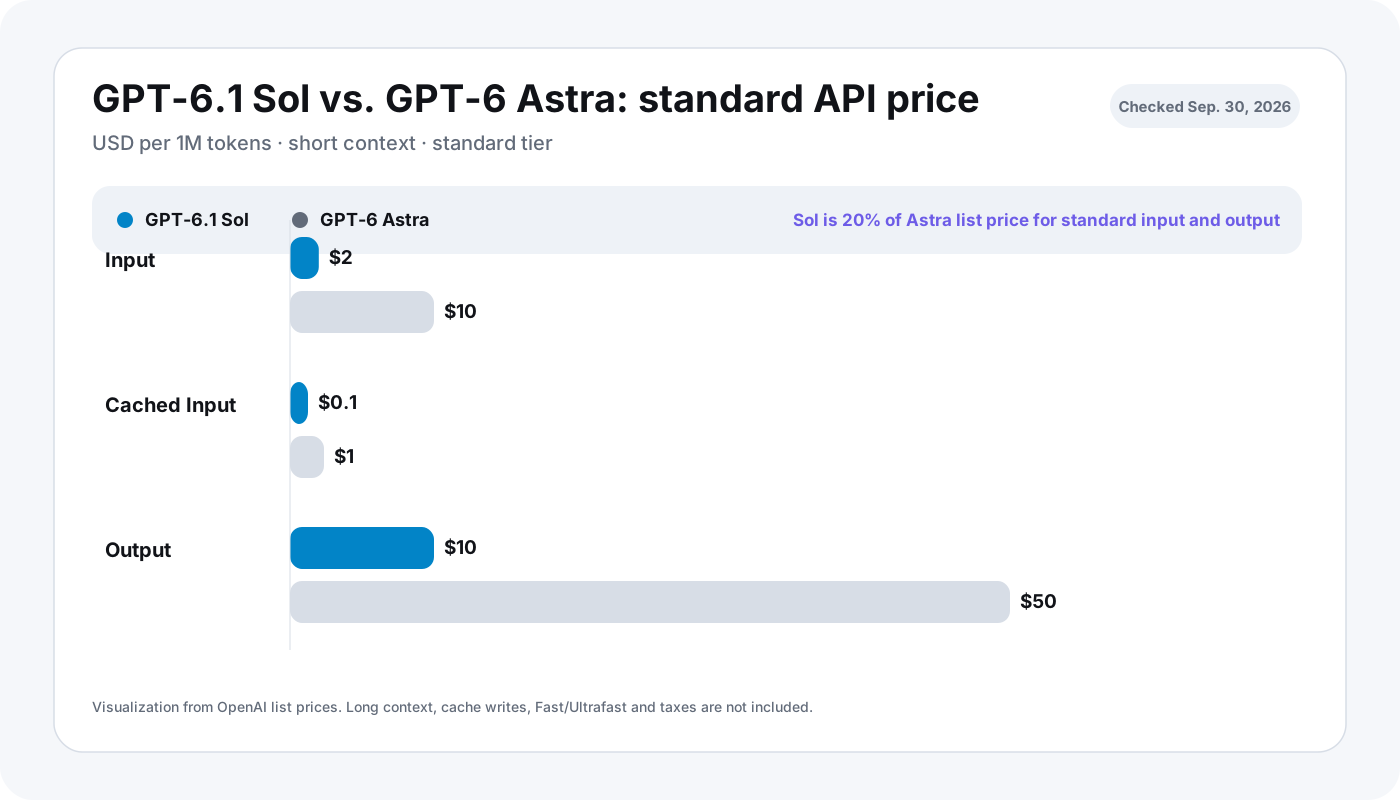
How much cheaper is GPT‑6.1 Sol than GPT‑6 Astra?
For standard processing and short context, OpenAI currently lists:
| Model | Input / 1M | Cached input / 1M | Output / 1M |
|---|---|---|---|
| GPT‑6.1 Sol | $2.00 | $0.10 | $10.00 |
| GPT‑6 Astra | $10.00 | $1.00 | $50.00 |
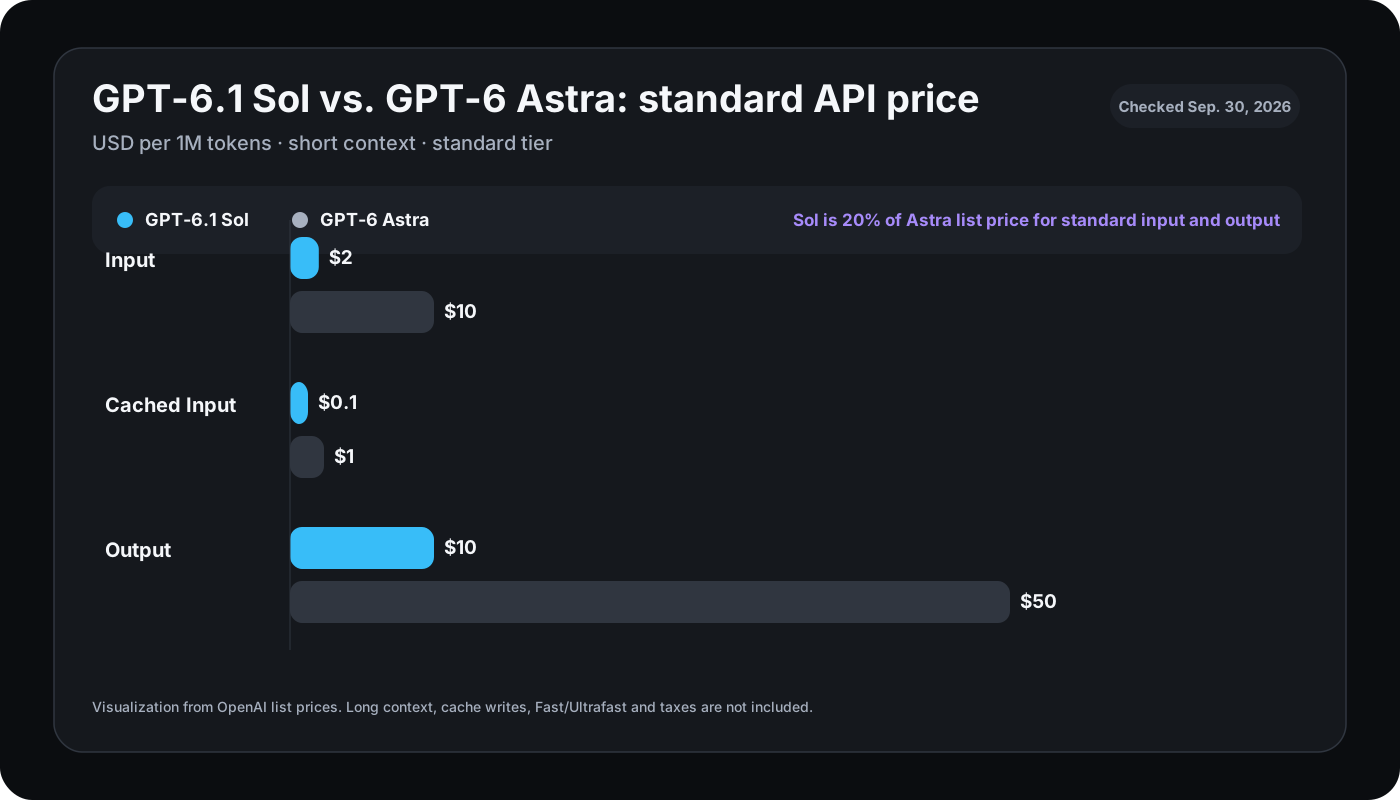
Our calculation: standard uncached input and output rates for Sol are 20% of Astra’s list price, an 80% price difference for the same token mix. That is a list-price relationship, not proof that every completed task costs 80% less. 4
Three transparent cost examples
Excluding cache, tools, taxes and long-context surcharges:
| Usage | Input | Output | GPT‑6.1 Sol | GPT‑6 Astra |
|---|---|---|---|---|
| Small | 1M | 0.1M | $3 | $15 |
| Medium | 10M | 1M | $30 | $150 |
| Intensive | 100M | 10M | $300 | $1,500 |
Formula: input millions × input price + output millions × output price.
Real agent bills can differ materially. GPT‑6.1 Sol applies long-context pricing once a request exceeds 272,000 input tokens, and Fast/Ultrafast, caching, tools and residency may change the effective cost. 34
For a broader subscription and API context, refer to the AI subscription comparison alongside live OpenAI pricing documentation.
How good is GPT‑6.1 Sol?
Most launch-day GPT‑6.1 Sol performance numbers are OpenAI-run or vendor-reported benchmarks. They are useful for specific workloads, but they are not an independent universal ranking. OpenAI itself notes that evaluations run in research environments or through the API can differ from production ChatGPT because of system prompts, tools and reasoning settings. 3
OpenAI reports, among other results:
- roughly Astra-level performance on DeepSWE at lower cost,
- a small gap to Astra on OSWorld 2.0 at maximum reasoning with lower task cost,
- lower average task cost on Terminal-Bench Science than Astra and Claude Opus 5.5,
- lower factual-error rates than GPT‑6 Sol in an OpenAI evaluation.
The actionable conclusion is not “Sol replaces Astra.” It is:
GPT‑6.1 Sol is a strong candidate for re-benchmarking existing Astra workloads on cost per successfully completed task.
Teams should test identical tasks with the same tool access, reasoning effort and success criteria.
Ultrafast: OpenAI separates model quality from speed tier
Ultrafast is a premium processing tier, not a separate base model. OpenAI says GPT‑6 Astra can deliver up to 8× faster token generation in Codex and up to 6× in the API. Astra Ultrafast is live; GPT‑6.1 Sol Ultrafast was still announced rather than broadly available on September 30. 16
The important operational point is that speed and allowance consumption are separate variables. A faster tier can consume substantially more budget or credits, and enterprise deployments should verify residency support for the selected processing path. 6
Pro 500: what does the $500/month tier add?
OpenAI’s new Pro 500 plan is a high-usage personal tier. The DevDay recap says it provides 25× the ChatGPT Plus allowance and access to Ultrafast. OpenAI’s current rate card explicitly refers to Pro $500 for GPT‑6 Astra Ultrafast in ChatGPT Work and Codex. 1
The economic question is therefore workload-specific. Pro 500 becomes more relevant when a user repeatedly hits Work/Codex capacity, needs concurrency, values Ultrafast latency, or would otherwise shift heavy usage to the API.
Codex Cloud: coding tasks can continue without the local Mac
Codex Cloud runs coding tasks in isolated, reusable cloud environments. Repositories, dependencies, tools, settings and permissions can be prepared so jobs start consistently and can continue without an active local computer. 17
For Mac users this is more important than asking whether GPT‑6.1 Sol itself runs locally: Sol and Astra are cloud models. The Mac remains the client and development machine while inference and remote agent work happen in OpenAI’s infrastructure.
DevDay also introduced or expanded:
- a refreshed Codex CLI with voice and
/agents, - desktop Code Review,
- Codex Security Cloud for eligible plans.
The coding-agent competition is therefore moving from pure code generation toward execution environments, permissions, review and asynchronous work.
Decisions API vs Agents API: different control models
Decisions API
The Decisions API focuses model intelligence on a finite set of predefined answers. That fits classification, routing and selecting an agent’s next action. It launched in limited preview with broader availability planned. 1
Agents API
The Agents API is the more general execution layer. OpenAI highlights computer use, multi-agent workflows, tool search, tool calling and context compaction. 1
For production systems, model quality is only one part of reliability. Teams also need to define tool permissions, approval boundaries, session state, logging and recovery behavior.
ChatGPT Space and Pages: shared work state beyond chat threads
ChatGPT Space gives people, ChatGPT and Dots a shared work context. Pages are persistent collaborative documents inside that context. Collaborative slides are planned for the coming weeks. 18
This changes the information model: useful state no longer has to live only inside isolated chat transcripts. Teams can maintain shared context and let agents operate against the same workspace state.
Plugins, Sites and MCP Events: integrations become runtime infrastructure
DevDay expands plugins beyond simple connectors:
- Plugin Extensions can add panels and file viewers inside ChatGPT.
- Sites can embed supported plugins into internal tools.
- MCP Events can trigger automations when something changes in a connected app. 1
That makes app authorization, workspace policy and auditability core deployment concerns.
Sign in with ChatGPT: identity is separate from conversation access
OpenAI separates identity from plan usage. “Sign in with ChatGPT” can share identity information such as name and email with an external app, but it does not automatically share conversations, memory, files, billing data or an API key. Using a ChatGPT plan inside a supported partner app is a separate permission. 9
This distinction matters in privacy reviews: a login flow is not the same as access to a user’s chat history.
All 25 DevDay items mapped by availability
| DevDay item | Status on Sep. 30, 2026 |
|---|---|
| Dots | Pro outside EEA/CH/UK at launch; Business Premium in supported regions; Enterprise beta via admin |
| GPT‑6.1 Sol | API, Work and Codex available; not regular Chat yet |
| GPT‑6 Astra Ultrafast | Available |
| GPT‑6.1 Sol Ultrafast | Announced / coming soon |
| Private Intelligence | Partly available; additional preview announced |
| Codex Cloud | Available |
| Codex CLI refresh | Available |
| Code Review desktop | Available |
| Codex Security Cloud | Eligible plans |
| Decisions API | Limited preview |
| Agents API + computer use | Available |
| Bedrock Managed Agents | Announced through AWS/OpenAI |
| Plugin Extensions | Available |
| Improved plugin creation | Available / rollout |
| Improved plugin discovery | Available / rollout |
| Sites hosting plugins | Eligible workspaces |
| MCP Events | Available |
| ChatGPT Space | Pro, Business, Enterprise |
| Pages | Pro, Business, Enterprise |
| Collaborative slides | Coming in the next weeks |
| Teams / shared tasks | Business, Enterprise |
| @ChatGPT in Slack and Teams | Business, Enterprise |
| Meetings plugin | Beta |
| Shareable profiles | Available |
| Sign in with ChatGPT / plan use | Identity global; plan use at participating partners |


What independent reporting confirms
Reuters and Axios independently confirm the event’s central shift toward Dots, GPT‑6.1 Sol and more persistent agent/workspace products. For exact pricing, plan eligibility and rollout state, current OpenAI product documentation is more precise than broad event coverage. 1011
That distinction matters for a fast-moving launch: an event-day article can become less precise than a product or release page within hours.
October 7 update: GPT-6 Chat is not GPT-6.1 Sol in Work
OpenAI expanded GPT-6 Chat on October 7, 2026. The new Intelligent UI rollout began for Plus, Pro, Business and Enterprise and extends to Free and Go on October 8. OpenAI identifies GPT-6 Sol as the paid Chat model and GPT-6 Luna as the Free/Go Chat model. This rollout applies to the Chat tab, not Work or Codex. OpenAI October 7 announcement
Do not infer from the public Chat announcement that GPT-6.1 Sol has joined ordinary Chat. OpenAI still documents GPT-6.1 Sol separately for Work, Codex and API. Nor does Intelligent UI expand Dots eligibility in Germany; those are different features governed by different rollout terms. OpenAI GPT-6.1 guidance
A Mac test plan based on real access and completed tasks
A launch table alone cannot predict an agent’s value for your work. Start with a small reproducible task in a public demo repository, including runnable acceptance tests. Record the actual product enabled on your account, subscription, region and exact model ID separately. Run the same bug fix with Codex Cloud and, if eligible, Work/Dots under consistent file access, permissions and success criteria.
Collect passing tests, failures, tool calls, elapsed time and total spend per successful task. GPT‑6.1 Sol and Astra remain cloud inference; launching their clients on a Mac is not local Apple Silicon execution. Review data sharing and plugin permissions before granting access to private code. This is an evaluation protocol, not an original model benchmark. For rollout details, consult current release documentation rather than assuming an announcement implies account access.
What does DevDay 2026 mean for Mac users?
Four points matter for a Mac-focused audience:
- GPT‑6.1 Sol and Astra do not run locally on Apple silicon. They are cloud models accessed through OpenAI products or the API.
- Codex Cloud can keep jobs running without the local Mac remaining active.
- Dots operate on their own cloud computer by default and can optionally connect to a user’s computer with permission. 5
- The optimization problem shifts from “does the model fit in unified memory?” to “which cloud tier completes this workload reliably at the lowest effective cost?”
Local inference remains a separate category based on open-weight models and runtimes such as MLX, llama.cpp and Ollama.
The individual GPT-6 Sol and Luna variants are broken down in the GPT-6 Sol vs Luna comparison.
References and evidence limits
Official OpenAI documents support feature and list-price claims; Reuters and Axios independently covered the event, not every product eligibility rule. Check current account access; no first-hand Mac benchmarks are asserted.
Footnotes
Frequently Asked Questions
Is GPT‑6.1 Sol available in ChatGPT?
Partly. On September 30, 2026, OpenAI says GPT‑6.1 Sol is available to Plus, Pro, Business, Enterprise and Edu users in ChatGPT Work and Codex. It is not yet available in regular Chat. The API model gpt-6.1-sol is available.
How much does GPT‑6.1 Sol cost?
The standard API rate is $2 per million input tokens, $0.10 per million cached input tokens and $10 per million output tokens.
Is GPT‑6.1 Sol better than GPT‑6 Astra?
OpenAI positions Sol as near-Astra at a lower cost. Launch benchmarks show small gaps on selected workloads, but most are vendor-run. That evidence does not support a universal „better“ verdict.
What is OpenAI Dots?
Dots are persistent GPT‑6 Astra agents with their own cloud computer. They can connect to more than 4,000 apps through plugins and pursue work in the background. Proactive research is initially read-only, while consequential actions can require approval.
Is Pro 500 really a $500 plan?
Yes. OpenAI’s current documentation refers to Pro 500 / Pro $500. The DevDay recap says it includes 25 times the Plus allowance and Ultrafast access.