Checked October 8, 2026. Gemini 3.1 Flash Lite Image (gemini-3.1-flash-lite-image) is still Google’s lowest-cost Nano Banana option for rapid 1K image batches. For 2K/4K, search-grounded image generation, multiple references, or repeated edits, Google now recommends the separate Nano Banana 2.1 API model (gemini-nano-banana-2.1), launched October 6. Nano Banana 2.1 is not a silent replacement or new name for Lite. Neither model performs image inference locally on the Mac. Google image documentation · 2.1 model card.
What is Gemini 3.1 Flash Lite Image?
Gemini 3.1 Flash Lite Image is the efficiency-focused member of Google’s image generation family. While Gemini 3.1 Flash Image, also known as Nano Banana 2, is the broader all-rounder, the Lite version is built for speed, cost control and high-volume visual workflows. Google describes it as optimized for ultra-low latency and cost-effective image generation and editing. (1)
The model supports:
| Capability | Support |
|---|---|
| Text to image | yes |
| Image + text to edited image | yes |
| Mixed image + text output | yes |
| Image editing | yes |
| Image generation | yes |
| 1K output | yes |
| 2K/4K output | no |
| Google Search Grounding | no |
| URL Context | no |
| Live API | no |
| Caching | no |
| Code Execution | no |
| Structured Outputs | no |
| Thinking | minimal and high |
| Batch API | yes |
The name can be confusing. gemini-3.1-flash-lite and gemini-3.1-flash-lite-image are not the same model. The first one is a low-latency multimodal model with text output. The second one is an image generation and editing model with image and text output. (2)
Gemini 3.1 Flash Lite Image specifications
| Property | Gemini 3.1 Flash Lite Image |
|---|---|
| Official model code | gemini-3.1-flash-lite-image |
| Product name | Gemini 3.1 Flash Lite Image |
| Nickname | Nano Banana 2 Lite |
| Status | GA / Stable |
| Release | June 30, 2026 |
| Latest update | June 2026 |
| Text knowledge cutoff | not documented (image model) |
| Input | Text and image |
| Output | Image and text |
| Input token limit | 65,536 |
| Output token limit | 4,096 |
| Image resolution | 1K, e.g. 1024×1024 px at 1:1 |
| 2K/4K | not supported |
| Image generation | supported |
| Image editing | supported |
| SynthID | always on |
| C2PA watermarking | supported |
| Local Mac inference | no |
| Ollama / LM Studio / MLX | no |
Google also lists several aspect ratios, including 1:1, 3:2, 2:3, 3:4, 4:3, 4:5, 5:4, 9:16, 16:9 and 21:9. The Lite model remains limited to 1K output. (1)
What it means for Mac users
Gemini 3.1 Flash Lite Image is not a local Apple Silicon model. You do not run it through Ollama, load it in LM Studio or accelerate it with MLX. Still, it can be useful for Mac users because many creative and technical workflows start on macOS:
- blog graphics
- article hero images
- thumbnails
- social media variants
- UI mockups
- small icons and stickers
- product image variations
- website component ideas
- fast A/B visual directions
- text-guided edits of existing images
Your Mac remains the workspace: you write prompts, manage files, review outputs, refine images in Figma, Photoshop, Affinity, Pixelmator or Preview, and then ship the final assets to your website or app. The model inference itself happens through Google AI Studio or the Gemini API.
Pricing and budget limits
According to Google’s official Gemini API pricing page, Gemini 3.1 Flash Lite Image has no free tier. In the Standard tier, input costs $0.25 per 1M tokens. Text and thinking output cost $1.50 per 1M tokens. Image output costs $30 per 1M tokens, which Google translates to about $0.0336 per 1K image. In the Batch tier, those prices are halved: $0.125 input, $0.75 text/thinking output and $15 per 1M image tokens, or about $0.0168 per 1K image. (3)
| Tier | Input | Text/thinking output | Image output |
|---|---|---|---|
| Standard | $0.25 / 1M tokens | $1.50 / 1M tokens | about $0.0336 per 1K image |
| Batch | $0.125 / 1M tokens | $0.75 / 1M tokens | about $0.0168 per 1K image |
100 images, output tokens only: 100 × $0.0336 = $3.36 Standard or 100 × $0.0168 = $1.68 Batch, plus input, text, thinking and any other charges. Actual U.S. tax treatment depends on the invoice.
For high-volume visual iteration, set budget limits. Image output is billed through image-output tokens, so a session with hundreds of variations adds up quickly.
Gemini Flash Lite Image versus Nano Banana 2.1
Updated October 8, 2026: Google’s current image-generation guide places Nano Banana 2.1, released October 6, as the high-efficiency workhorse for new projects. Nano Banana 2 Lite remains the budget-focused 1K-only model, while Nano Banana 2 (gemini-3.1-flash-image) is the previous-generation workhorse. These are distinct model IDs. Official image guide · deprecation schedule.
| Direct Gemini Developer API model | 1K Standard image | 1K Batch image | Output resolution | Search grounding |
|---|---|---|---|---|
Flash Lite Image – gemini-3.1-flash-lite-image | $0.0336 | $0.0168 | 1K only | No |
Nano Banana 2.1 – gemini-nano-banana-2.1 | $0.0336 | $0.0168 | 1K, 2K, 4K | Yes |
Flash Image – gemini-3.1-flash-image | ~$0.067 | ~$0.034 | 0.5K–4K | Yes |
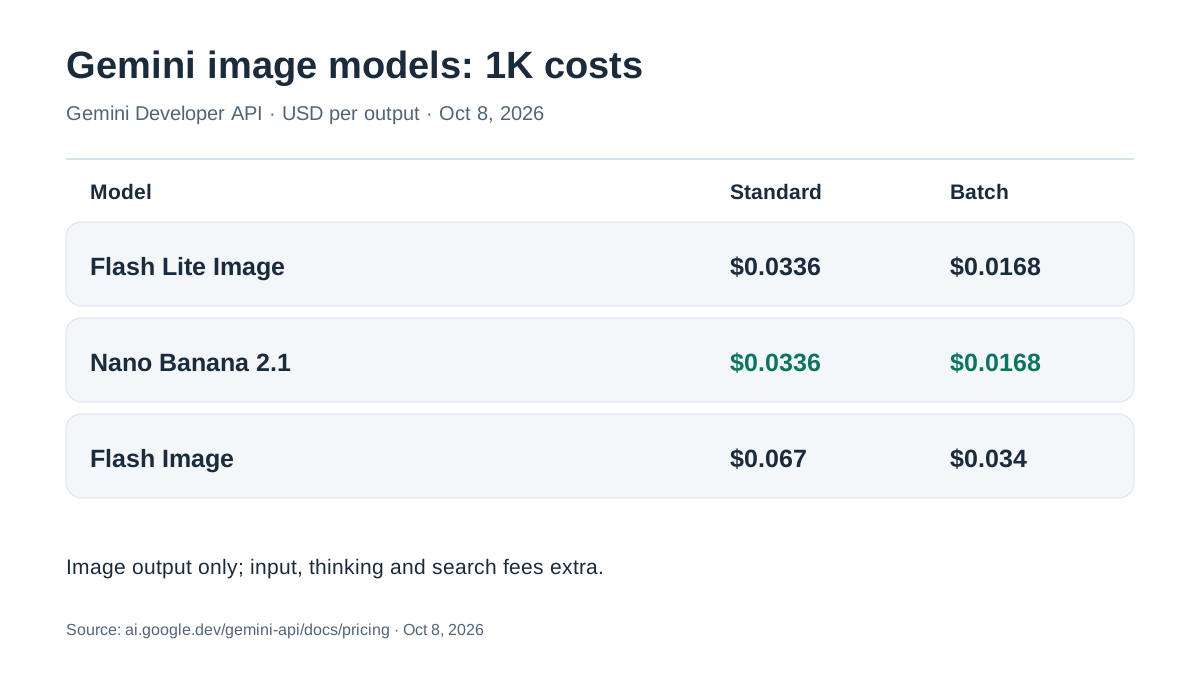
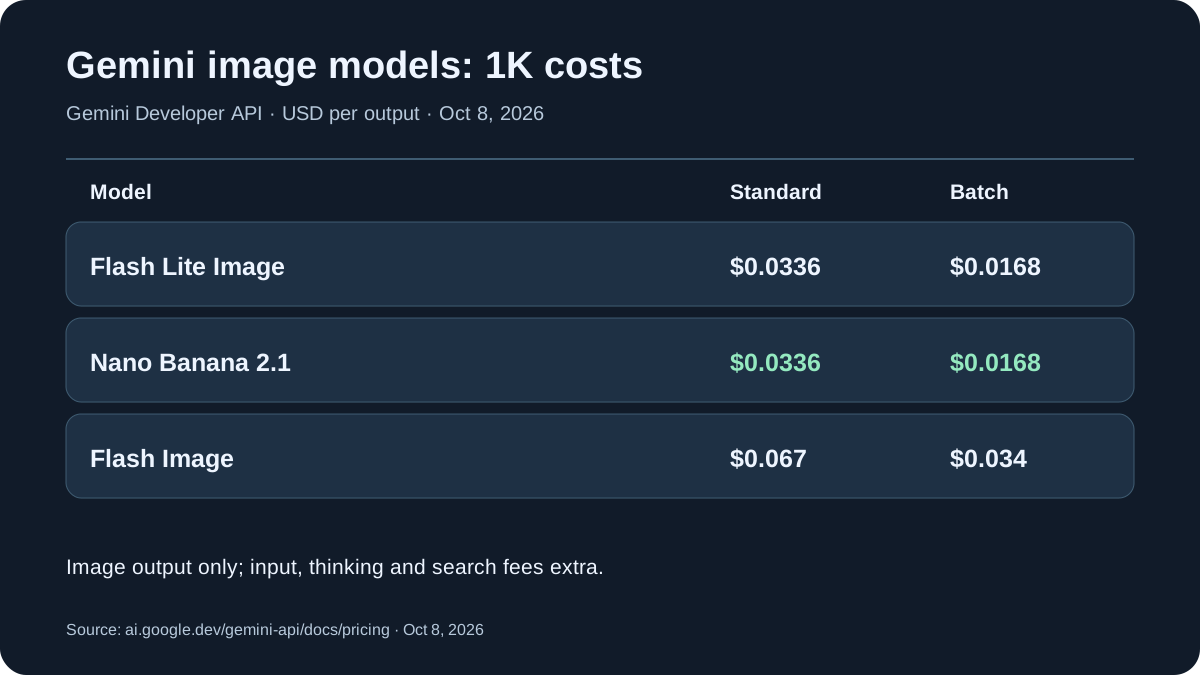
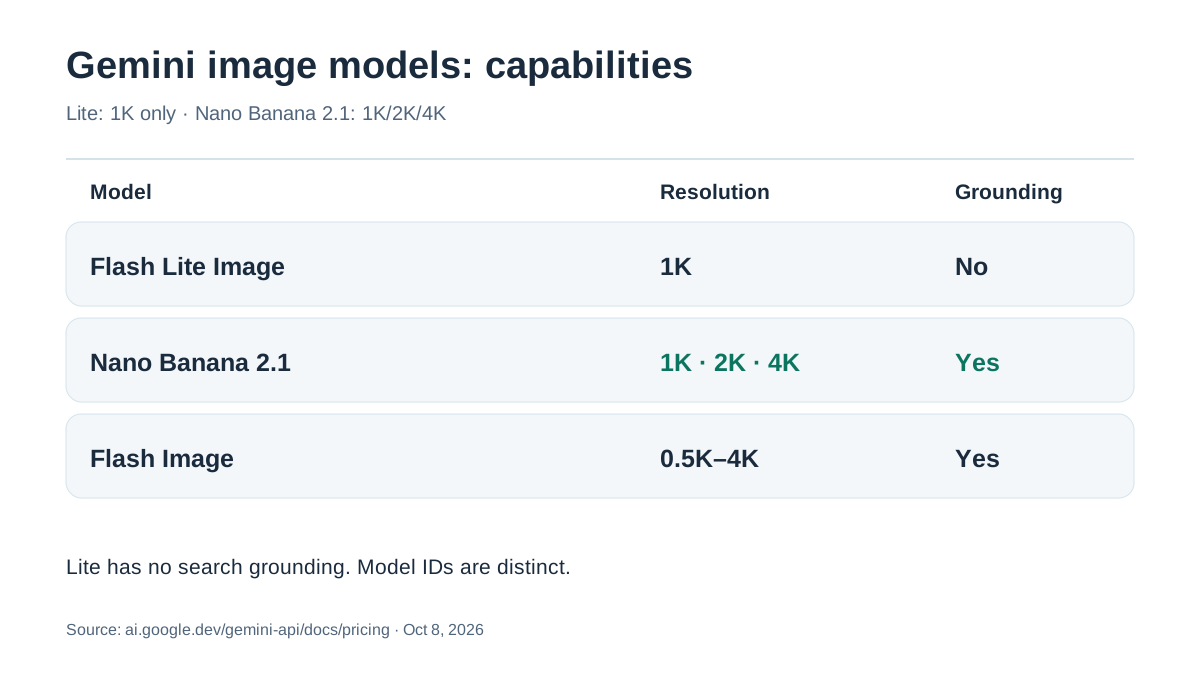
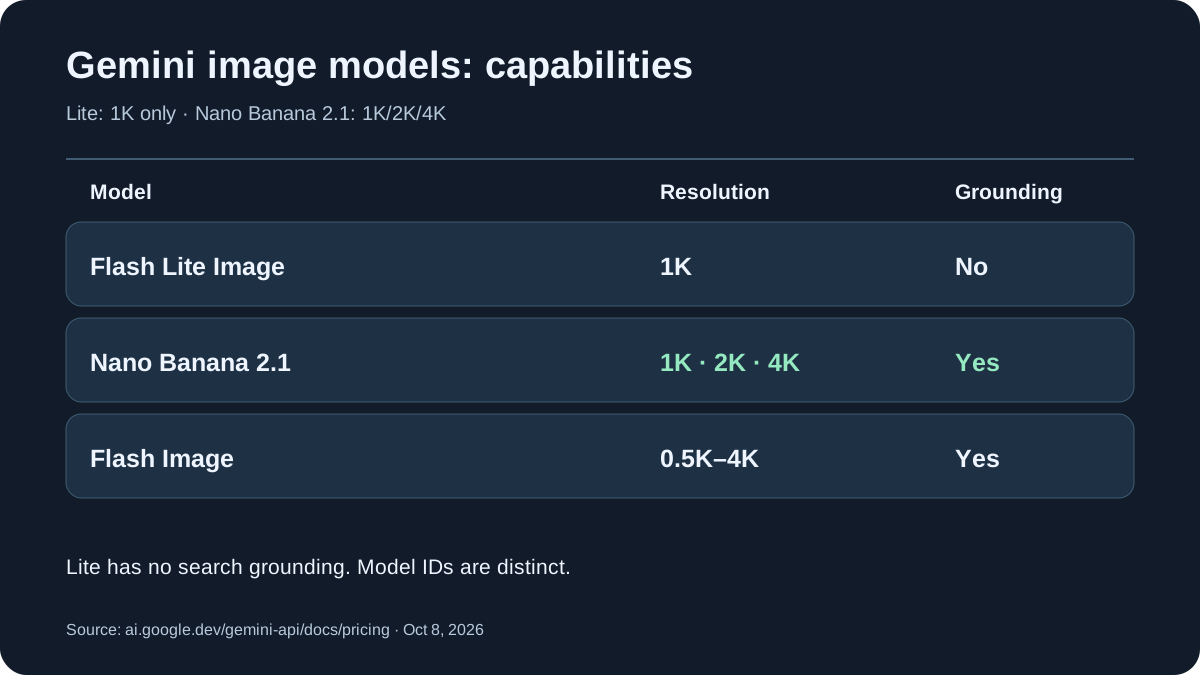
The $0.0336 is an image-output equivalent, not a guaranteed all-in request price. Flash Lite input costs $0.25 per million tokens, and text/thinking output $1.50. For Nano Banana 2.1, those categories cost $1.50 and $7.50. At 2K and 4K, Nano Banana 2.1 image output is approximately $0.0504 and $0.113 on Standard, or $0.0252 and $0.0567 through Batch. Search grounding may add request-based fees. Provider taxes and other billable tokens are separate. Gemini API pricing.
Which to choose? Use Lite for inexpensive high-volume 1K drafts. Test Nano Banana 2.1 for demanding layouts, legible typography, 2K/4K, Google Search grounding, and multi-reference edits. Google documents up to 14 reference images on 2.1; do not assume the same capability on Lite. These are product capabilities, not an independently reproduced benchmark. 2.1 model card.
When the Lite model fits
Gemini 3.1 Flash Lite Image fits when speed and cost matter more than maximum resolution or extensive creative control.
Good use cases:
| Task | Fit |
|---|---|
| 10 variations of a blog thumbnail | excellent |
| simple text-guided image editing | good |
| fast website illustrations | good |
| stickers, icons, small graphics | good |
| UI ideas and layout mockups | good |
| 4K posters or print assets | poor |
| complex brand/product campaigns | use Flash Image or Pro |
| many reference images with character consistency | use Flash Image or Pro |
| high-volume near-real-time production | good |
For website workflows, the Lite model fits article graphics, small comparison visuals, simple hero variants and social preview images. Final brand assets still need manual review and refinement in a design tool.
Setup on Mac
You do not need a powerful Apple Silicon chip because the model does not run locally. A MacBook Air, Mac mini or Mac Studio is enough as a client. In practice, you need:
- Google AI Studio or Gemini API access.
- An API key.
- Python or Node.js.
- A local folder for generated images.
- Optionally, a design tool for cleanup and final exports.
Python example
from pathlib import Path
from google import genai
from google.genai import types

client = genai.Client()

response = client.models.generate_content(
    model="gemini-3.1-flash-lite-image",
    contents=(
        "Create a clean 16:9 hero image for a tech blog article about "
        "local AI on Mac. Dark background, subtle Apple Silicon chip "
        "silhouette, neural network lines, no text."
    ),
    config=types.GenerateContentConfig(
        response_modalities=["Image"],
        response_format={
            "image": {
                "aspect_ratio": "16:9",
                "image_size": "1024px",
            }
        },
    ),
)

for part in response.parts:
    if getattr(part, "inline_data", None):
        Path("gemini-flash-lite-image.png").write_bytes(part.inline_data.data)
Example using the current Gemini API; verify against the official docs before production use because SDK field names can vary slightly by version.
For the Lite model, set image_size to 1K (the code value is "1024px"). Google says 2K and 4K are not supported by Gemini 3.1 Flash Lite Image. (1)
REST example
The call reads the GEMINI_API_KEY environment variable (export GEMINI_API_KEY="your-api-key").
curl -sS -X POST \\
  "https://generativelanguage.googleapis.com/v1/models/gemini-3.1-flash-lite-image:generateContent" \\
  -H "x-goog-api-key: $GEMINI_API_KEY" \\
  -H "Content-Type: application/json" \\
  -d '{
    "contents": [{"role": "user", "parts": [{"text": "Generate a clean 16:9 1K illustration showing a MacBook controlling a cloud image generator. No text."}]}],
    "generationConfig": {
      "responseModalities": ["TEXT", "IMAGE"],
      "responseFormat": {"image": {"aspectRatio": "16:9", "imageSize": "1024px"}}
    }
  }'
Prompt tips for better results
Describe the final asset clearly in the prompt instead of writing “make a nice image”.
Example:
Create a 16:9 1K hero image for a technical blog.
Subject: local AI workflows on Mac.
Style: dark editorial tech illustration, subtle blue and purple glow, clean composition.
Elements: Apple Silicon-inspired chip shape, neural network lines, small image-generation tiles.
Avoid: text, logos, brand names, fake UI labels, clutter, human faces.
For image editing:
Use the uploaded image as reference.
Keep the composition and main subject.
Change only the background to a clean dark gradient.
Make it suitable for a Mac AI blog hero image.
Do not add text or logos.
Useful rules:
- Avoid text inside the image if you can add real HTML text later.
- Specify the aspect ratio.
- Name the target medium: blog hero, thumbnail, social card, icon.
- Add “no text” when text is not needed.
- Avoid brand logos and third-party product designs.
- Manually review final images, especially UI, text, hands, small details and identity-related elements.
United States: API list rates, sales taxes and cloud processing
These are USD Gemini Developer API list rates, not Google AI Pro consumer-subscription prices. Depending on the billing entity and jurisdiction, applicable state/local sales taxes or processing charges may affect the U.S. invoice. The image models have no free Developer API tier according to Google’s current price sheet. Trying them in AI Studio should not be presented as an entitlement to unlimited free production calls.
An American billing address, U.S. IP, or English-language prompt does not itself establish U.S.-only inference or retention. For sensitive user images, inspect the actual API terms, Google Cloud configuration where applicable, and location/privacy commitments of the selected service. Gemini pricing.
Privacy and rights
Gemini 3.1 Flash Lite Image is a cloud model, so do not upload sensitive, confidential or third-party images unless you have the right to use them. Google’s image generation guide explicitly reminds users to have the necessary rights for uploaded images and not to generate content that infringes rights or deceives, harasses or harms others. (4)
For website owners, that means:
- Do not upload third-party product images without rights.
- Do not use real people as references without consent.
- Do not recreate logos.
- Do not imitate brand assets.
- Keep generated image files organized and documented.
- Manually review important visuals before publishing.
Is this better than local image generation on Mac?
Not universally. Local image models on Mac have a different advantage: privacy and control. Cloud image models like Gemini 3.1 Flash Lite Image provide easier API integration, scaling and often strong outputs without local setup.
| Workflow | Local on Mac | Gemini 3.1 Flash Lite Image |
|---|---|---|
| Private drafts | better | only for non-sensitive data |
| Many cheap variations | depends on setup | very good |
| No installation | no | yes |
| Offline use | yes | no |
| API scaling | harder | easy |
| 1K blog graphics | possible | very good |
| 4K output | depends on model | no |
| Full data control | yes | no |
For private drafts and sensitive references, local models keep data on the Mac. Nano Banana 2 Lite fits fast, low-cost blog assets, mockups and visual variations.
Fast cloud image model, not a local Mac package
Gemini 3.1 Flash Lite Image is not a “small local Mac model”. It is a fast cloud image model for high-volume, low-cost 1K visual generation and editing. The official model code is gemini-3.1-flash-lite-image, the product name is Gemini 3.1 Flash Lite Image, and the nickname is Nano Banana 2 Lite.
For Mac users, it fits workflows where the Mac acts as the creative and development hub: write prompts, generate variations, manage files locally, refine images in a design tool and ship them into a website or app. The limits are just as important: 1K output, no local privacy advantage, no Ollama/MLX/LM Studio workflow and no 2K/4K generation. Within those limits, it is suited to fast visual work.
The newer Gemini generation and its API pricing are covered in the Gemini 4 Argon guide and the Gemini 3.8 Flash pricing check.
Footnotes
-
https://ai.google.dev/gemini-api/docs/models/gemini-3.1-flash-lite-image “Gemini 3.1 Flash Lite Image | Gemini API | Google AI for Developers” ↩ ↩2 ↩3
-
https://ai.google.dev/gemini-api/docs/models/gemini-3.1-flash-lite “Gemini 3.1 Flash-Lite | Gemini API | Google AI for Developers” ↩
-
https://ai.google.dev/gemini-api/docs/pricing “Gemini Developer API pricing | Gemini API | Google AI for Developers” ↩
-
https://ai.google.dev/gemini-api/docs/generate-content/image-generation “Image generation | Gemini API | Google AI for Developers” ↩
Frequently Asked Questions
Does Gemini 3.1 Flash Lite Image run locally on Mac?
No. Gemini 3.1 Flash Lite Image runs through Google AI Studio or the Gemini API. Your Mac is only the client for prompting, file handling and post-processing.
Is gemini-3.1-flash-lite-image the same as gemini-3.1-flash-lite?
No. gemini-3.1-flash-lite is a multimodal text-output model. gemini-3.1-flash-lite-image is an image generation and editing model with image and text output.
What resolution does Nano Banana 2 Lite support?
The Lite model is designed for 1K output, roughly 1024 x 1024 pixels in a square format. 2K and 4K output are not supported for this model.
Can Gemini 3.1 Flash Lite Image edit images?
Yes. It supports text-to-image and image-plus-text workflows, including simple background changes, style variations, object adjustments and fast image variants.
How much does one Gemini 3.1 Flash Lite Image output cost?
Google lists about 0.0336 US dollars per 1K image in the Standard tier and about 0.0168 US dollars per 1K image in the Batch tier. Prices can change and should be checked before production use.
Does Gemini 3.1 Flash Lite Image support Google Search Grounding?
No. Search Grounding, URL Context and Image Search Grounding are not core features of the Lite model. Gemini 3.1 Flash Image is the better fit for that type of workflow.
What is Gemini 3.1 Flash Lite Image best for?
It is best for fast and low-cost 1K visuals: blog hero images, thumbnails, social cards, small website graphics, UI mockups and simple image edits.
What is Gemini 3.1 Flash Lite Image not ideal for?
It is not ideal for 4K assets, print graphics, complex brand campaigns, sensitive private images, long multi-turn edits or fully local Mac workflows.
Did Nano Banana 2.1 replace Gemini 3.1 Flash Lite Image?
No. Lite is a separate 1K-only model at gemini-3.1-flash-lite-image. Nano Banana 2.1 uses gemini-nano-banana-2.1, supporting 1K/2K/4K and Search grounding. Their 1K image-output charges match, but other token and search costs differ.