Claude Opus 4.7 Fast vs Standard: When the 6x Premium Is Worth It
Claude Opus 4.7 Fast Mode explained: 6x pricing, up to 2.5x output speed, prompt cache, Claude Code and when Standard is cheaper.
Claude Opus 4.7 Fast Mode uses the same model weights as Standard Opus 4.7. It is a faster inference configuration, not an intelligence upgrade. Fast costs $30/MTok input and $150/MTok output versus Standard at $5/MTok and $25/MTok: a 6x premium for an advertised advantage of up to 2.5x higher output-token speed.
What does not change: Fast Mode does not improve intelligence or model capabilities. It primarily accelerates output token generation. Anthropic frames the benefit specifically as output tokens per second, not a time-to-first-token upgrade. This comparison covers the technical differences, pricing, hidden cost traps, and clear decision criteria for Mac users, developers, and agent builders.
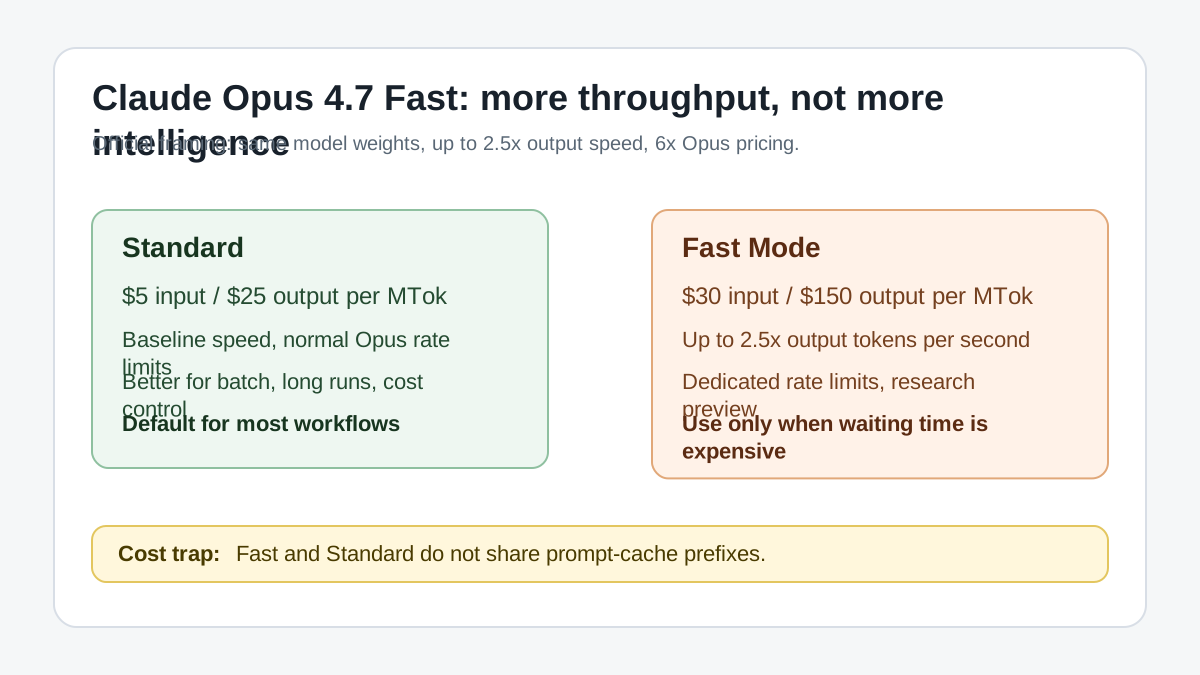
Original graphic based on Anthropic’s official Fast Mode, pricing, models overview, and Claude Code Fast Mode documentation, plus the OpenRouter model page. Sources: Anthropic Fast Mode, Anthropic Pricing, Claude Code Fast Mode, OpenRouter Claude Opus 4.7 Fast. Checked on May 27, 2026.
What Fast Mode Actually Speeds Up — and What It Doesn’t
Fast Mode primarily accelerates:
- Output token generation — the visible throughput when writing long responses
- Long streaming responses — users see progress noticeably earlier
- Interactive agent loops — shorter feedback cycles in tool-call chains
- Claude Code workflows — faster iteration in code reviews, debugging, refactoring
- Workloads where wait time directly costs money — paid AI products, live assistants
According to Anthropic, Fast Mode does not primarily accelerate:
- Time-to-First-Token — the wait time for the first response stays the same
- Prompt processing — the docs do not present it as an input-processing upgrade
- Initial planning — Fast Mode is not a higher effort or reasoning level
- Tool routing — routing decisions don’t depend on output speed
- Model intelligence — reasoning, quality, and benchmark scores are identical to Standard
- Batch API — Fast Mode is not available there
The benefit is largest when generating large amounts of output. The longer the response, the more time is saved. With short responses, startup latency dominates — Fast Mode feels less spectacular there because the TTFT wait makes up most of the perceived latency.
The Price Question — 6x Premium, Up to 2.5x Speed
Anthropic officially confirms a speed advantage of up to 2.5x higher output tokens per second. Input and output pricing are also officially documented. Checked on May 27, 2026.
| Mode | Input | Output | Speed Advantage |
|---|---|---|---|
| Opus 4.7 Standard | $5/MTok | $25/MTok | Baseline |
| Opus 4.7 Fast | $30/MTok | $150/MTok | up to 2.5x output speed |
Net: Fast Mode costs 6x as much per output token but delivers at most 2.5x the tokens per second. Computed against pure output speed, you are paying more than the linear speed gain justifies (6 ÷ 2.5 = 2.4). The premium buys a faster inference configuration and separate Fast rate limits — not better model quality.
Note: Anthropic describes Fast Mode as a research preview. Pricing, availability and API behavior can change. Fast Mode is also not available with Priority Tier and is not offered on AWS Bedrock, Google Vertex AI or Microsoft Azure Foundry according to Anthropic’s docs.
Economically, the break-even only works if the time saved is worth money directly: faster throughput in a paid product, shorter feedback loops in billed developer workflows, or measurable improvements in conversion or retention.
Example: 4,000 Output Tokens
| Mode | Assumed Output Speed | Pure Decode Time | Output Cost |
|---|---|---|---|
| Standard | 69 tok/s | approx. 58 s | approx. $0.10 |
| Fast | 173 tok/s | approx. 23 s | approx. $0.60 |
Note: These tok/s figures are illustrative examples. They can vary depending on provider, load, context length, region, and request pattern. The only officially confirmed figure is the up to 2.5x speed advantage.
Hidden Cost Trap: Fast and Standard Don’t Share the Same Prompt Cache
Important: Fast Mode is not just “the same chat, but faster.” Switching between Standard and Fast can lose cache benefits. For long sessions, check whether the speed gain is worth the extra cost.
Anthropic notes that Fast and Standard do not share cached prefixes. Switching between Fast and Standard can therefore cause a prompt cache miss. This is particularly relevant for:
- Long Claude Code sessions
- Large contexts with extensive conversation history
- Workflows that switch modes mid-session
If you switch to Fast mid-conversation, the entire uncached context may be billed at Fast prices — including tokens that could have come at Standard rates. This can increase actual costs more than the simple price-per-token table suggests.
For long sessions, evaluate whether switching is worth it across the full session — or whether staying in one mode throughout is more economical.
The Opus 4.7 Tokenizer Changes the Real Cost Calculation
Anthropic notes that Opus 4.7 can use approximately 1x to 1.35x as many tokens as previous models for the same text. This means: even if the list price looks comparable, effective costs can increase compared to earlier Opus versions. Check real token counts on your own prompt mix instead of comparing list prices alone.
This point is even more important for Fast Mode, because every additional token is billed at the 6x price. Anyone switching from Opus 4.6 to Opus 4.7 Fast should compare not just model prices but actual token consumption. The same applies to switching from any other model to Opus 4.7 Fast: tokenizer-driven overhead multiplies against the 6x output price.
Claude Code and Fast Mode
In Claude Code, Fast Mode is activated with /fast. The Claude Code docs say it is available to Pro/Max/Team/Enterprise users and Console users, but draws directly from usage credits rather than regular plan limits. Fast Mode can remain active across sessions, so keeping track of costs is important.
When hitting a rate limit in Claude Code, Fast Mode automatically falls back to Standard speed. In the API, the behavior is different: a 429 error with a Retry-After header is returned instead. Opus 4.6 Fast and Opus 4.7 Fast can share the same Fast rate limit pool — high volume on both can hit that limit faster.
Recommendation:
Use /fast in Claude Code mainly when you are actively waiting: debugging, refactoring, test-fix loops, large code reviews, or multi-step agent tasks. For long autonomous runs without time pressure, Standard is usually more economical. Leaving Fast Mode active without active use drives costs without delivering a measurable advantage. Honestly, I found Fast Mode most useful during late-night refactoring sessions where I wanted to iterate quickly before losing my train of thought.
When Is Claude Opus 4.7 Fast Worth It?
| Workload | Is Fast Worth It? | Why |
|---|---|---|
| Short chat | No | Startup latency dominates, output speed matters less |
| Long visible streaming response | Sometimes | Users see progress faster |
| Claude Code debugging | Yes | Many feedback loops benefit from less waiting |
| Large code reviews | Yes, if interactive | Long outputs become noticeably faster |
| Autonomous overnight run | Usually no | Time is less valuable than cost |
| Batch API | No | Fast Mode is not supported there |
| Paid agent product | Yes, if latency affects revenue | Speed can improve conversion and retention |
| Cost-sensitive automation | Usually no | 6x token pricing is hard to justify |
Opus 4.7 in Context
Opus 4.7 was Anthropic’s most capable generally available Claude model when released. Opus 4.8 replaced it on May 28, 2026. For Opus 4.7, Anthropic lists a 1M context window, up to 128k output on the synchronous Messages API path, and claude-opus-4-7 as the API ID.
Compared to alternatives on OpenRouter (Models API snapshot checked on May 27, 2026 — prices and provider metadata change quickly):
| Model | Classification | $/M Input / Output |
|---|---|---|
| Claude Opus 4.7 Fast | Top frontier | $30 / $150 |
| Claude Opus 4.7 Standard | Top frontier | $5 / $25 |
| GPT-5.5 Pro | very expensive frontier model | $30 / $180 |
| Grok 4.3 | cheaper cloud frontier model | $1.25 / $2.50 |
| Gemini 3.1 Flash Lite | Entry-level | $0.25 / $1.50 |
This table is a snapshot. Model rankings, prices, and provider metadata change regularly.
For Mac users: Both Opus variants are cloud-only — no local run possible. If you’re working locally on a Mac, you use Ollama or LM Studio with models like Gemma 4, Qwen3.6, or Mistral 7B.
Verdict
Claude Opus 4.7 Fast is not a quality upgrade; it is an infrastructure upgrade. You are not buying more intelligence, but more throughput. It is most useful when people or paid systems are actively waiting for the response.
For normal chats, short tasks, Batch API usage, long autonomous low-cost runs, and cost-sensitive automation, Standard Opus 4.7 is usually the better choice. The 6x price for a maximum 2.5x speed advantage only makes sense in clearly defined scenarios.
Fast Mode is still described as a research preview; availability, pricing, and API behavior may change. In Claude Code, /fast depends on usage credits and plan or organization enablement. On OpenRouter, Fast is listed as anthropic/claude-opus-4.7-fast.
Sources and Further Reading
Frequently Asked Questions
How much more does Claude Opus 4.7 Fast cost compared to Standard?
Fast Mode costs 6x per token compared with Standard Opus 4.7. Standard costs $5 per million input tokens and $25 per million output tokens; Fast costs $30 and $150 respectively. Anthropic advertises up to 2.5x higher output-token speed.
When is the Fast Mode premium worth it?
Fast Mode is worth it for latency-critical interactive workflows: Claude Code in the IDE, inline completions, live refactoring, agent-based tool calls with many short steps, realtime chat. It is not worth it for long generation tasks (full reports, books, multi-step analyses) where Standard is cheaper and total wall time matters less.
How do I enable Fast Mode in Claude Code?
In Claude Code, use the `/fast` slash command to enable or disable Fast Mode for the session. Check the active mode and cost before long tasks.
Is Fast Mode as good as Standard on coding tasks?
For standard coding (functions, refactoring, tests, bugfixes) both modes are comparable per Anthropic. On complex multi-file reasoning, architecture discussions, or generative planning phases, Standard is slightly better. The SWE-Bench Pro delta between Opus 4.7 Standard and Fast is measurable but not dramatic.
How does Fast Mode interact with Prompt Caching?
Fast Mode uses the same prompt cache mechanism as Standard. Cache reads cost the same, cache writes can be more expensive in Fast. For workflows with large system prompts and long code files, caching is worth it in Fast Mode too, often more so because each cached request benefits from the cheaper token component.